
2 in 2 Out USB 3.0 Switch
4.6Editor score
2 in 2 Out USB 3.0 ports
One-button switch with LED indicator
Includes two USB 3.0 A-to-A cables
This guide compares the top 10 Keyboard and Mouse Switch for 2 Computers to help you share peripherals efficiently across your dual PC setup today.
Managing two computers often means wrestling with tangled cables and constantly plugging devices in and out. A dedicated Keyboard and Mouse Switch for 2 Computers solves this by letting you share peripherals like keyboards, mice, and printers seamlessly between your work and personal machines.
We have evaluated ten top-rated USB switchers based on port count, data transfer speed, build quality, and ease of use. Our analysis focuses on devices that offer reliable switching mechanisms and broad operating system compatibility for both Windows and macOS environments.
Each pick below highlights specific strengths such as budget-friendly pricing or advanced USB-C support. Remember that product availability and pricing can change frequently, so always check the current listing before making your final purchase decision for your workspace.
4.6Editor score

4.1Editor score

4.3Editor score
The table below provides a side-by-side comparison of all ten featured USB switchers. It highlights key specifications including port configurations, transfer speeds, and included accessories to help you quickly identify the right model for your specific dual computer needs.



The UGREEN USB 3.0 Switch is a robust solution for sharing peripherals between two computers. It holds a solid rating and stands out for its ability to handle both modern USB-C and traditional USB-A devices seamlessly.
We may earn a commission when you buy through this link, at no additional cost to you.
Its standout quality is the flexibility in connectivity. With one USB-C port and three USB-A ports, you can connect diverse hardware like keyboards, mice, and printers simultaneously. The included controller allows you to switch devices without cluttering your desk.
While it offers high-speed data transfer up to 5Gbps, it does not support video transmission. This means it is strictly a peripheral sharing tool. Additionally, high-power devices may require an external power supply to ensure stability during operation.
This switch is ideal for professionals who need to alternate between work and personal machines efficiently. If you prioritize flexible connectivity and a clean desk setup, this model delivers reliable performance for your dual PC environment.
The mix of USB C and USB A ports ensures you can connect older and newer peripherals without needing extra adapters.
Using the included controller keeps the switch box hidden under the desk while maintaining easy access for switching.
We may earn a commission when you buy through this link, at no additional cost to you.
The BENFEI USB 3.0 Switch is a cost-effective way to share four USB devices between two computers. It maintains a strong rating and is designed for users who need basic functionality without breaking the budget.
We may earn a commission when you buy through this link, at no additional cost to you.
Its key strength lies in its simplicity and support for high-power devices via a dedicated power slot. You can switch between systems with a single click and see which computer is active through the LED indicator.
However, users should note that the power adapter is not included. You will need to connect an extra USB cable for stability when using devices like hard drives. Also, ensure you have the correct cables to match the switch inputs.
This model is perfect for home office users or students managing a dual setup on a tight budget. It provides reliable performance for standard peripherals and ensures you can switch effortlessly between tasks.
The one-button switch design eliminates the need for software or drivers, making it plug-and-play for any setup.
With four USB ports available, you can share more than just a keyboard and mouse, including printers or scanners easily.
We may earn a commission when you buy through this link, at no additional cost to you.
This 2 in 2 Out USB 3.0 Switch offers a premium experience with its high user rating and sturdy build. It is designed specifically for sharing a keyboard and mouse between two computers with minimal fuss.
We may earn a commission when you buy through this link, at no additional cost to you.
The aluminum alloy shell provides excellent heat dissipation and a modern look for your desk. The clear LED indicator and one-button design make it incredibly intuitive to use without technical knowledge.
While it is limited to two devices, this focus ensures stability and simplicity for core peripherals. However, if you need to share printers or other USBs simultaneously, you might find the port count restrictive compared to 4-port models.
Ideal for users who prioritize quality materials and straightforward operation, this switch delivers a clean and reliable dual-computer experience. It comes ready to use right out of the box with all necessary cables.
The aluminum shell ensures the device stays cool and lasts longer than plastic alternatives in high-use environments.
Including two high-quality USB 3.0 cables saves you from buying extra accessories to get started immediately.
We may earn a commission when you buy through this link, at no additional cost to you.
This UGREEN 2-in 2-out switch offers a streamlined solution for sharing a keyboard and mouse between two computers. It is designed for efficiency, allowing users to toggle between systems without physically disconnecting cables every time.
We may earn a commission when you buy through this link, at no additional cost to you.
The device supports fast data transfer speeds of up to 5Gbps, ensuring that your peripheral responses are quick and lag-free. Its driver-free nature means it works instantly on Windows, macOS, and Linux systems.
While it is efficient for basic needs, it does not support video output. This makes it strictly a peripheral switch rather than a full KVM unit. Additionally, it is limited to two devices, which might not be enough for complex setups.
If you need a straightforward and reliable switch for essential devices, this model fits the bill perfectly. It comes with cables for immediate use and ensures your workflow remains uninterrupted between machines.
The USB 3.0 technology ensures that data moves quickly between devices, keeping your typing and mouse movements responsive.
You can use this switch across various operating systems without needing to install additional drivers or software utilities.
We may earn a commission when you buy through this link, at no additional cost to you.
This Hearvo HDMI KVM Switch is more than just a USB switch. It allows two computers to share one monitor along with a keyboard and mouse, making it ideal for space-constrained desks.
We may earn a commission when you buy through this link, at no additional cost to you.
The standout feature is its 4K resolution support at 60Hz, ensuring sharp visuals regardless of which computer you are using. The included remote control lets you switch computers without reaching behind your hardware.
While it solves both monitor and peripheral sharing, it requires HDMI cables which are not included. The setup is slightly more involved than a simple USB switcher, but the result is a cleaner workspace.
Choose this if you need to save monitor space while maintaining high-quality display output. It is a robust choice for users who want a complete control solution for two systems.
Supporting 4K at 60Hz ensures your multimedia and design work looks crisp and smooth on the shared monitor.
The wired remote switch lets you place the unit out of sight while keeping control within arm's reach on your desk.
We may earn a commission when you buy through this link, at no additional cost to you.
This UGREEN USB 2.0 switch is a reliable choice for basic peripheral sharing. It has earned a strong rating from users who value simplicity and compatibility with older hardware configurations.
We may earn a commission when you buy through this link, at no additional cost to you.
Its main strength is the ease of use. The one-button swapping mechanism is intuitive, and it works with Windows, Mac, and Linux systems without any software installation. It is perfect for keyboards and mice that do not require high speed.
However, because it is USB 2.0, data transfer speeds are limited to 480Mbps. If you need to transfer large files frequently, you might find this slower than USB 3.0 alternatives. Also, it does not support video output.
For users who need to share printers or basic peripherals without needing high speed, this switch is a solid option. It is affordable and straightforward to set up in any office environment.
The device works seamlessly with a wide range of operating systems ensuring you can switch without configuration.
A separate micro USB port allows for optional power supply to keep your devices stable during long switching sessions.
We may earn a commission when you buy through this link, at no additional cost to you.
This UGREEN USB 3.0 switch provides a fast and efficient way to share four USB ports between two computers. It is designed for users who need quick access to peripherals like printers and scanners.
We may earn a commission when you buy through this link, at no additional cost to you.
The device supports transfer speeds of up to 5Gbps, making it suitable for modern hardware. The LED indicator helps you see which computer is currently active, reducing confusion during work sessions.
While effective, it does not support video transmission and is not a KVM switch. Additionally, high-power devices like external hard drives may need extra power to function stably through the switch.
If you need to share multiple devices and want faster transfer speeds than USB 2.0, this is a great choice. It simplifies your workspace by reducing the need for frequent cable plugging.
With USB 3.0 technology you can move files quickly between devices without the bottlenecks of older standards.
The LED lights provide immediate visual feedback about which computer is connected to the shared peripherals.
We may earn a commission when you buy through this link, at no additional cost to you.
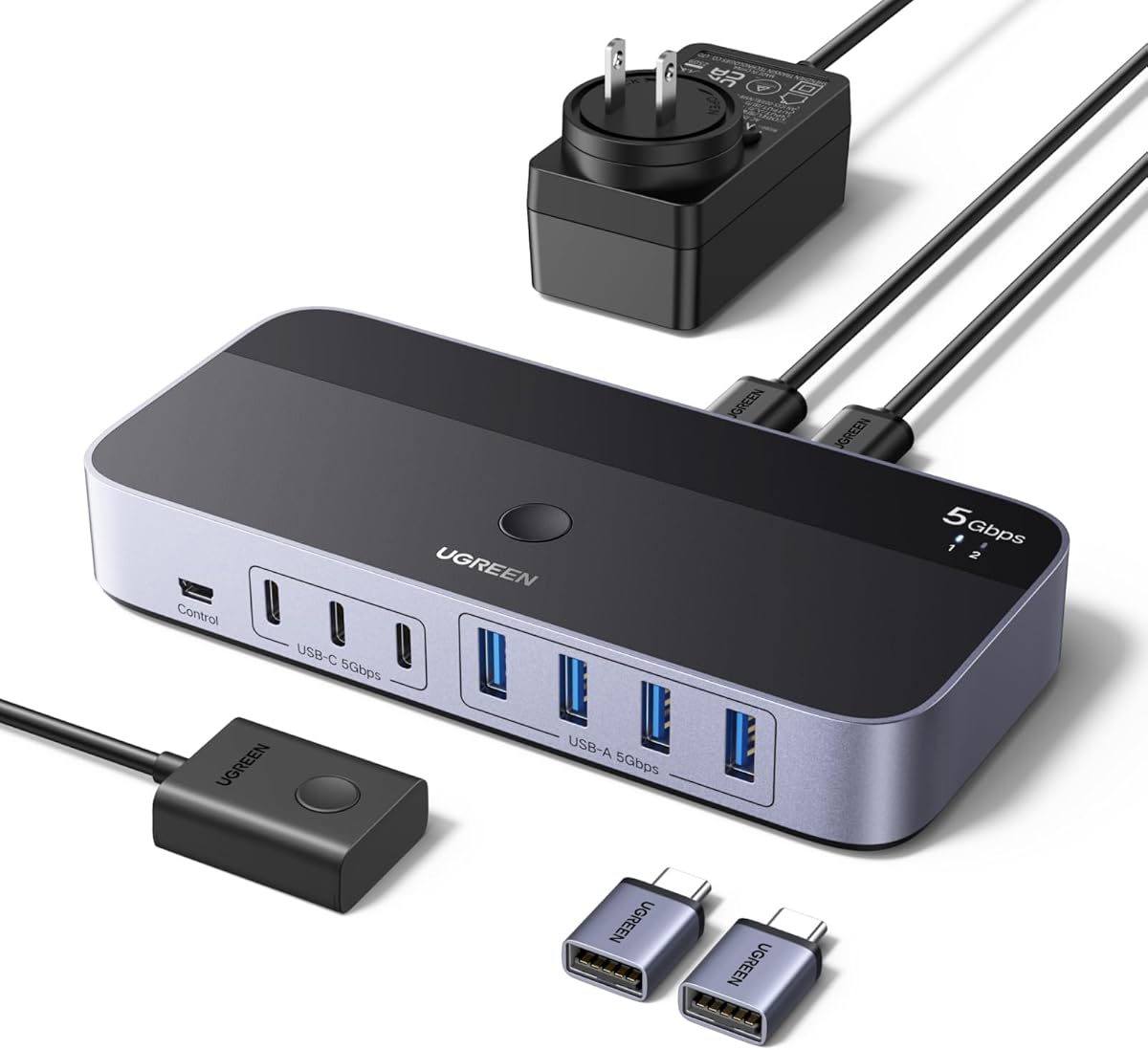
The UGREEN 2-in 7-Out switch is perfect for setups requiring extensive peripheral sharing. It supports both USB A and USB C devices, making it versatile for modern and legacy hardware alike.
We may earn a commission when you buy through this link, at no additional cost to you.
It includes a power adapter to ensure stability even with multiple connected devices. The controller allows you to keep the main switch box hidden while maintaining easy access to switching functions.
While it is more expensive than basic models, the expanded port count justifies the cost for users with complex needs. However, it does not support video transmission so it remains a data-only device.
Choose this if you have many devices to connect and want to avoid using separate hubs. It keeps your workspace tidy by centralizing all connections into one manageable switch unit.
With seven ports available you can connect a wide range of peripherals simultaneously without needing additional hubs.
The included power adapter ensures that high-power devices like external drives work reliably without disconnecting.
We may earn a commission when you buy through this link, at no additional cost to you.
This compact USB switch is designed for simplicity and ease of use. It allows two computers to share two devices efficiently with a straightforward button interface that works without drivers.
We may earn a commission when you buy through this link, at no additional cost to you.
The external desktop switch controller is a key feature that helps keep your desk organized. It is also powered directly from the PC port, which means you do not need an extra power adapter for basic use.
While it is great for keyboards and mice, the manufacturer notes it is not recommended for mass storage devices. This limitation makes it best suited for essential peripherals rather than file-heavy tasks.
If you need a simple and affordable way to switch between keyboards and mice, this is an excellent choice. It is small, portable, and works instantly with most modern operating systems.
The included external controller lets you switch computers without reaching for the switch box itself on your desk.
You can start using this switch right out of the box with no software installation or complex configuration steps.
We may earn a commission when you buy through this link, at no additional cost to you.
This UGREEN USB 3.2 switch offers the fastest data transfer speeds in our comparison. It is designed for users who need to move large files quickly while sharing peripherals between two computers.
We may earn a commission when you buy through this link, at no additional cost to you.
The 10Gbps speed means you can transfer gigabytes of data in seconds. With seven ports available you can connect almost all your devices to a single switch without cluttering your desk.
However, high-speed performance comes at a higher price. Also, the device requires more physical space due to the port count. It is also best used for data transfer rather than audio devices for optimal performance.
If you need high-speed file transfers along with peripheral sharing, this model is ideal. It ensures efficient workflow by minimizing wait times during data movement between computers.
With 10Gbps speeds you can complete large file transfers in seconds significantly boosting your overall productivity.
Supporting both USB A and C devices means you can connect any peripheral without needing multiple adapters.
We may earn a commission when you buy through this link, at no additional cost to you.
Choosing the right USB switch depends on several factors including port count, speed, and compatibility. This guide outlines what to look for to ensure you select a device that fits your dual computer setup needs.
Determine how many devices you need to share. Most switches offer two to four ports for basic use, while premium models offer seven or more. Also check if you need USB-A, USB-C, or a mix of both for your peripherals.
Ensure the switch supports the specific ports your devices use. If you have a mix of old and new hardware, look for a switch that supports both USB-A and USB-C for maximum flexibility.
USB 2.0 switches are sufficient for keyboards and mice but can be slow for file transfers. USB 3.0 and 3.2 models offer speeds up to 10Gbps which is better for external drives and printers.
If you frequently transfer large files between computers, prioritize a USB 3.2 switch with high-speed support. For basic typing and navigation, USB 2.0 may be adequate but is less future-proof.
Most switches offer button or controller options. A physical button on the device is simple but may require reaching under the desk. A controller allows you to switch easily from your workspace.
Consider where the switch will be placed. If you want a tidy desk, choose a model with an external remote or controller that you can keep within easy reach on your desktop.
Some switches require external power to run high-consumption devices like external hard drives. Others draw power directly from the USB port. Check if the power adapter is included or sold separately.
If you plan to connect many devices or high-power peripherals, ensure the switch has a dedicated power port and that an adapter is available for stable performance.
Most USB switches are plug-and-play and work with Windows, macOS, and Linux without drivers. However, verify that the switch supports your specific OS version to avoid connectivity issues.
Always check the product description for OS compatibility. This ensures you can switch between computers immediately without installing additional software or updates.
Durability matters for daily use. Look for switches made with aluminum alloy shells which dissipate heat better than plastic. Sturdy builds ensure longevity even with frequent switching.
Invest in a model with a solid casing to protect your peripherals. Higher build quality often correlates with better reliability and a longer lifespan for your switch.
Check what comes in the box. Some switches include USB cables or adapters which can save you money. Others require you to buy these separately.
A complete package with necessary cables makes setup easier. Ensure the included cables are long enough to reach your computers comfortably.
Standard USB switches do not support video transmission. If you need to share a monitor as well, look for a KVM switch that includes HDMI or DisplayPort capabilities.
Decide early if you need video sharing. USB switches are purely for peripherals. KVM switches add video support but often cost more and require HDMI connections.
To set up your switch, connect it to one computer using the provided USB cable. Then connect your shared devices like the keyboard and mouse to the switch ports. Finally, connect the switch to the second computer using another cable.
Switch between computers by pressing the button or using the external controller. The LED indicator will show which computer is currently active. You can start using your devices on the selected system immediately.
To maintain your switch, keep it in a cool dry place. Avoid overloading it with too many high-power devices without an external power supply. Periodically check cables for wear and ensure connections are tight for stable operation.
Yes, a USB switch allows you to share USB peripherals like keyboards and mice between two computers. It simply toggles the connection to one of the computers without needing software or drivers.
No, a USB switch shares only USB data peripherals. A KVM switch shares both USB devices and video signals such as a monitor. If you need to share a monitor, you will need a KVM switch.
Most USB switches are plug-and-play and do not require driver installation. They work automatically with major operating systems like Windows and macOS. However, always check the product details to confirm compatibility.
Yes, many USB switches support sharing printers and scanners between two computers. This allows multiple users to access a single printer without needing network sharing or extra hardware.
If your computer has only USB-C ports, you will need a USB-C to USB-A adapter or cable to connect to most switches. Some premium switches include USB-C ports directly for easier connection.
Yes, the speed depends on the switch version. USB 3.0 switches offer faster transfer rates than USB 2.0. Choose a USB 3.0 or 3.2 switch if you plan to share large files or use high-speed devices.
We have explored ten top-rated options ranging from budget-friendly USB switches to premium multi-port models. Each offers unique features to help you share peripherals efficiently between your work and personal computers.
When making your choice prioritize the number of ports you need and whether you require USB-C support. Consider also if you want an external controller for a cleaner desk setup.
Prices and availability can change quickly so always check the current listings before purchasing. Ensure the model you select matches your specific needs and operating system for the best experience.