
Logitech K120
4.6Editor score
Spill Resistant Design
Full Size Standard Layout
Plug and Play USB
Finding the right Keyboard for Pos System is crucial for maintaining efficiency in retail, hospitality, and industrial settings. A well designed input device ensures quick transactions, accurate data entry, and minimal downtime during peak hours when every second counts.
We evaluated ten top rated models based on durability, key layout, connectivity options, and specialized features like touchpads or magnetic stripe readers. Each product was assessed for its ability to withstand heavy use and integrate seamlessly with existing point of sale hardware.
Each review highlights specific strengths, trade offs, and ideal use cases to help you make an informed decision. Please note that availability and pricing may change frequently, so verify current details before purchasing to ensure you get the best value.
4.6Editor score
4.5Editor score

4.4Editor score
As an Amazon Associate we earn from qualifying purchases.
The following comparison table provides a side by side overview of all ten selected keyboards. It highlights key specifications to help you quickly identify which model fits your specific point of sale requirements and environmental needs.


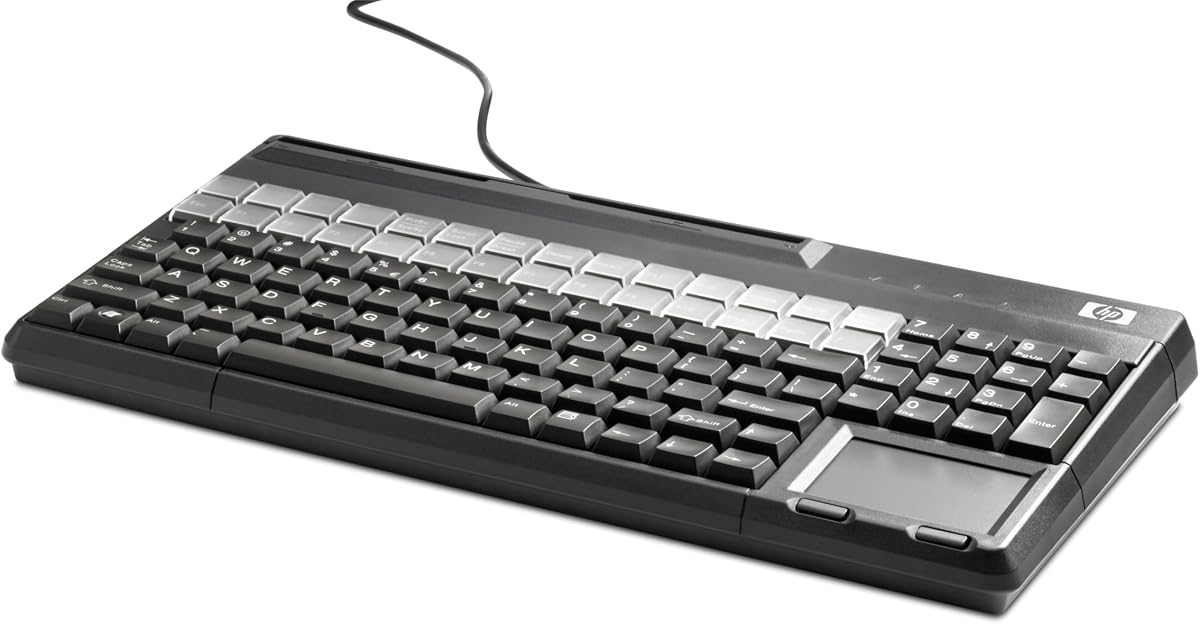
The HP POS Keyboard stands out as a top contender for businesses needing a dedicated input solution. With a rating reflecting strong user satisfaction, it offers a balanced mix of traditional typing comfort and specialized point of sale features.
We may earn a commission when you buy through this link, at no additional cost to you.
Its 106 key QWERTY layout ensures familiarity while the 28 relegendable keys allow for custom functions specific to your software. The integrated magnetic stripe reader streamlines transactions by eliminating the need for external peripherals.
While the initial investment might be higher than generic keyboards, the durability and functionality justify the cost for high volume environments. Some users may need time to adapt to the relegendable key setup.
This keyboard is ideal for retail stores and service counters where speed and accuracy are paramount. If you need a reliable all in one input device, this model deserves serious consideration.
The built in magnetic stripe reader reduces hardware clutter and speeds up checkout times significantly.
Relegendable keys can be tailored to match specific menu items or shortcuts in your POS software.
We may earn a commission when you buy through this link, at no additional cost to you.
The Cherry G86-62401 offers a premium experience for environments where space is limited but functionality cannot be compromised. Its spill resistant design makes it suitable for areas prone to liquid spills like kitchens or bars.
We may earn a commission when you buy through this link, at no additional cost to you.
The integrated touchpad removes the need for a separate mouse, creating a cleaner workstation. The 106 key layout provides ample keys for data entry without taking up excessive desk real estate.
Some users might find the touchpad slightly small for extensive navigation tasks. Additionally, it lacks the extensive relegendable key options found in more specialized POS models.
This keyboard is perfect for compact POS stations in cafes or small retail shops. If you prioritize space efficiency and spill resistance, this Cherry model is an excellent choice.
The compact form factor allows for multiple stations in tight counter spaces without clutter.
Spill resistant features protect internal components from accidental liquid exposure common in service environments.
We may earn a commission when you buy through this link, at no additional cost to you.
The Logitech K120 proves that you do not need to spend a fortune to get a reliable keyboard for basic POS tasks. With a high user rating, it delivers consistent performance for straightforward data entry.
We may earn a commission when you buy through this link, at no additional cost to you.
Its spill resistant design adds a layer of protection against common accidents. The full size layout ensures comfort during long shifts, and the plug and play setup minimizes IT overhead.
It lacks specialized features like magnetic readers or relegendable keys, making it less suitable for complex transactions. The plastic build is durable but feels less premium than industrial options.
This is an ideal choice for small businesses or backup stations where budget is a primary concern. If you need a straightforward, durable keyboard for basic tasks, this fits the bill perfectly.
Delivers dependable performance at a fraction of the cost of specialized POS hardware.
Plug and play functionality ensures immediate use without driver installation or configuration steps.
We may earn a commission when you buy through this link, at no additional cost to you.
The Cherry Lpos G86-71411 is designed for complex environments requiring extensive shortcuts and data entry capabilities. With 169 keys, it offers a level of customization that few other keyboards match.
We may earn a commission when you buy through this link, at no additional cost to you.
The 42 relegendable keys allow for deep integration with specific POS software, enabling rapid access to functions. The magnetic stripe reader adds convenience by reducing peripheral clutter on the counter.
The larger size may not fit well in compact workspaces. Additionally, configuring the relegendable keys requires time and technical knowledge to set up correctly.
Ideal for high volume retail or ticketing systems where speed is critical. If your workflow demands maximum customization and key availability, this keyboard provides the necessary tools.
42 relegendable keys offer unparalleled flexibility for mapping complex software shortcuts and commands.
169 keys ensure that every possible function has a dedicated key without needing secondary layers.
We may earn a commission when you buy through this link, at no additional cost to you.
The Perixx PERIBOARD-513III brings laptop style comfort to desktop POS environments. Its quiet scissor switches are excellent for settings where noise reduction is important, such as libraries or offices.
We may earn a commission when you buy through this link, at no additional cost to you.
The integrated touchpad and full size number pad support efficient data entry without external peripherals. The extra long 6 ft cable allows flexible placement relative to the computer tower.
While comfortable, it lacks the rugged durability of dedicated industrial POS models. The touchpad may not withstand heavy daily usage as well as physical keys.
This keyboard suits quiet environments or back office POS tasks where noise is a concern. If comfort and silence are priorities alongside standard typing, it is a strong contender.
Scissor switch mechanism minimizes noise, creating a more pleasant environment for customers and staff.
Extra long cable provides freedom to position the keyboard away from the main unit comfortably.
We may earn a commission when you buy through this link, at no additional cost to you.
The Adesso Easy Touch 630Ub is built for harsh environments where liquids and rough handling are daily realities. Its IP67 waterproof rating ensures protection against submersion and spills.
We may earn a commission when you buy through this link, at no additional cost to you.
Large keys offer high contrast for easy readability, while the rugged build withstands industrial conditions. The simple plug and play setup makes it easy to deploy quickly.
The keys may feel stiffer compared to standard office keyboards, which could impact typing speed for some users. It focuses purely on durability rather than multimedia features.
This is the go to choice for manufacturing plants or food service areas. If your workspace involves water, grease, or dust, this keyboard ensures uninterrupted operation.
IP67 rating provides certified protection against water immersion and dust ingress for tough settings.
Large high contrast keys ensure clear visibility even in bright or dirty environments.
We may earn a commission when you buy through this link, at no additional cost to you.
The Cherry G86-71401 offers a high degree of programmability for advanced users. With 127 programmable keys, it supports complex workflows where many commands need quick access.
We may earn a commission when you buy through this link, at no additional cost to you.
The integrated touchpad allows for navigation without a mouse, which can save space. The relegendable keys add another layer of customization for specific applications.
User feedback suggests a learning curve or potential issues with setup that may affect the experience. It is less plug and play compared to simpler models.
This keyboard is best for power users who need extensive programmability in a single device. If you have the resources to configure it properly, it offers significant utility.
127 programmable keys allow mapping complex tasks to physical keys for efficient workflow.
Integrated touchpad reduces desktop clutter by combining pointing and typing functions.
We may earn a commission when you buy through this link, at no additional cost to you.
The Cherry KC 1000 addresses security needs with its integrated smartcard reader. It is designed for environments where secure authentication and card reading are necessary requirements.
We may earn a commission when you buy through this link, at no additional cost to you.
Secure PIN entry ensures data protection during transactions. Compliance with FIPS and EMV standards makes it a safe choice for regulated industries.
This is a specialized tool and may not be needed for general retail. The cost reflects the added security features, which might not justify the price for simple POS setups.
Choose this if your business requires secure card authentication or compliance standards. It provides a reliable and certified solution for security focused transactions.
Integrated smartcard reader and secure PIN entry protect sensitive customer data effectively.
FIPS and EMV compliance ensures adherence to industry standards for secure payment processing.
We may earn a commission when you buy through this link, at no additional cost to you.
The Cherry G80-1800 combines mechanical reliability with a compact design. It uses MX Black switches known for durability and linear feel, ideal for industrial use.
We may earn a commission when you buy through this link, at no additional cost to you.
The compact size fits easily into tight spaces or racks, maximizing valuable counter real estate. USB and PS/2 connections offer flexibility for different legacy systems.
Mechanical switches can be louder than membrane options, which might be distracting in quiet areas. The compact layout means fewer function keys compared to full size models.
This keyboard is perfect for industrial or embedded POS systems where space is limited. If you need a durable mechanical option that fits in tight spots, consider this model.
MX switches rated for 100 million actuations ensure long term durability in high traffic environments.
Space saving design allows integration into smaller enclosures or crowded workspaces efficiently.
We may earn a commission when you buy through this link, at no additional cost to you.
The Logitech K270 offers the convenience of wireless connectivity for POS systems. With a 24 month battery life, it reduces maintenance compared to USB wired models.
We may earn a commission when you buy through this link, at no additional cost to you.
Full size layout with multimedia hotkeys provides a familiar typing experience. The spill resistant design adds a layer of protection for daily use environments.
Wireless connections can be susceptible to interference or require battery replacements eventually. For critical transaction speeds, a wired connection is generally more stable.
This keyboard is suitable for mobile stations or setups where cable management is difficult. If you prioritize flexibility and battery life, this is a practical option.
Eliminates cables for a cleaner workspace and easier movement around the counter area.
Extended battery life minimizes downtime associated with changing batteries frequently.
We may earn a commission when you buy through this link, at no additional cost to you.
Selecting the right POS keyboard requires balancing durability, functionality, and budget. The following factors help you evaluate options based on your specific business needs and environment.
POS environments often involve heavy use, spills, or harsh conditions. Look for keyboards with spill resistant or waterproof ratings to ensure they survive daily accidents. Industrial grade materials and robust key mechanisms extend the lifespan of the device.
Prioritize models with high actuation ratings or waterproof certifications for longevity in demanding settings.
A standard QWERTY layout is essential for familiarity, but specialized keys can boost efficiency. Relegendable keys allow you to map common commands, reducing reliance on screen taps. Consider if you need a numeric keypad for frequent data entry tasks.
Choose a layout that matches your software requirements and supports your workflow speed needs.
Many POS keyboards come with extras like magnetic stripe readers or touchpads. These can reduce peripheral clutter and streamline transactions. Determine if these features align with your payment processing or navigation needs.
Integrated tools like readers and touchpads save space and simplify the workstation setup.
USB is the most common and reliable connection for POS systems. Some models offer wireless options for flexibility but may introduce latency. Ensure compatibility with your existing hardware and operating system.
Stable wired connections are generally preferred for critical transaction speeds and reliability.
Staff members may type for hours, so key travel and layout comfort matter. Deep profile keys and adjustable tilt legs can reduce fatigue over time. A comfortable keyboard improves overall productivity and accuracy.
Focus on ergonomic features that support long shifts and repetitive typing tasks.
If your business handles sensitive data, consider keyboards with smartcard readers or secure PIN entry. Compliance with standards like FIPS may be necessary for regulated industries. Security features protect both business and customer information.
Implement security certified hardware if handling sensitive transactions or government regulated data.
Counter space is often limited, so a compact design might be crucial. Integrated touchpads can save desk real estate by removing the need for a mouse. Measure your available space before purchasing to ensure a good fit.
Compact keyboards with built-in navigation tools maximize counter efficiency and reduce clutter.
Prices vary significantly between basic office keyboards and specialized POS models. While budget options save money initially, specialized features may pay for themselves in efficiency. Balance initial cost against expected usage and durability.
Invest in higher quality devices if high volume usage justifies the higher price point.
Plug the keyboard into the USB port on your POS terminal. Ensure your operating system recognizes the device automatically without needing extra drivers. Test all keys and special functions to confirm they work correctly with your software.
Regular cleaning is essential to maintain performance. Wipe down keys with a slightly damp cloth to remove dust and debris. Avoid spraying liquids directly onto the keyboard and use compressed air to clean between keys.
Store the keyboard in a dry area when not in use. If it has a detachable cable, secure it properly to avoid damage during transport. Periodically check for loose keys or connection issues to prevent unexpected downtime.
POS keyboards need durability, spill resistance, and often specialized features like magnetic readers. They must withstand heavy daily use while providing accurate data entry for transactions.
Wireless options offer flexibility but wired connections are more stable for transactions. If you choose wireless, ensure it has a strong range and reliable battery life to avoid interruptions.
Use a damp cloth for general cleaning and wipe gently around keys. For deeper cleaning, tilt the keyboard to let debris fall out without liquids entering internal components.
A relegendable key allows you to customize the label or function of a specific key. This is useful for mapping unique software commands or shortcuts to physical buttons.
Most USB keyboards work with Mac but specialized features may not be supported. Check compatibility lists or ensure drivers are available for your specific software and hardware setup.
Compact keyboards save space on crowded counters. They are ideal when you have limited desk real estate or need to mount the unit in tight spots.
Yes but they lack durability and specialized features like magnetic readers. For high volume or industrial environments, a dedicated POS model is more reliable.
Standard warranties range from one to three years depending on the brand. Specialized industrial models may offer longer coverage due to their durability and professional usage focus.
Choosing the right Keyboard for Pos System depends on balancing durability, features, and budget. Whether you prioritize waterproofing, wireless freedom, or specialized keys, there is a model that fits your needs.
Consider your specific environment and workflow requirements before making a final decision. High volume retail might need robust models while offices may prefer comfortable basic options.
Verify current availability and pricing since these details change frequently. Select a solution that supports your business efficiency for the long haul.