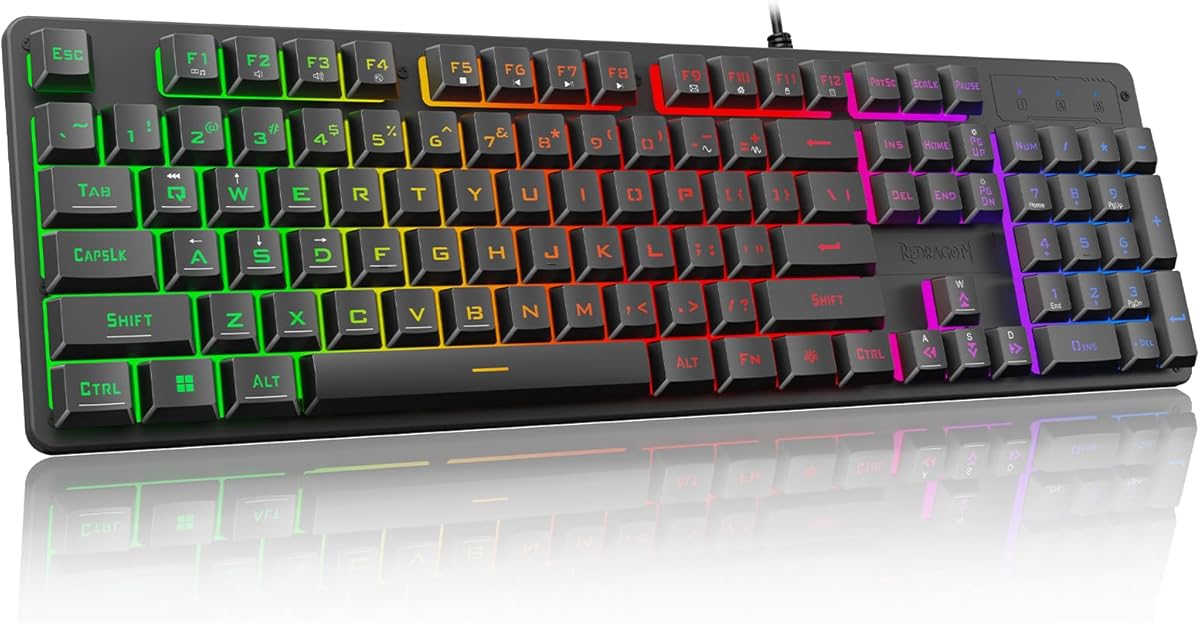
Redragon K521 Upgrade Rainbow LED Gaming Keyboard
4.4Editor score
Mechanical feeling keys
Anti-ghosting support
Rainbow LED backlighting
Compare the top keyboards for Rainbow Six Siege including mechanical gaming models with rapid trigger features and customizable RGB lighting for competitive
Finding the right keyboard for Rainbow Six Siege can significantly impact your tactical performance and reaction times during intense matches. A quality gaming keyboard provides the precision and speed needed for quick peeking and precise aiming in this competitive shooter.
We have evaluated ten top-rated gaming keyboards based on their switch responsiveness, build quality, and features tailored for FPS gamers. This guide compares membrane, mechanical, and magnetic switch options to help you choose the best tool for your setup.
Each product selection highlights key specifications and real-world performance traits that matter for Siege gameplay. Please note that product availability and pricing may fluctuate over time so verify current details before making your purchase decision today.
4.4Editor score

4.5Editor score

4.6Editor score
This side-by-side comparison highlights the core specifications and unique strengths of each selected keyboard to help you identify the model that best fits your gameplay style and budget requirements.


The Aula WIN60 HE stands out as a top contender for competitive gamers seeking maximum speed and precision. With a rating of 4.5 stars it delivers a highly responsive typing experience optimized for fast-paced tactical shooters.
We may earn a commission when you buy through this link, at no additional cost to you.
Its Hall Effect magnetic switches enable a rapid trigger mode that allows for incredibly fast re-triggering of keys. This feature is particularly beneficial in Siege for quick peeking and rapid-fire actions where milliseconds matter.
While the 60% compact design saves desk space it does lack dedicated arrow keys and a numpad which might inconvenience users needing full functionality for other applications. This trade-off is acceptable for pure gaming setups.
Competitive FPS players prioritizing speed will find this keyboard offers a distinct advantage. Its web-based driver simplifies customization making it a strong recommendation for those focused on winning more rounds.
Rapid trigger allows keys to reset as soon as you lift your finger enabling faster consecutive inputs than traditional mechanical switches.
The 60% design frees up significant mouse space which is crucial for low sensitivity aiming setups common in tactical shooters.
We may earn a commission when you buy through this link, at no additional cost to you.
The Corsair K55 RGB PRO offers a budget-friendly entry into gaming keyboards with a solid 4.4 star rating. It provides essential gaming features without the cost of high-end mechanical switches.
We may earn a commission when you buy through this link, at no additional cost to you.
Its six dedicated macro keys allow players to bind complex in-game commands to single presses. This can simplify grenade throws or utility usage during intense Siege rounds.
The membrane switches are quieter than mechanical alternatives but lack the tactile feedback preferred by some competitive players. This might affect reaction times for those used to clicky switches.
Gamers on a tight budget looking for reliability and macro functionality will appreciate this model. It serves well as a primary or secondary keyboard for casual competitive play.
The six macro keys provide quick access to abilities or chat commands streamlining your workflow during complex multi-step actions.
IP42 spill resistance guards against accidental liquid damage extending the keyboard lifespan even during late-night gaming sessions.
We may earn a commission when you buy through this link, at no additional cost to you.
With a 4.6 star rating the SteelSeries Apex 3 is an excellent choice for players sharing spaces where noise is a concern. Its whisper quiet switches ensure minimal distraction during gameplay.
We may earn a commission when you buy through this link, at no additional cost to you.
The keyboard boasts IP32 water resistance protecting it from accidental spills. This durability feature ensures longevity even in high-use environments typical of competitive gaming.
While quiet the switches may feel less precise than mechanical options for rapid inputs. This can be a drawback for players relying heavily on quick tap sequences.
Ideal for streamers or dorm gamers this keyboard balances performance with practical features. Its comfortable wrist rest supports long sessions without fatigue making it a reliable all-rounder.
The whisper quiet switches maintain low sound pressure levels allowing teammates to hear callouts clearly through voice communication.
Ten distinct lighting zones enable creative color schemes that can sync with game events for enhanced visual feedback during matches.
We may earn a commission when you buy through this link, at no additional cost to you.
The Razer Ornata V3 achieves a 4.5 star rating by blending speed with comfort. Its low-profile keys reduce travel distance enabling quicker keystrokes for tactical maneuvers.
We may earn a commission when you buy through this link, at no additional cost to you.
The mecha-membrane switches aim to provide the best of both worlds with tactile feedback and durability. This hybrid approach works well for players seeking responsive inputs without loud clicks.
UV-coated keycaps resist wear and fading over time ensuring the keyboard maintains a fresh look. This longevity is valuable for daily use across multiple gaming sessions.
Those preferring a slimmer profile will find this keyboard comfortable for extended play. It offers a solid compromise between traditional mechanical feel and modern ergonomic design.
Shorter key travel reduces finger strain and allows for faster repetition of inputs during intense tactical exchanges.
Dedicated media keys let you adjust volume quickly without pausing your game ensuring uninterrupted communication with teammates.
We may earn a commission when you buy through this link, at no additional cost to you.
The Logitech G413 TKL SE is a robust 4.6 star mechanical keyboard designed for performance. Its tactile switches offer clear feedback crucial for confirming input execution in fast games.
We may earn a commission when you buy through this link, at no additional cost to you.
PBT keycaps resist shine and wear better than standard ABS plastic. This ensures the keyboard remains functional and aesthetically pleasing even after months of heavy use.
The tenkeyless layout saves space for wider mouse movements which is a significant advantage in FPS games. However the fixed switches prevent later customization.
Players seeking a straightforward reliable mechanical experience without extra software overhead will appreciate this model. It provides the essential features needed to compete effectively.
Removing the numpad creates more room for low sensitivity mouse movement enhancing aiming precision during critical moments.
The brushed aluminum case adds structural rigidity reducing flex during aggressive typing or rapid key presses.
We may earn a commission when you buy through this link, at no additional cost to you.
With a 4.4 star rating the Redragon K521 offers an accessible entry point for budget-conscious gamers. It mimics mechanical key feel while maintaining a lower cost structure.
We may earn a commission when you buy through this link, at no additional cost to you.
The rainbow backlighting creates an engaging visual atmosphere without requiring complex software setup. This lighting is customizable through onboard controls for quick adjustments.
Anti-ghosting ensures that multiple key presses register correctly during complex combos. This is essential for executing movement strategies and utility placement simultaneously.
Gamers new to mechanical keyboards or looking for a secondary device will find this appealing. It delivers essential performance without demanding a large investment.
This keyboard provides a solid introduction to gaming peripherals without the higher cost typically associated with premium brands.
No driver installation is required allowing users to set up and start playing immediately after connecting to their system.
We may earn a commission when you buy through this link, at no additional cost to you.
The AULA F75 Pro earns a 4.6 star rating for its versatility and premium features. It offers tri-mode connectivity allowing seamless switching between wired and wireless connections.
We may earn a commission when you buy through this link, at no additional cost to you.
Hot-swappable switches enable users to change switch types without soldering. This future-proofs the device and allows personalization based on evolving gaming preferences.
Side-printed keycaps ensure legends remain visible even if the lighting is dim or turned off. This adds a layer of practicality to the aesthetic design.
Players who value customization and wireless convenience will find this keyboard impressive. It balances performance with modern convenience features effectively.
Swapping switches allows you to experiment with different tactile feels or sounds without purchasing a new keyboard entirely.
Bluetooth and 2.4GHz modes provide flexibility for different setups while maintaining low latency necessary for competitive play.
We may earn a commission when you buy through this link, at no additional cost to you.
With a 4.6 star rating the ROG Strix Scope II 96 delivers premium performance in a compact wireless form. Its 96% layout retains full functionality while saving significant desk space.
We may earn a commission when you buy through this link, at no additional cost to you.
Hot-swappable pre-lubed switches provide smooth and consistent keystrokes out of the box. The sound-dampening foam reduces noise for a more pleasant typing experience.
Tri-mode connectivity ensures compatibility with various devices and connection preferences. This flexibility makes it suitable for multi-device workflows.
Gamers seeking high-end features and wireless freedom will appreciate this investment. It offers a comprehensive solution for both gaming and productivity tasks.
The 96% layout includes a numpad and arrow keys in a smaller footprint offering the best of both worlds.
Integrated foam absorbs internal noise reducing hollow sounds and ensuring a quiet operation for shared environments.
We may earn a commission when you buy through this link, at no additional cost to you.
The ROG Strix Scope II X scores 4.5 stars for its robust full-size design and build quality. It includes a dedicated numpad ideal for those needing standard layout functionality.
We may earn a commission when you buy through this link, at no additional cost to you.
PBT doubleshot keycaps ensure legends never fade even with extensive use. This longevity is a key benefit for daily drivers in high-pressure environments.
Hot-swappable switches allow for future customization ensuring the keyboard evolves with your preferences. This flexibility adds long-term value to the purchase.
Players preferring wired stability and full layout functionality will find this model ideal. It combines essential gaming features with durable construction materials.
Having a complete numpad and full layout supports complex workflows and gaming macros that require numerous keys.
USB-C wired connection guarantees zero latency and consistent signal integrity crucial for competitive multiplayer matches.
We may earn a commission when you buy through this link, at no additional cost to you.
The Razer BlackWidow V4 X achieves a 4.5 star rating with its feature-rich design. Its yellow mechanical switches are designed for rapid and quiet inputs suitable for fast gameplay.
We may earn a commission when you buy through this link, at no additional cost to you.
Six dedicated macro keys provide additional command options expanding your in-game utility. This is helpful for executing complex strategies without relying on default key bindings.
Chroma RGB per-key lighting allows deep customization and integration with supported games. This visual feedback can enhance immersion and situational awareness.
Gamers looking for advanced macro capabilities and customizable lighting will find this keyboard useful. It balances performance with a high degree of personalization.
Extra macro keys allow bind frequently used items or actions reducing the need for multiple key combinations during combat.
Linear switches provide a smooth travel path without a tactile bump ensuring rapid and consistent actuation for firing.
We may earn a commission when you buy through this link, at no additional cost to you.
Selecting the right keyboard for tactical shooters involves evaluating several technical factors that directly impact gameplay precision and comfort.
Switch type determines the feel and speed of keypresses. Linear switches are generally faster and smoother which benefits rapid inputs while tactile switches offer confirmation of actuation.
Choose linear switches for speed or tactile switches for feedback based on your personal preference.
Polling rate is how often the keyboard reports to your computer. Higher rates like 1000Hz or 8000Hz reduce input lag for faster response times in matches.
Prioritize keyboards with higher polling rates if you play competitively to gain a split-second advantage.
Anti-ghosting ensures all keys pressed simultaneously are registered correctly. This is vital for executing complex combos or movement sequences without errors.
Always select a keyboard with full N-key rollover to guarantee accurate input registration during intense situations.
Form factor refers to the layout size such as TKL or 60%. Smaller layouts save desk space for larger mouse movements which is crucial for low sensitivity aiming.
Select a compact layout if you need more mouse space or a full-size if you require a numpad for other tasks.
Connectivity options include wired and wireless. Wired connections provide absolute stability while modern wireless options offer convenience with minimal latency.
Use wired connections for pure competitive play and wireless if you prioritize a clean desk setup.
Keycaps can be made of ABS or PBT. PBT keycaps are more durable and resist shine over time making them preferable for longevity.
Look for PBT keycaps to ensure your keyboard maintains its look and texture even with daily heavy use.
Ergonomic features like wrist rests prevent strain during long gaming sessions. Comfort is essential for maintaining focus and performance over time.
Ensure the keyboard provides adequate support or comes with an attached rest to maintain physical comfort.
Budget considerations range from affordable membrane options to premium mechanical keyboards. You can find high performance at various price points.
Determine how much you are willing to invest and prioritize features that align with your specific gameplay needs.
Proper key binding is essential for maximizing keyboard utility. Map your utility and grenade keys to easily accessible locations to ensure quick deployment during tactical encounters.
Regular maintenance like dusting with a brush or compressed air extends the device lifespan. Keeping the surface clean prevents debris from interfering with key movement over time.
Adjusting actuation points on compatible models can fine-tune sensitivity. This allows you to customize the keyboard to your specific finger pressure and reaction style.
Linear switches are often preferred in tactical shooters due to their smooth and fast actuation. They allow for rapid firing and movement without tactile bumps that might slow down inputs.
Modern wireless keyboards use low-latency protocols that rival wired connections. However for absolute zero latency wired connections remain the gold standard for professional competitors.
Macros allow you to execute complex actions with a single press. While helpful they should be used carefully to avoid disrupting your natural hand positioning during combat.
Rapid trigger allows a key to reset as soon as you lift your finger. This feature significantly speeds up key repetition for actions like peeking or rapid tapping.
RGB lighting is primarily aesthetic and does not directly impact performance. However it can help you identify keys quickly in low light environments which is a practical benefit.
While mechanical switches offer better feedback budget membrane keyboards can suffice for casual play. They lack the speed of mechanical switches but work well for non-competitive sessions.
Choosing the right keyboard can elevate your performance in Siege by improving input speed and reliability. The featured models offer a range of options from budget-friendly to high-end mechanical.
Prioritize features like switch responsiveness and layout size to match your specific gameplay style. The best keyboard is one that feels comfortable and allows for accurate execution.
Always verify current pricing and availability before purchasing as stock fluctuates regularly. Investing in quality hardware ensures you have the tools needed to succeed in future matches.