
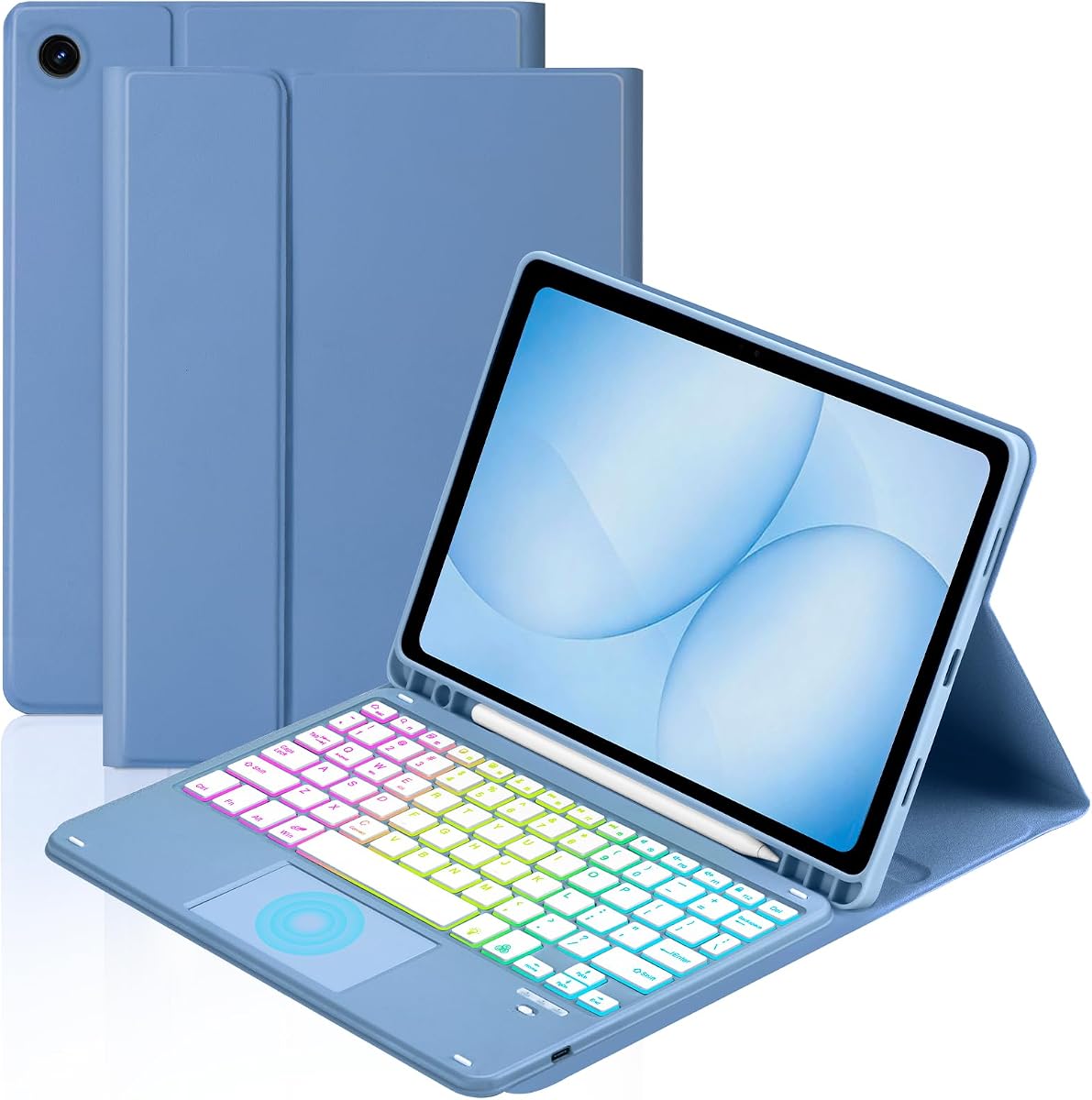
YBING Keyboard Case for Samsung Galaxy Tab A11 Plus & Galaxy Tab A9 Plus
4.5Editor score
7-color rainbow backlight
360-degree rotation hinge
Detachable magnetic keyboard
Find the best keyboard for Samsung A11 tablet with our expert guide comparing top magnetic cases, trackpads, and backlit options for productivity and protection
Transforming your Samsung Galaxy Tab A11 into a productive workstation requires the right accessories. A quality keyboard case offers typing comfort, portability, and essential protection for daily use.
We evaluated ten top-rated models based on compatibility, build quality, battery life, and typing experience. Each option was assessed for features like trackpads, backlighting, and detachable designs.
This guide details the strengths and weaknesses of every pick to help you choose wisely. Prices and availability fluctuate, so verify current details before making your final purchase decision today.
4.5Editor score

4.3Editor score

4.6Editor score
Explore our comprehensive side-by-side comparison of the leading keyboard cases for the Samsung Galaxy Tab A11. This table highlights key specifications to help you quickly identify the model that fits your workflow needs.



The Dexnor keyboard case stands out as a top choice for users wanting laptop-like functionality. With a 4.3 rating, it delivers essential features like a trackpad and sturdy magnetic connection.
We may earn a commission when you buy through this link, at no additional cost to you.
Its standout qualities include the built-in multi-touch trackpad which allows for smooth cursor control without touching the screen. The scissor-switch keys provide a responsive typing experience suitable for long sessions.
While it lacks a floating cantilever design, the tablet sits securely on the base ensuring stability on any surface. The 720-hour standby time means you rarely need to recharge it.
This model is ideal for students and professionals needing reliable input and protection. If you value navigation precision and battery endurance, this keyboard case is highly recommended for your Samsung A11.
The included trackpad supports multi-finger gestures for scrolling and zooming. This feature transforms your tablet into a true productivity machine for web browsing and editing.
Constructed with premium materials, the case protects against drops and scratches. The magnetic clasp ensures the case stays securely closed during transport.
We may earn a commission when you buy through this link, at no additional cost to you.
The TUNKARMOR case offers flexibility with its detachable magnetic keyboard design. It transforms into a mini laptop quickly and provides three adjustable viewing angles for comfort.
We may earn a commission when you buy through this link, at no additional cost to you.
Key strengths include the honeycomb grid pattern which cushions the tablet against bumps. The auto sleep/wake function helps conserve battery life when the case is closed.
The keyboard is slim and lightweight allowing easy removal for media consumption. However, note that the stylus pen is not included and sold separately by Samsung.
This option is great for users who want the option to detach the keyboard. Its protective features and smart power management make it a solid choice for everyday use.
The magnetic keyboard can be moved or detached as needed. This flexibility allows you to use the tablet freely for watching videos or reading content.
The case automatically detects lid status to wake or sleep the tablet. This feature prevents battery drain and extends the usage time between charges.
We may earn a commission when you buy through this link, at no additional cost to you.
This keyboard case comes with a rechargeable Bluetooth mouse and built-in trackpad. It supports multi-touch gestures making navigation effortless for productivity tasks.
We may earn a commission when you buy through this link, at no additional cost to you.
The standout feature is the 7-color rainbow backlight which adds a fun touch to the setup. You can switch between constant on and breathing light modes easily.
While the extra mouse adds some weight the functionality it provides is unmatched in this price range. The Type-C charging ensures quick recharge times for both devices.
Ideal for users who prefer mouse control over trackpads this model delivers versatility. The adjustable viewing angles and stylus holder further enhance its utility for creatives.
Included accessories like the mouse and trackpad cover all input needs. This reduces the need to buy separate peripherals for your tablet setup.
The keyboard features colorful backlight modes for typing in dim environments. This helps visibility and adds a stylish aesthetic to your device.
We may earn a commission when you buy through this link, at no additional cost to you.
The Soke keyboard case supports iOS Android and Windows systems seamlessly. This versatility allows you to switch between devices without changing hardware.
We may earn a commission when you buy through this link, at no additional cost to you.
Its rating of 4.6 indicates strong user satisfaction with the typing experience. The 7 backlight colors provide excellent visibility in low-light conditions.
While it has only two non-slip grooves the stability is sufficient for most tasks. The 10-meter operation distance gives you plenty of room to move.
Best for travelers who use multiple devices this keyboard offers great adaptability. Its compact design and reliable connection make it a practical choice for daily productivity.
Switch between systems using simple shortcuts on the keyboard. This saves money if you own multiple tablets or laptops using different operating systems.
The keys are well-spaced and responsive for fast typing. Users report minimal fatigue even after extended writing sessions on the device.
We may earn a commission when you buy through this link, at no additional cost to you.
The YBING case is a top value pick offering extensive features for the price. It features a 360-degree rotation hinge allowing flexible positioning for any task.
We may earn a commission when you buy through this link, at no additional cost to you.
With 16 built-in magnets it securely attaches the keyboard to prevent movement. The battery lasts about 80 hours without backlight which is impressive for this range.
The rainbow backlight modes make typing in the dark easy and fun. However, some users may prefer a stiffer hinge for stability during typing.
For budget-conscious buyers this model delivers exceptional utility and protection. The multi-angle adjustment and solid build make it a reliable companion for students.
The back cover rotates 360 degrees for landscape or portrait use. This flexibility supports both typing and media consumption scenarios seamlessly.
Charge the keyboard for 2 to 3 hours for long usage periods. The energy-efficient design ensures minimal downtime during your work or study.
We may earn a commission when you buy through this link, at no additional cost to you.
The Harvopu case includes a 3-level DPI wireless mouse for precise control. This setup is perfect for editing graphics or navigating documents accurately.
We may earn a commission when you buy through this link, at no additional cost to you.
Its battery life is a highlight offering up to 180 hours of use on one charge. The stain-resistant case keeps your device looking new despite daily spills.
The detachable keyboard allows for versatile use cases when typing is not needed. While it adds weight the mouse functionality provides significant productivity gains.
Ideal for heavy users this model combines durability with advanced input options. The ability to adjust mouse sensitivity helps tailor the experience to your needs.
Adjust the DPI for smooth scrolling or detailed editing tasks. This level of control is rare in standard tablet keyboard cases today.
The case repels stains and wipes clean easily. This keeps your device looking fresh and professional in office or home settings.
We may earn a commission when you buy through this link, at no additional cost to you.
The TiMOVO keyboard case features an intelligent sleep mode to save power. It enters hibernation when idle and wakes up when you press any key.
We may earn a commission when you buy through this link, at no additional cost to you.
Users appreciate the 90-day standby time which ensures the keyboard is ready whenever needed. The 7 vibrant colors provide a colorful and fun typing environment.
The case offers full protection against scratches and bumps with a slide design. Its detachable keyboard allows you to carry the tablet freely when not typing.
This option suits users who want reliable protection and power efficiency. The multiple viewing angles support comfortable typing and reading in various settings.
The auto sleep mode extends battery life significantly. This ensures your keyboard is always ready without needing frequent recharging.
Raised edges and anti-slide features protect your tablet from drops. This robust construction helps maintain the device's condition over time.
We may earn a commission when you buy through this link, at no additional cost to you.
The MePadKey case includes a smart touchpad that supports multi-finger gestures. You can swipe to scroll zoom pictures or even take screenshots with four fingers.
We may earn a commission when you buy through this link, at no additional cost to you.
This feature-rich option enhances navigation without needing an external mouse. The rainbow backlight and breathing light modes provide excellent visibility for typing.
Users note a slight learning curve for gestures but find them powerful once mastered. The detachable keyboard ensures the tablet remains lightweight for casual use.
Ideal for multitaskers this case offers desktop-like control on your tablet. The combination of a touchpad and shortcut keys boosts productivity for work and school.
Multi-finger gestures simplify navigation and screen management. This functionality makes the tablet feel more like a traditional laptop.
Function keys allow quick actions like copy and paste. This speeds up workflows and reduces the need to reach for the screen.
We may earn a commission when you buy through this link, at no additional cost to you.
This MePadKey variant offers 360-degree rotation for flexible tablet positioning. The touchpad supports various gestures for efficient navigation and app switching.
We may earn a commission when you buy through this link, at no additional cost to you.
Built-in pen holder keeps your stylus secure and accessible for drawing or notes. The system switch allows seamless transitions between different operating systems.
The four thickened angles protect against bumps and ensure durability. While heavier than others the versatility and features provide substantial value for users.
Best for creative professionals this model supports both typing and drawing needs. The protection and gesture control make it a versatile tool for diverse workflows.
Rotate the case 360 degrees to match your preference. This ensures comfort whether you are typing or reading in bed.
The dedicated holder prevents your pen from getting lost. This feature is essential for users who rely on the stylus for tasks.
We may earn a commission when you buy through this link, at no additional cost to you.
The Supveco case uses premium silicone and TPU to protect your device. It features a honeycomb grid pattern that increases the tablet's lifespan significantly.
We may earn a commission when you buy through this link, at no additional cost to you.
Users appreciate the flexible material which offers shock absorption without bulk. The magnetic closure is secure yet easy to snap on and off.
While it costs more the build quality justifies the investment. The 3.5-hour charge time ensures minimal disruption to your daily workflow.
Best for those prioritizing protection and durability this model is a top choice. The multi-angle stand and auto sleep functions round out its premium features.
The honeycomb grid absorbs shocks better than standard cases. This design reduces the risk of internal damage from accidental drops.
TPU material provides flexibility and resistance to wear. This ensures the case maintains its shape and look over long use.
We may earn a commission when you buy through this link, at no additional cost to you.
Choosing the right keyboard case involves evaluating compatibility, features, and build quality. This guide outlines the essential factors to consider before making your purchase.
Ensure the keyboard case matches your specific tablet model number such as SM-X230 or SM-X210. Mismatched sizes can lead to poor fit and functionality.
Always verify your model in settings before purchasing to guarantee a perfect fit and full access to ports.
Decide between built-in and detachable keyboards based on your usage habits. Detachable options offer flexibility while built-in ones provide stability.
Choose a design that supports your workflow whether typing frequently or consuming media regularly.
Look for keyboards with rechargeable batteries lasting at least 50 hours of active use. Longer battery life reduces charging interruptions and improves convenience.
Prioritize models with sleep modes to extend standby time and preserve energy effectively.
Check if the keyboard connects via Bluetooth or a physical connector. Bluetooth offers wireless freedom but requires pairing and charging.
Ensure the connection is stable to prevent typing lag or disconnection during important work sessions.
Consider keyboards with backlighting for typing in low-light environments. Multi-color options can help you customize the ambiance to your preference.
Bright adjustable backlights improve visibility and reduce eye strain during late-night work.
Features like touchpads and wireless mice enhance navigation efficiency. These tools help you manage apps without touching the screen frequently.
Select a model with multi-finger gestures for smoother scrolling and app switching capabilities.
High-quality materials like TPU or honeycomb grids offer better shock absorption. Stronger materials ensure the tablet stays protected from drops and scratches.
Invest in durable cases to protect your device over the long term.
Look for extras like S Pen holders, auto sleep/wake functions, and multi-angle stands. These features add convenience and improve the overall user experience.
Evaluate these add-ons to ensure they align with your specific productivity needs.
To start using your keyboard case, first charge it fully using the provided Type-C cable. Ensure the power indicator light shows it is ready before connecting via Bluetooth.
Place your tablet securely into the case slots and allow the magnets to hold it in place. Adjust the viewing angle using the built-in grooves for a comfortable position.
Clean the keyboard regularly with a soft cloth and keep it away from liquids to prevent damage. If the keyboard slows down, recharge it to maintain optimal performance.
No, these keyboards are designed specifically for the Samsung Galaxy Tab A11 and A9 models. Using a keyboard meant for another model may not fit properly or function correctly with your device.
Most models power on automatically when you open the case. If not, press any key or wake the tablet. The built-in sensors detect movement to activate the device quickly.
Yes, all models listed come with rechargeable batteries. They use Type-C cables for charging and offer hours of use on a single full charge.
Most cases allow you to detach the keyboard for lighter use. Check the specific model to confirm if the keyboard detaches magnetically for easy storage.
Most cases do not include the stylus pen but have a dedicated holder. You must buy the pen separately from Samsung to use the holder effectively.
Several models support switching between iOS, Windows, and Android systems. Look for specific system switch keys if you need to use different devices with one keyboard.
We reviewed ten excellent keyboard cases for the Samsung Galaxy Tab A11 each offering unique strengths. From the Dexnor trackpad model to the flexible YBING option there is a choice for everyone.
Prioritize features like battery life and compatibility based on your needs. The right keyboard enhances productivity and protects your device from daily wear.
Always check current prices and model compatibility before buying to ensure you get the best deal. We hope this guide helps you find the perfect keyboard for your tablet.