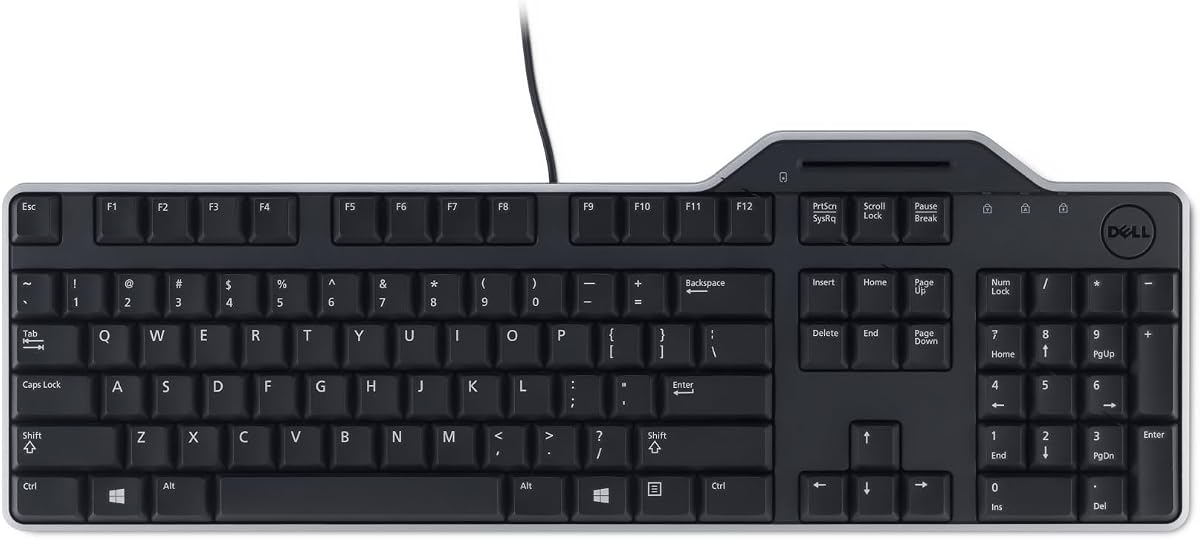
Dell KB813 Black USB English Keyboard with Smart Card Reader
4.6Editor score
Spill-resistant durable design
Integrated smartcard reader
Ergonomic detachable palm rest
Discover the top 10 keyboards with smart card readers for secure authentication in enterprises and homes compared by security features and usability in October
In today’s digital landscape, securing access to sensitive data is paramount for businesses and individuals alike. A keyboard with smart card reader integration offers a robust solution by combining everyday typing functionality with advanced authentication methods. This guide explores the best options available to enhance your workspace security seamlessly.
We have carefully evaluated ten leading models based on compatibility, build quality, and security certifications like FIPS and ISO standards. Our analysis focuses on how each device integrates into existing workflows, whether for government agencies, healthcare providers, or corporate environments. Every product listed meets strict criteria for reliability and user comfort.
Each pick in this guide highlights key strengths and potential trade-offs to help you make an informed decision. We discuss connectivity, ergonomic design, and specific security protocols supported by each model. Please note that prices and availability may change frequently, so verify current details before purchasing to ensure the best value for your needs.
4.6Editor score

4.1Editor score

4.6Editor score
This side-by-side comparison highlights the critical specifications and features of the top ten keyboards with integrated smart card readers. We evaluate connectivity, key switches, security standards, and ergonomic designs to help you identify the perfect match for your specific security and typing requirements.


The Adesso TruForm AKB-150SB-TAA stands out as a top choice for users requiring strict regulatory compliance. With a rating of 4.1 stars, it balances security features with ergonomic design. This keyboard is tailored for government agencies and organizations needing TAA compliance.
We may earn a commission when you buy through this link, at no additional cost to you.
Its built-in smart card reader supports multiple international standards including ISO7816 and PC/SC 2.0. The split ergonomic design encourages natural hand positioning to reduce strain during long sessions. Integrated hotkeys provide quick access to multimedia and internet tools.
While the price is higher than standard keyboards, the durability and compliance justify the investment. The membrane key switch offers a quiet typing experience with a lifecycle of over five million keystrokes. However, non-TAA regions might find limited utility.
This keyboard is ideal for federal employees or secure enterprise environments prioritizing comfort and security. We recommend it for organizations needing validated TAA compliant input devices for secure logons and authentication systems.
It meets U. S. Trade Agreement Act Specifications for GSA sales to government agencies and military suppliers.
Split zones and sloped shape encourage natural hand position reducing joint pain and spinal discomfort.
We may earn a commission when you buy through this link, at no additional cost to you.
The Adesso EasyTouch 130SB delivers premium mechanical feel with robust security features. Rated 4.6 stars, it combines tactile red switches with a built-in smart card reader. It is ideal for professionals needing enhanced visibility and AI integration.
We may earn a commission when you buy through this link, at no additional cost to you.
Its red mechanical switches offer silent tactile feedback rated for 50 million keystrokes. The dedicated Copilot AI hotkey provides instant access to Microsoft Copilot for creative tasks. Large print keycaps improve contrast and readability during extended typing.
While mechanical switches can be louder than membrane, this model focuses on tactile clarity. The built-in smart card reader ensures secure authentication for banking and logon processes. Some users may prefer quieter options for shared spaces.
This keyboard suits advanced users seeking AI integration and durability. We recommend it for workstations where visibility and secure authentication are critical for daily productivity and code generation.
Copilot AI hotkey provides instant access to generate code or receive assistance without navigating menus.
2X large print keycaps provide excellent contrast and enhanced visibility for users needing legibility.
We may earn a commission when you buy through this link, at no additional cost to you.
The Dell KB813 offers an affordable entry into secure computing with integrated smart card readers. With a 4.6 star rating, it provides reliable functionality without breaking the budget. This keyboard is designed for everyday office tasks and secure authentication.
We may earn a commission when you buy through this link, at no additional cost to you.
Its spill-resistant design protects against liquid damage ensuring long-lasting usability. The integrated smartcard reader enhances security for authentication. A detachable palm rest adds ergonomic comfort for extended typing sessions.
While it lacks advanced multimedia keys, it covers essential needs effectively. The wired USB connection ensures fast and secure data transfers. Some users may find the design basic but functional.
This keyboard is perfect for budget-conscious enterprises needing secure logon. We recommend it for general office use where durability and cost-effectiveness are priorities for IT managers.
This keyboard offers an affordable entry into secure computing with integrated smart card readers.
Spill-resistant construction protects against liquid damage ensuring long-lasting usability for daily office use.
We may earn a commission when you buy through this link, at no additional cost to you.
The Cherry KC 1000 features a thin design ideal for space-constrained environments. Rated 4.6 stars, it prioritizes secure PIN entry and FIPS 201 compliance. This keyboard is suitable for high-security workstations requiring minimal footprint.
We may earn a commission when you buy through this link, at no additional cost to you.
Its protocols support T=0 and T=1 standards for reliable card communication. The secure PIN entry ensures data protection during authentication. Driver support covers Windows MacOS and Linux for broad compatibility.
While the design is specialized it meets strict regulatory standards for security. One-handed operation of the smart card module adds convenience. Some users may find the profile less ergonomic.
This keyboard suits high-security environments needing compact solutions. We recommend it for facilities requiring FIPS 201 Approved hardware for secure logons and data access.
It meets FIPS 201 Approved and EMV 2000 Level 1 approved standards for secure authentication.
Driver support for Windows MacOS-X and Linux ensures broad compatibility across diverse operating systems.
We may earn a commission when you buy through this link, at no additional cost to you.
The Dell Keyboard Smartcard USB delivers a quiet and secure typing experience for daily tasks. With a 4.7 star rating, it focuses on reliability and comfort. This keyboard is designed for offices needing silent operation and secure access.
We may earn a commission when you buy through this link, at no additional cost to you.
Its spill-resistant keyboard safeguards against beverage mishaps ensuring durability. The wired USB connectivity eliminates battery needs for consistent performance. Low-profile keys reduce distraction and improve comfort.
While it offers a full-size layout it lacks advanced multimedia keys. The smart card integration provides essential authentication without extra hardware. Some users may prefer more robust features.
This keyboard is ideal for quiet office environments requiring secure logon. We recommend it for professionals prioritizing comfort and reliability in standard office setups.
Low-profile keys and a full-size keyboard are designed for a smooth quiet typing experience.
Reliable wired USB connectivity helps provide secure fast data transfers for essential authentication.
We may earn a commission when you buy through this link, at no additional cost to you.
The Kensington KB201C is a simple solution for secure access in compliant environments. With a 3.8 star rating, it meets federal sourcing standards. This keyboard is tailored for U. S. Federal Government institutions needing secure logons.
We may earn a commission when you buy through this link, at no additional cost to you.
Its TAA Compliant status ensures readiness for federal institutions. The CAC smart card reader supports PIV and ISO/IEC 7816 standards. A full-Size Keyboard layout facilitates faster data entry.
While the rating is lower it meets strict compliance needs. The Quiet-Click Keyboard enhances workspace focus. Some users may find the build basic compared to premium options.
This keyboard suits federal agencies prioritizing regulatory compliance. We recommend it for organizations needing TAA compliant secure authentication tools for daily operations.
Meets government standards for sourcing and quality making it ready for use in U. S. Federal Government institutions.
Quiet-Click Keyboard enhances workspace focus allowing you to maintain productivity without disturbing colleagues.
We may earn a commission when you buy through this link, at no additional cost to you.
The Lenovo Smartcard Wired Keyboard II provides a standard solution for secure access. With a 4.4 star rating, it offers reliable connectivity. This keyboard is designed for general office use needing basic card authentication.
We may earn a commission when you buy through this link, at no additional cost to you.
Its US English layout suits standard typing needs. The wired connection ensures stable data transfers without battery worries. Package dimensions are standard for easy integration.
While features are basic it fulfills core requirements effectively. The compact design fits various desktop setups. Users seeking advanced ergonomics might look elsewhere.
This keyboard is suitable for general users needing basic secure access. We recommend it for environments prioritizing standard connectivity and ease of use.
US English layout suits standard typing needs for general office use.
Wired connection ensures stable data transfers without battery worries for consistent performance.
We may earn a commission when you buy through this link, at no additional cost to you.
The HP USB Business Slim offers a compact form factor for secure office environments. With a 4.5 star rating, it prioritizes functionality. This keyboard is designed for business use needing reliable authentication.
We may earn a commission when you buy through this link, at no additional cost to you.
Its built-in spill drain protects against accidental damage. The 6 ft cable length provides flexibility. LED light indicators show key status clearly.
While the membrane keys are basic they offer reliable typing. The slim design fits modern workspaces. Some users may prefer tactile switches.
This keyboard suits business users needing spill protection. We recommend it for offices prioritizing durable compact designs for secure logon.
Built-in spill drain protects against accidental liquid damage ensuring longevity in office environments.
6 ft cable length provides flexibility to place keyboards conveniently at your desk.
We may earn a commission when you buy through this link, at no additional cost to you.
The Cherry Secure Board 1.0 provides intelligent security with NFC capabilities. With a 4.2 star rating, it supports multiple card standards. This keyboard is ideal for secure clients needing advanced authentication.
We may earn a commission when you buy through this link, at no additional cost to you.
Its RF/NFC interface allows reading cards and tags seamlessly. The secure mode with encryption ensures data protection during use. GS Approval indicates compliance with strict security protocols.
While the features are advanced it may require specific setup. The ISO 14443 compliant support covers various card types. Users may find the security modes complex initially.
This keyboard suits environments needing NFC and encryption. We recommend it for secure clients requiring robust and intelligent security features.
Intelligent security keyboard with integrated reader for smart cards and tags with RF/NFC interface.
Secure mode with authentication and encryption ensures data protection especially with thin clients.
We may earn a commission when you buy through this link, at no additional cost to you.
The NEW OEM Dell KB813t offers a reliable option for secure workstations. With a 4.4 star rating, it ensures quality. This keyboard is designed for users needing standard secure keyboards.
We may earn a commission when you buy through this link, at no additional cost to you.
It features a Black USB English layout with Smart Card Reader. The OEM packaging provides value. The unopened condition ensures readiness for use.
While it is OEM it offers trusted quality. The smart card functionality integrates smoothly. Some users may prefer retail packaging.
This keyboard is suitable for standard business use. We recommend it for organizations seeking OEM value with reliable secure features.
OEM packaging provides value for users needing standard secure keyboards for business use.
Unopened condition ensures readiness for use without needing additional configuration.
We may earn a commission when you buy through this link, at no additional cost to you.
Selecting the right keyboard with smart card reader involves evaluating compatibility, security protocols, and ergonomic design. This guide outlines key factors to help you choose a model that meets your organizational and personal requirements.
Security certifications such as FIPS 201 or ISO/IEC 7816 ensure the keyboard meets regulatory standards for authentication. These standards verify that the smart card reader can handle secure data exchange safely. Organizations handling sensitive information should prioritize keyboards with documented compliance to avoid legal or data risks.
Always verify certification documents before purchase to ensure the device meets your specific compliance requirements.
Different smart cards use various protocols like T=0 T=1 or CCID. Ensure the keyboard supports the protocol your organization uses for authentication. Compatibility with PC/SC and EMV standards broadens usability across different systems and card types. Without proper support the smart card may not function correctly with the keyboard.
Check protocol support lists on product pages to confirm compatibility with your existing card infrastructure.
Most smart card keyboards use USB wired connections for reliable data transfer. Wireless options are rare due to security concerns. Ensure the USB interface matches your systems port availability such as USB-A or USB-C with adapters. Wired connections reduce latency and eliminate battery dependency for continuous use.
Confirm cable length and connector type to ensure seamless integration with your desktop setup.
Ergonomic design like split zones or detachable palm rests reduces strain during long typing sessions. Key switch types such as membrane or mechanical affect tactile feel and noise. Choose a layout that suits your hand size and typing habits to prevent fatigue. Comfort is critical for productivity in daily work environments.
Prioritize keyboards with adjustable angles and soft keycaps for extended comfort during work.
Drivers for Windows macOS and Linux determine how well the keyboard functions on your system. Some models require specific driver installations to enable smart card reading features. Ensure the vendor provides updated drivers for your OS version to avoid compatibility issues. Cross-platform support is valuable in mixed IT environments.
Verify OS support lists before purchase to ensure driver availability for your current system.
Spill-resistant designs and durable materials protect the keyboard from accidental damage. Key lifecycle ratings like 50 million keystrokes indicate long-term durability. High-quality construction ensures the smart card reader remains functional over years of use. This is especially important for high-traffic environments like offices or call centers.
Choose models with spill-resistant features to safeguard against common workplace accidents.
For U. S. federal agencies or government contractors TAA compliance is mandatory. These keyboards must meet specific sourcing standards to be eligible for government procurement. Non-TAA models may not be legally purchased for federal use. Always check if the product listing explicitly states TAA compliance if needed.
Confirm TAA status on the product page before purchasing for government-related projects.
Extra features like multimedia hotkeys or AI integration can enhance productivity. Dedicated smart card module operation may improve convenience during authentication. Consider if you need special keys for volume control or web navigation to streamline tasks. These features vary widely between models and impact daily usability.
Assess which additional features align with your workflow to avoid unnecessary costs.
To use the smart card reader, insert your smart card into the slot on the keyboard. Ensure the card is aligned correctly with the reader symbol. Follow your organization’s authentication process to log in securely. The reader communicates with your system to verify your credentials instantly.
Regularly clean the keyboard surface and the smart card slot with a soft dry cloth. Avoid liquids near the smart card reader to prevent corrosion. Use compressed air to remove dust from key gaps and the card slot. Keeping the device clean ensures long-term functionality and secure data transfer.
Install the required drivers for your operating system before first use. Check the manufacturer’s website for updated drivers to avoid compatibility issues. Restart your system after installing drivers to enable full smart card functionality. Proper setup ensures the smart card reader works as intended.
Yes, most models support Windows macOS and Linux through compatible drivers. Always check the product specifications for supported operating systems before purchasing. Driver availability ensures the smart card reader functions correctly across platforms.
No, compatibility depends on protocols like ISO/IEC 7816 or ISO 14443. Verify that your smart cards match the supported standards listed for each keyboard. Incompatibility may prevent the card from being read by the keyboard.
Use a soft dry cloth and compressed air to remove dust from keys and the card slot. Avoid liquid cleaners near the smart card reader to prevent damage. Clean regularly to maintain functionality and prevent debris buildup.
Yes, most secure keyboards use wired USB connections to prevent wireless interception. This ensures faster and safer data transfer between the smart card and your system. Wired connectivity also eliminates battery dependency for consistent operation.
Only if they are TAA compliant and meet FIPS standards. Check the product description for government compliance certifications before purchasing. Non-compliant models may not be eligible for federal procurement.
First, reinstall the latest drivers and restart your system. Verify that the card is inserted correctly and the slot is clean. If issues persist contact the manufacturer for technical support or warranty service.
Most models have a lifecycle of 5 million to 50 million keystrokes. This ensures durability for daily office use without key failure. Check the specifications for exact ratings on each model.
Yes, spill-resistant designs protect against accidental liquid damage. This feature extends the keyboard’s lifespan in busy workspaces. Always prioritize spill protection for high-traffic office environments.
The top three picks—Adesso TruForm, Dell KB813, and Adesso EasyTouch—offer distinct advantages for government, budget, and premium users. Each keyboard delivers secure authentication with comfortable typing experiences suited for diverse environments. Choosing the right model depends on your specific compliance and ergonomic needs.
Prioritize security certifications like FIPS and TAA if you work in regulated industries. For general office use, focus on spill resistance and ergonomic features to ensure long-term comfort. Evaluate driver support to ensure smooth integration with your existing operating system.
Prices and availability change frequently so verify current details on the product links before purchasing. Always check for updated drivers and compliance certificates to ensure you get the right security features. We hope this guide helps you find the perfect secure keyboard for your workflow.