
Dell Inspiron 15.6 FHD Touchscreen Business Laptop
4.7Editor score
Affordable FHD touchscreen display
Full numeric keypad included
10-Core Intel i5 processor
This expert guide compares the top laptops with keypads and touchscreens for productivity, helping you find the perfect device for work and school needs.
Finding a laptop with a keypad and touchscreen combines the efficiency of numerical input with the intuitiveness of touch controls. This setup is ideal for professionals managing spreadsheets, students taking notes, and creative users who need precise interaction.
We evaluated ten top models based on performance, display quality, keyboard comfort, and connectivity options. Our comparison focuses on devices that offer reliable numeric keypads alongside responsive touchscreens to enhance daily workflows and user experience.
Each pick highlights specific strengths such as processing power, battery life, or display clarity. Prices and availability can change frequently, so checking the latest listings ensures you get the most accurate and up-to-date information before purchasing.
4.7Editor score

4.0Editor score

5.0Editor score
The following table provides a side-by-side comparison of all ten laptops reviewed in this guide, highlighting key specifications and features to help you make an informed decision quickly.


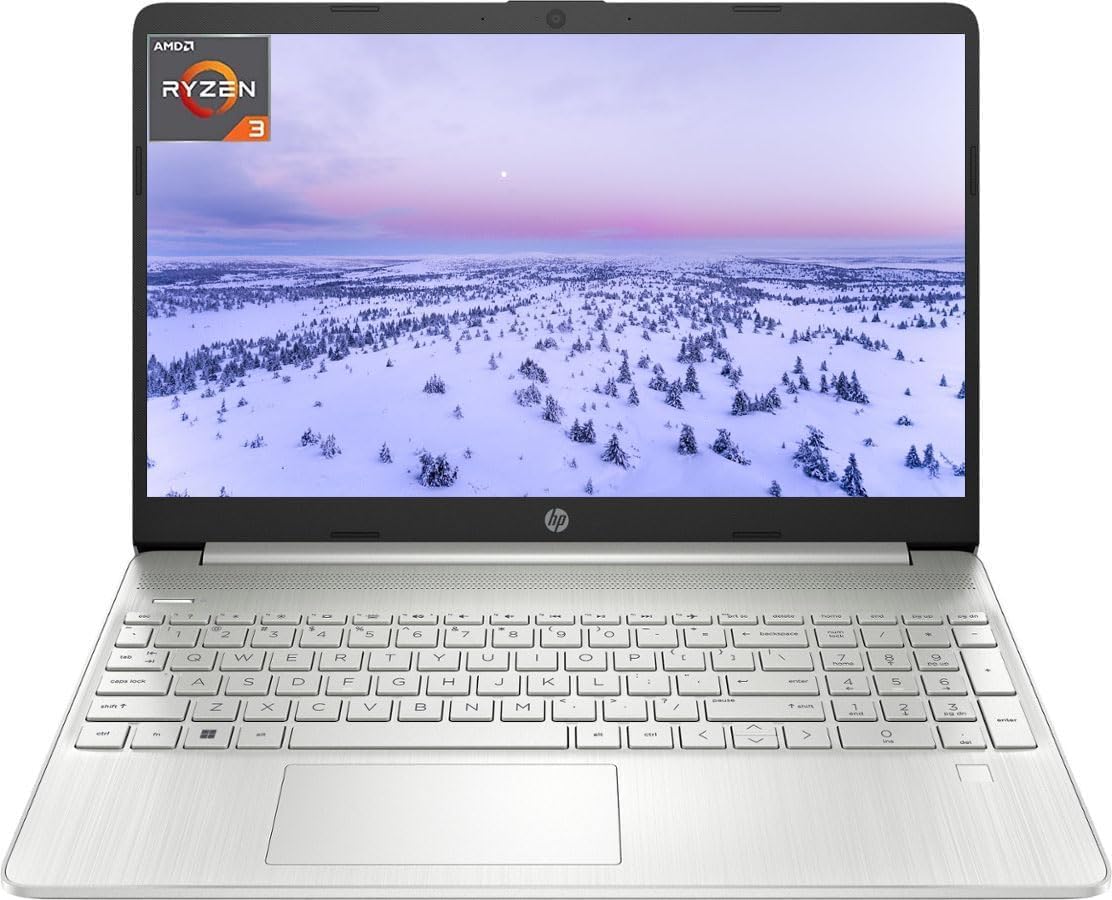



This HP laptop stands out with its impressive 32GB RAM and 1TB SSD, making it a powerhouse for multitasking. The 15.6-inch FHD touchscreen offers clear visuals and intuitive touch control for various applications and tasks.
We may earn a commission when you buy through this link, at no additional cost to you.
The AMD Ryzen 7 7730U processor ensures smooth performance even when running demanding applications simultaneously. With a full-size keyboard featuring a numeric keypad, this device is perfect for data entry and spreadsheet work.
While the battery life is decent at up to 10.75 hours, heavier usage may require frequent charging. The weight is also slightly higher than ultra-portable options, but the performance trade-off is worth it for productivity.
This laptop is ideal for professionals and students who need reliable performance and ample storage. Its combination of touch interaction and keypad efficiency makes it a versatile choice for daily workflows.
The 32GB RAM allows users to run multiple heavy applications without slowdowns, ensuring seamless transitions between tasks.
The touchscreen display enhances usability by allowing direct interaction with content, which is helpful for presentations and navigation.
We may earn a commission when you buy through this link, at no additional cost to you.
HPs 17.3-inch laptop offers a spacious viewing area that is perfect for extended work sessions. The Intel Core i7-1355U processor provides robust performance for demanding tasks and applications.
We may earn a commission when you buy through this link, at no additional cost to you.
With 32GB of RAM and a 1TB SSD, this device handles heavy workloads with ease. The HD+ touchscreen display delivers vibrant visuals, making it suitable for both professional and entertainment purposes.
The size of the device means it is less portable than smaller laptops, but it excels as a desktop replacement. The numeric keypad ensures efficient data entry for business and financial tasks.
This laptop is recommended for users who prioritize screen real estate and processing power. It is an excellent choice for professionals working from home or in environments where portability is secondary.
The 17.3-inch screen provides ample space for multitasking windows and detailed content viewing without strain.
Built-in AI capabilities streamline workflows and ensure lightning-fast responsiveness for complex applications.
We may earn a commission when you buy through this link, at no additional cost to you.
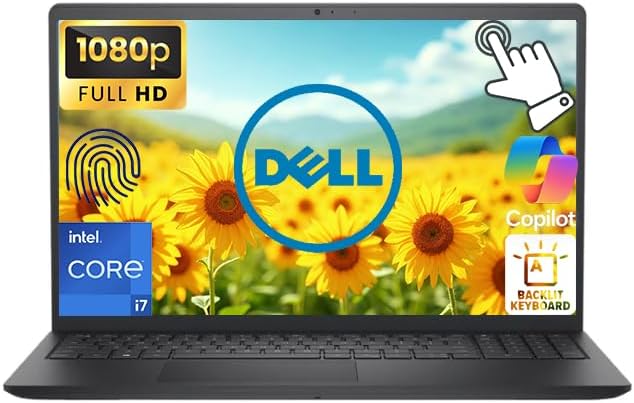
The Dell Inspiron offers an affordable entry into the world of touchscreen laptops with a numeric keypad. Its 10-Core Intel i5 processor provides solid performance for everyday tasks and light professional work.
We may earn a commission when you buy through this link, at no additional cost to you.
The 15.6-inch FHD touchscreen delivers clear visuals, while the 8GB RAM ensures smooth operation for common applications. The numeric keypad makes this model particularly useful for users who frequently enter data.
Although the RAM and storage are lower than premium models, they are sufficient for basic computing needs. The Express Charge capability helps minimize downtime, keeping you productive throughout the day.
This laptop is ideal for students and home users looking for a balance of cost and functionality. It meets essential requirements for work and school without breaking the budget.
The 10-Core processor turns this affordable laptop into a capable machine for multitasking and efficient workflows.
Fast charging technology allows the battery to recharge quickly, reducing time spent tethered to an outlet.
We may earn a commission when you buy through this link, at no additional cost to you.
This HP laptop focuses on providing a large display for media consumption and casual productivity. The 17.3-inch HD+ touchscreen offers immersive visuals for watching content and browsing the web.
We may earn a commission when you buy through this link, at no additional cost to you.
While the processor is more basic, it handles daily tasks comfortably. The inclusion of Microsoft 365 adds value for users needing productivity apps, and the numeric keypad supports basic data entry needs.
The limited storage capacity may require external solutions for users with large media libraries. However, the anti-glare display and portable design make it a good companion for entertainment.
It is best suited for users who prioritize screen size over raw performance. The combination of touch controls and a full keyboard makes it versatile for casual users.
The massive display and touch controls make this laptop excellent for streaming and interactive content.
Microsoft 365 premium apps are included, enhancing the value for work and educational tasks.
We may earn a commission when you buy through this link, at no additional cost to you.
Designed for business environments, this Dell laptop combines professional features with everyday usability. The Intel Core i5-1135G7 processor provides reliable performance for office applications and web browsing.
We may earn a commission when you buy through this link, at no additional cost to you.
With 16GB of RAM and a 1TB SSD, it offers ample resources for multitasking and storing business files. The numeric keypad supports quick data entry, which is essential for financial and administrative tasks.
Windows 11 Pro adds enhanced security and management features suitable for professional settings. Express Charge ensures you can quickly recharge the battery during busy days.
This model is a strong choice for professionals who need a dependable machine with business-grade features. Its layout supports efficiency and productivity throughout the workday.
Windows 11 Pro offers advanced security features that protect sensitive business data and workflows.
The integrated numeric keypad allows for faster input of numbers and financial figures without external peripherals.
We may earn a commission when you buy through this link, at no additional cost to you.
This budget-friendly option is well-suited for students and casual users who need essential computing capabilities. The Intel Core i3-1115G4 processor handles basic applications and web browsing efficiently.
We may earn a commission when you buy through this link, at no additional cost to you.
The 15.6-inch touchscreen provides an interactive experience for navigation and media viewing. With a numeric keypad included, this laptop is also useful for tasks involving numbers and spreadsheets.
The operating system is in S Mode, which restricts app installation to the Microsoft Store for added security. Users can switch out if they need broader software compatibility, though it is an extra step.
For those seeking an entry-level touchscreen laptop with a keypad, this model delivers solid value. It covers the basics of productivity and connectivity without unnecessary complexity.
The integrated privacy shutter on the webcam and S Mode help protect user identity and system integrity.
The touchscreen enhances usability by allowing direct interaction with apps and web content.
We may earn a commission when you buy through this link, at no additional cost to you.
The HP OmniBook 3 stands out with its sharp 2K IPS touchscreen, offering vibrant visuals for content creation and consumption. The AMD Ryzen 5 7530U processor balances performance and efficiency for daily tasks.
We may earn a commission when you buy through this link, at no additional cost to you.
At just 3.61 lbs, it is a lightweight option for users who travel frequently. The numeric keypad ensures that even in a portable design, data entry remains efficient and comfortable.
The advanced AI noise reduction feature improves audio quality during video calls, filtering out background noise effectively. This makes it a strong choice for remote workers and frequent travelers.
This laptop is ideal for professionals who need a high-quality display in a portable form factor. The combination of features makes it a versatile tool for both work and leisure.
The 2K IPS touchscreen delivers exceptional detail and color accuracy for creative and visual tasks.
AI noise reduction ensures clear communication during video conferences and virtual meetings.
We may earn a commission when you buy through this link, at no additional cost to you.
Security-conscious users will appreciate the fingerprint reader included on this Dell laptop. The Intel Core i7-1355U processor ensures high performance for demanding applications and multitasking.
We may earn a commission when you buy through this link, at no additional cost to you.
The 15.6-inch FHD touchscreen provides clear visuals, and the backlit keyboard enhances usability in low-light conditions. A numeric keypad is included for convenient data entry tasks.
With 16GB of RAM and a 1TB SSD, this device offers reliable performance and ample storage. The MaxxAudio Pro and stereo speakers also deliver a good audio experience for media consumption.
This laptop is a strong contender for business professionals who need security and performance. Its features make it suitable for a wide range of professional tasks.
The fingerprint reader allows for quick and secure access to the device without typing passwords.
The backlit keyboard ensures comfortable typing in any lighting environment, boosting productivity.
We may earn a commission when you buy through this link, at no additional cost to you.
This Dell model is designed to meet the demands of students and professionals alike. The 32GB of RAM ensures that you can run multiple programs without performance drops during intensive study sessions.
We may earn a commission when you buy through this link, at no additional cost to you.
The 15.6-inch Full HD IPS display offers clear visuals for research and content creation. Windows 11 Pro provides advanced features that can be useful for university requirements and business use.
The numeric keypad simplifies working with spreadsheets and data, while the HDMI port allows for easy presentation setups. The device is suitable for various educational and professional scenarios.
It is an excellent choice for users who need high performance in a student-friendly package. The combination of features supports productivity and creativity effectively.
The 32GB RAM ensures smooth performance even with heavy multitasking and virtual machines.
The HDMI port allows for easy connection to projectors or external monitors for presentations.
We may earn a commission when you buy through this link, at no additional cost to you.
This HP laptop offers a modern design and reliable connectivity for home and business use. The Intel Core i3-N305 processor handles everyday tasks efficiently, while the FHD touchscreen provides clear visuals.
We may earn a commission when you buy through this link, at no additional cost to you.
With Bluetooth 5.4 and Wi-Fi 6, you benefit from stable and fast wireless connections. The numeric keypad makes it practical for various input tasks, and the design adds a stylish touch to your workspace.
While the storage is limited, it is sufficient for cloud-based workflows and basic file storage. The lightweight design ensures easy transport for users on the go.
It is an ideal choice for general users who want a balance of style and functionality. The features make it a versatile companion for daily tasks and entertainment.
Wi-Fi 6 and Bluetooth 5.4 ensure fast and stable wireless connections for all devices.
The Moonlight Blue finish adds a unique and professional look to the laptop exterior.
We may earn a commission when you buy through this link, at no additional cost to you.
Selecting the right laptop with a keypad and touchscreen requires careful consideration of several key factors to ensure it meets your specific needs.
The display is a critical component for a touchscreen laptop. Larger screens like 17.3 inches offer more workspace but reduce portability. Look for Full HD or higher resolution to ensure crisp visuals when using touch controls.
Your processor determines how well the laptop handles tasks. Intel Core i5 and i7 or AMD Ryzen 5 and 7 processors provide the power needed for multitasking and productivity software. Consider your workload to choose the right tier.
Adequate RAM ensures smooth multitasking. For professional use, aim for at least 16GB of RAM. Similarly, a 512GB or 1TB SSD provides fast boot times and ample space for files and applications.
Since you are looking for a keypad, ensure the keyboard is comfortable for typing. A full numeric keypad is essential for data entry. Check for backlit keys if you often work in dim environments.
Battery life affects how long you can work away from an outlet. Look for models offering at least 8 to 10 hours of usage. Weight is also important if you plan to carry the laptop frequently.
Ensure the laptop has the ports you need, such as USB-A, USB-C, and HDMI. Wi-Fi 6 and Bluetooth 5.0 or newer standards offer better connection stability. Additional options like SD card readers can be useful.
Most modern laptops come with Windows 11 Home or Pro. Pro offers additional security and management features suitable for business. Verify that the OS meets your software compatibility needs.
Price varies significantly based on specs and brand. Determine your budget first and prioritize features that matter most to you. Often, mid-range models offer the best balance of performance and cost.
To get the most out of your touchscreen laptop, adjust the display settings to optimize touch responsiveness and brightness. Clean the screen regularly with a microfiber cloth to remove fingerprints and dust that can interfere with touch input.
When using the numeric keypad, ensure your posture is ergonomic to reduce strain. Keep your wrist in a neutral position and take regular breaks to avoid repetitive strain injuries during long typing sessions.
Extend the life of your laptop by managing power settings to reduce heat generation. Avoid using the device on soft surfaces like beds that can block ventilation. Store it in a protective case when traveling to prevent physical damage.
A numeric keypad is essential for users who frequently work with numbers, such as accountants, data entry clerks, and students. It allows for faster input of numerical data without switching between keys, improving efficiency and workflow.
Yes, modern touchscreen laptops are built with durable glass and coatings to withstand daily interaction. However, using a stylus or fingers gently can extend the life of the display. Avoid using sharp objects that could scratch the surface.
Most of the laptops listed in this guide are traditional clamshell designs and do not fold into tablets. While they support touch input, they lack the 2-in-1 hinge mechanism required to function as a standalone tablet device.
Use a soft, lint-free microfiber cloth slightly dampened with water or a screen-safe cleaning solution. Avoid using paper towels or household cleaners that can damage the coating. Gently wipe the screen in circular motions.
For most users, 16GB RAM is sufficient for multitasking, web browsing, and standard office applications. However, if you run heavy software like video editors or virtual machines, consider models with 32GB RAM for better performance.
Yes, all the laptops featured in this guide come pre-installed with Windows 11 Home or Pro. This ensures you have access to the latest features, security updates, and compatibility with modern software applications.
FHD (Full HD) offers a resolution of 1920×1080, providing sharper images and better clarity compared to HD (1366×768). FHD is recommended for professional work and detailed media viewing to reduce eye strain.
To improve battery life, lower the screen brightness and close unused applications. Ensure your operating system is updated for power management fixes. Using a power saver mode can also significantly extend usage time.
In this guide, we explored ten diverse options that combine touchscreens with numeric keypads to meet various professional and personal needs. Whether you need a powerful workstation or a budget-friendly student laptop, there is a model here for you.
When making your choice, prioritize the factors that matter most to your daily workflow. Screen quality, processor speed, and keyboard comfort should guide your decision to ensure satisfaction with your purchase.
Remember that technology prices and availability fluctuate frequently. Checking current listings and promotions can help you secure the best deal for your chosen model. We hope this guide helps you find the perfect companion for your computing needs.