
RedThunder One Handed Gaming Keyboard RGB Backlit 35 Keys Portable Mini Gaming Keypad Ergonomic Game Controller for PC Gamer
4.4Editor score
35 Keys Anti-Ghosting
Macro Recording Functionality
RGB Backlit Modes
This guide compares the top left handed gaming keyboards for ergonomics, speed, and comfort to help you find the perfect input device for your setup.
Finding the right input device can transform your gaming experience significantly. Left handed gamers often struggle with standard layouts that force awkward hand positions. A dedicated left handed gaming keyboard solves this by repositioning keys for natural comfort.
We evaluated ten distinct products ranging from compact keypads to full layout alternatives. Our comparison focuses on build quality, responsiveness, and ergonomic design tailored for left hand dominance. Each entry offers unique features suited for different gaming styles and budgets.
Every pick includes detailed specifications and real user feedback to help you decide. We highlight key strengths and potential weaknesses so you know exactly what to expect. Remember that prices fluctuate frequently so verify current costs before purchasing your new device.
4.4Editor score

4.6Editor score

4.6Editor score
This table provides a side by side overview of all ten products examined in this guide. It highlights core specifications and features to help you quickly identify the model that aligns with your specific needs and preferences.


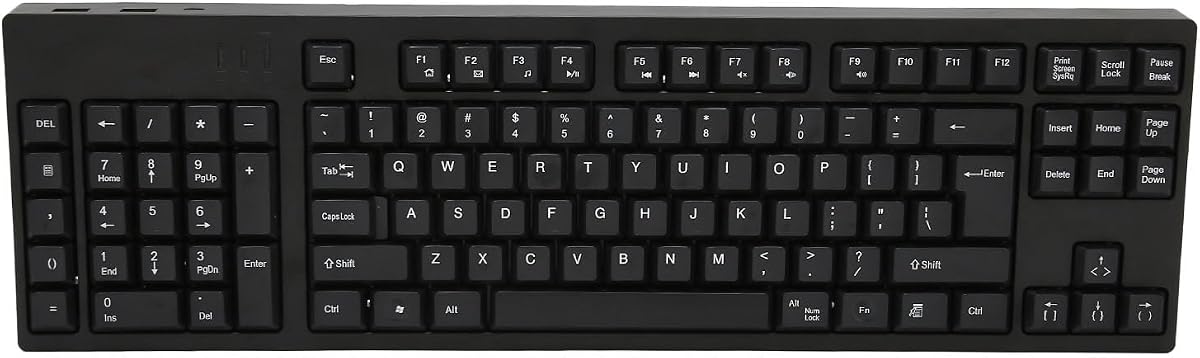

The RK ROYAL KLUDGE L98 stands out as a top choice for left handed gamers seeking a full mechanical experience. With a 4.6 rating it delivers exceptional build quality and comfort. The Southpaw Numpad layout redefines how left handed users interact with their peripherals daily.
We may earn a commission when you buy through this link, at no additional cost to you.
Its gasket structure provides a soft cushioned typing feel that reduces fatigue during long sessions. The inclusion of PBT keycaps ensures durability and oil resistance. Five layers of sound dampening create a satisfying acoustic experience without distracting hollow sounds.
While the feature set is robust users may need time to configure the software settings. The tri-mode connectivity requires understanding how to switch between devices effectively. These trade-offs are acceptable given the performance and versatility the keyboard offers overall.
We recommend this device for gamers who want a dedicated left handed setup without sacrificing quality. It balances ergonomic design with mechanical performance effectively. Choose this if you value comfort and customization in your gaming peripheral collection.
The relocated numpad frees up space on the right for mouse movement improving overall comfort.
Seamless switching between wireless and wired connections ensures you stay connected regardless of your setup.
We may earn a commission when you buy through this link, at no additional cost to you.
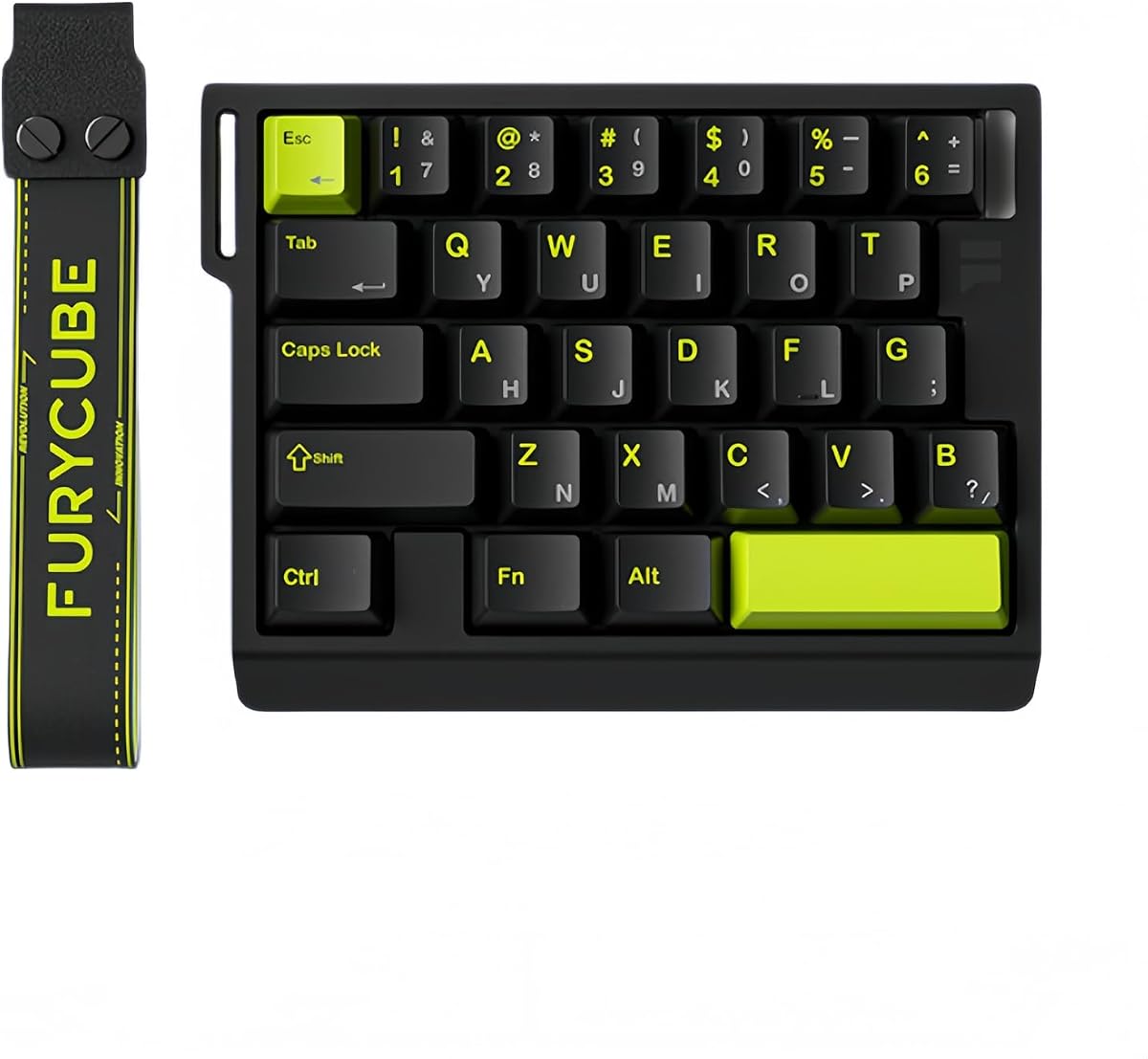
The RedThunder One Handed Keyboard offers an accessible entry point for gamers wanting left handed ergonomics. Rated at 4.4 it provides reliable performance without breaking the bank. Its compact 35-key layout is perfect for saving desk space while maintaining essential functionality.
We may earn a commission when you buy through this link, at no additional cost to you.
Users appreciate the macro recording feature which allows custom commands without complex software. The RGB backlighting adds a personalized touch to the gaming setup. The ergonomic wrist rest ensures comfort even during extended play sessions.
The limited number of keys means it cannot replace a full keyboard entirely. Build quality is functional but lacks the premium feel of higher-end models. These limitations are reasonable considering the budget-friendly pricing strategy.
This keypad is ideal for casual gamers or those needing a secondary input device. It excels in portability and simplicity. Buy this if you need a cost-effective solution for left handed gaming or macro tasks.
Two sets of macro recording keys allow you to automate complex commands quickly and efficiently.
The small footprint saves desk space while the wrist rest supports natural hand positioning.
We may earn a commission when you buy through this link, at no additional cost to you.
The AZERON Keyzen represents the pinnacle of one-handed input devices for serious gamers. With a 4.6 rating it combines premium build materials with advanced control features. The Hall-Effect joystick provides unmatched precision compared to traditional analog sticks.
We may earn a commission when you buy through this link, at no additional cost to you.
Its 32 programmable keys offer immense flexibility for mapping complex abilities. The inclusion of Cherry MX switches ensures a tactile experience that rivals full keyboards. The modular design allows users to replace components as needed over time.
The premium price tag may deter casual users seeking basic functionality. The software required for full customization can be overwhelming for some. However these factors are justified by the unmatched control and durability provided.
We recommend this device for competitive players demanding the highest level of precision. It transforms how left handed users manage movement and abilities. Invest in this if you value performance and longevity over cost.
The joystick supports 360-degree analog movement eliminating stick drift for smoother in-game navigation.
3D printed construction ensures that parts can be replaced to extend the device lifespan significantly.
We may earn a commission when you buy through this link, at no additional cost to you.
The AZERON Gaming Keypad focuses heavily on adjustability to fit various hand sizes. Rated at 4.3 it appeals to those needing a tailored fit. The Hall Effect thumbstick enables precise movement control that enhances FPS and MOBA gameplay significantly.
We may earn a commission when you buy through this link, at no additional cost to you.
Exclusive software allows users to fine-tune sensitivity and map directional zones effectively. The ability to store six layouts directly on the device ensures quick switching between profiles. This flexibility supports complex gaming needs without external tools.
The medium size may not suit all hand sizes comfortably. Some users might find the cost higher than standard keypads. Yet the customization options provide value that justifies the expense for dedicated gamers.
This keypad is suitable for gamers who need fine-tuned control over movement. It bridges the gap between a controller and a keyboard. Choose this if you value ergonomic customization and analog precision.
Easy calibration lets you adjust dead zones and cone angles for a personalized gaming feel.
The redesigned main board allows for future software updates and hardware enhancements easily.
We may earn a commission when you buy through this link, at no additional cost to you.
The AJAZZ AK029 targets competitive FPS players needing instant responsiveness. With a 4.5 rating it offers rapid trigger technology that resets keys instantly. This feature prevents delays and improves double-tap performance during intense firefights.
We may earn a commission when you buy through this link, at no additional cost to you.
The 8KHz polling rate ensures zero latency in command execution. Integrated SOCD technology allows smoother strafing by handling multiple inputs correctly. The aluminum alloy plate provides robust durability for daily use.
The wired connection limits flexibility for wireless setups. With only 29 keys it focuses strictly on essential functions. However these trade-offs are necessary to achieve the speed required for competitive play.
We recommend this device for pro-level players focusing on tactical shooters. It minimizes latency effectively. Buy this if speed and precision are your top priorities over convenience.
Rapid Trigger ensures keys reset instantly without bottoming out for faster repeated actions.
SOCD and DKS technologies allow complex movement combos to be executed with ease.
We may earn a commission when you buy through this link, at no additional cost to you.
This ergonomic keyboard caters specifically to business professionals and accountants. Rated at 4.4 it prioritizes health by reducing repetitive strain injuries. The patented natural keycaps encourage better posture during long work hours.
We may earn a commission when you buy through this link, at no additional cost to you.
Eight multimedia hotkeys streamline common tasks and improve workflow efficiency. Its compatibility with various systems ensures it fits into diverse environments easily. The layout allows the left hand to handle numbers while keeping the right free for the mouse.
Gamers may find the lack of RGB lighting and macro support limiting. It is designed for productivity rather than intense play. These limitations are acceptable for its intended office environment users.
We recommend this device for left handed professionals seeking health-focused input. It alleviates physical discomfort effectively. Choose this if comfort and posture are your main concerns.
The ergonomic layout helps eliminate RSI and carpal tunnel issues caused by standard keyboards.
Software tools optimize performance with multi-functional hotkeys for better productivity.
We may earn a commission when you buy through this link, at no additional cost to you.
The Keychron C0 HE offers a unique browser-based customization experience. Rated at 4.2 it appeals to users who dislike installing heavy software. The Hall Effect magnetic switches allow fine-tuned actuation for varied preferences.
We may earn a commission when you buy through this link, at no additional cost to you.
Its compact layout is perfect for MMO players needing quick access to skills. The web configurator supports Windows and macOS seamlessly. Per-key RGB lighting adds style without needing system resources.
The lack of wireless mode restricts cable management options. It is less robust than high-end models for intense competitive play. Still it provides great value for multi-platform users.
We recommend this device for streamers and multi-system users. It simplifies configuration significantly. Buy this if you want flexibility across devices without extra tools.
Browser-based config allows remapping and actuation changes without any software downloads.
Beyond gaming it supports creator workflows with shortcuts for streaming and editing.
We may earn a commission when you buy through this link, at no additional cost to you.
This device provides a full 109-key layout tailored for left handed comfort. Rated at 5.0 it demonstrates high user satisfaction with daily tasks. The layout allows the left hand to control numbers while the right hand uses the mouse.
We may earn a commission when you buy through this link, at no additional cost to you.
Its design is straightforward ensuring no drivers are needed for operation. Additional USB ports allow connecting peripherals without clutter. The build uses sturdy ABS material for long-term stability.
It lacks advanced gaming features like RGB or mechanical switches. The Micro USB connection is less convenient than modern types. Yet it is perfect for basic office and design work.
We recommend this for those needing a full keyboard experience without switching hands. It ensures stability and ease of use. Choose this if you prefer simplicity and standard layouts.
Two additional USB interfaces allow for easy peripheral connection without extra hubs.
Premium ABS material ensures a stable typing platform for accurate input daily.
We may earn a commission when you buy through this link, at no additional cost to you.
The FKZ M30HE offers granular control over key actuation points. Rated at 4.0 it allows users to fine-tune sensitivity for specific needs. The hot-swappable design lets you experiment with different switches easily.
We may earn a commission when you buy through this link, at no additional cost to you.
Web driver support enables remapping and lighting customization without heavy software. North-facing LEDs improve visibility during dark gaming sessions. The 30-key layout keeps essential commands within easy reach.
Build quality is decent but lacks premium finishes. Some users may find the web setup tedious initially. However the customization potential outweighs these minor inconveniences.
We recommend this for gamers wanting to tweak their exact input feel. It offers good value for features. Buy this if you like adjusting actuation points manually.
Adjust sensitivity from 0.1mm to 3.4mm to match your personal typing style.
North-facing LEDs and vibrant RGB effects let you match your setup perfectly.
We may earn a commission when you buy through this link, at no additional cost to you.
The A4tech Ergonomic Left Handed Keyboard prioritizes long-term health and comfort. Rated at 4.3 it uses patented design to reduce physical strain. This is ideal for users spending many hours at a desk daily.
We may earn a commission when you buy through this link, at no additional cost to you.
Eight multimedia hotkeys provide convenient access to essential functions. The ergonomic layout encourages a natural posture reducing shoulder stress. It is a reliable tool for accounting and general business tasks.
Gaming-specific features like macros are absent from this model. It focuses purely on comfort and utility. These trade-offs are acceptable for users prioritizing health over speed.
We recommend this for professionals needing ergonomic relief. It improves daily comfort. Choose this if posture and strain reduction are your main goals.
The layout eliminates RSI and carpal tunnel risks by improving alignment.
Multimedia hotkeys help manage tasks efficiently during work sessions.
We may earn a commission when you buy through this link, at no additional cost to you.
Selecting the ideal left handed input device requires understanding your specific needs and preferences. This guide outlines key factors to consider when comparing different models.
Ergonomic design is the core consideration for any left handed device. Look for layouts that naturally position keys and numpads to reduce strain. The right design ensures your hand and wrist align properly during use.
Prioritize devices that explicitly mention ergonomic benefits and natural hand positioning.
Switch types define how keys feel and respond during typing. Mechanical switches offer tactile feedback while magnetic ones provide rapid resets. Choose based on your preference for clickiness and speed.
For gaming mechanical or magnetic switches usually deliver better responsiveness.
Connectivity options determine how the device links to your system. Wired connections ensure low latency while wireless offers freedom of movement. Consider your setup and cable management needs.
Choose wireless for flexibility or wired for minimal lag.
Programmable keys allow you to customize functions to suit your play style. Look for software or web tools that let you create macros and remaps easily. This feature is crucial for complex games.
Ensure the device supports deep customization before purchasing.
Build quality ensures the device lasts through heavy usage. Check for materials like aluminum alloys or robust plastics. A durable device saves money in the long run.
Look for high ratings and reviews regarding longevity.
Layout size affects desk space and usability. Full layouts offer more keys while compact ones save room. Consider your desk size and how much you need from the keyboard.
Choose a size that fits your workspace comfortably.
Battery life matters if you use wireless modes frequently. High capacity batteries ensure you play longer without recharging. Check specs for hours of usage with lights on and off.
Look for devices with at least 30 hours of use.
Good software makes setup and customization easier. Web-based tools are convenient while dedicated apps offer more features. Ensure the software is compatible with your OS.
Choose software that matches your workflow preferences.
Start by connecting your device securely to your computer. Ensure the connection is stable before configuring any settings or software. This prevents issues during initial setup.
Clean your keyboard regularly using a soft cloth and mild cleaner. Dust and debris can affect switch performance over time. Gentle cleaning preserves the device life.
Adjust settings based on your usage patterns to maximize comfort. Remap keys to match your gaming style or workflow needs. Regular adjustments help maintain ergonomic benefits.
Most modern keyboards support macOS through standard USB or Bluetooth connections. However some proprietary software may be Windows-only. Check product compatibility details before buying.
Many keyboards function with consoles that support external input. However full macro support may be limited on non-PC systems. Always verify console compatibility on the product page.
Some models come with PBT keycaps that accept dye-sublimation printing. Others allow replacing caps with compatible styles. Verify hot-swap support before changing keycaps.
Hall Effect switches use magnetic sensors for actuation which eliminates physical contact wear. They allow adjustable actuation points and prevent ghosting. This makes them ideal for competitive gaming.
Use wired connections whenever possible to minimize signal delay. Ensure your polling rate is set to the maximum supported speed. Proper driver settings also help reduce lag.
For left handed users it provides better ergonomics and convenience. A dedicated device reduces wrist strain and improves comfort significantly. It is a worthwhile upgrade for daily users.
Choosing the right left handed gaming keyboard depends on your balance of comfort and performance. The RK ROYAL KLUDGE L98 leads in overall quality while the RedThunder offers great value for budget users.
Prioritize features like switch type and layout size that match your play style. A device that fits your hand will reduce fatigue and improve gameplay.
Prices change frequently so verify the latest costs before buying. Ensure the model you select meets your specific needs for gaming or work.