
Kids Microphone with Stand
4.6Editor score
Rotating light ball base
Adjustable height range
Safe durable design
Discover the top light up led mic stand options for streaming and gaming. We compare features, lighting effects, and stability to help you choose.
Finding the right microphone setup is crucial for content creators. A light up led mic stand adds visual flair to your stream. It enhances the atmosphere while providing stable support for your audio gear.
We evaluated ten top products based on build quality and lighting features. Our team analyzed stability, adjustability, and compatibility with popular microphones. This guide helps you find the perfect stand for your needs.
Each pick highlights unique strengths like RGB sync or heavy duty bases. Prices may vary over time so check current listings before buying. Use this guide to make an informed decision for your studio.
4.6Editor score

4.9Editor score

4.3Editor score
This side by side comparison lists all ten products with key specifications. Review each entry to see how they stack up on features and design choices for your setup.



The InnoGear Mic Stand Tripod is a reliable choice for those needing a sturdy floor stand. It features a robust construction that ensures stability during use.
We may earn a commission when you buy through this link, at no additional cost to you.
Its adjustable boom arm allows for versatile positioning which is key for recording and live performance. The included bag makes transport easy for gigs.
While it lacks RGB lights it focuses on durability and function. The weight helps prevent tipping which is a common issue with lighter models.
Buy this if you need a dependable stand that works with various microphones. It offers great value for the price and build quality.
The thickened steel poles enhance the load bearing capacity significantly.
Disassembly into pieces allows fitting into the provided small carrying bag.
We may earn a commission when you buy through this link, at no additional cost to you.
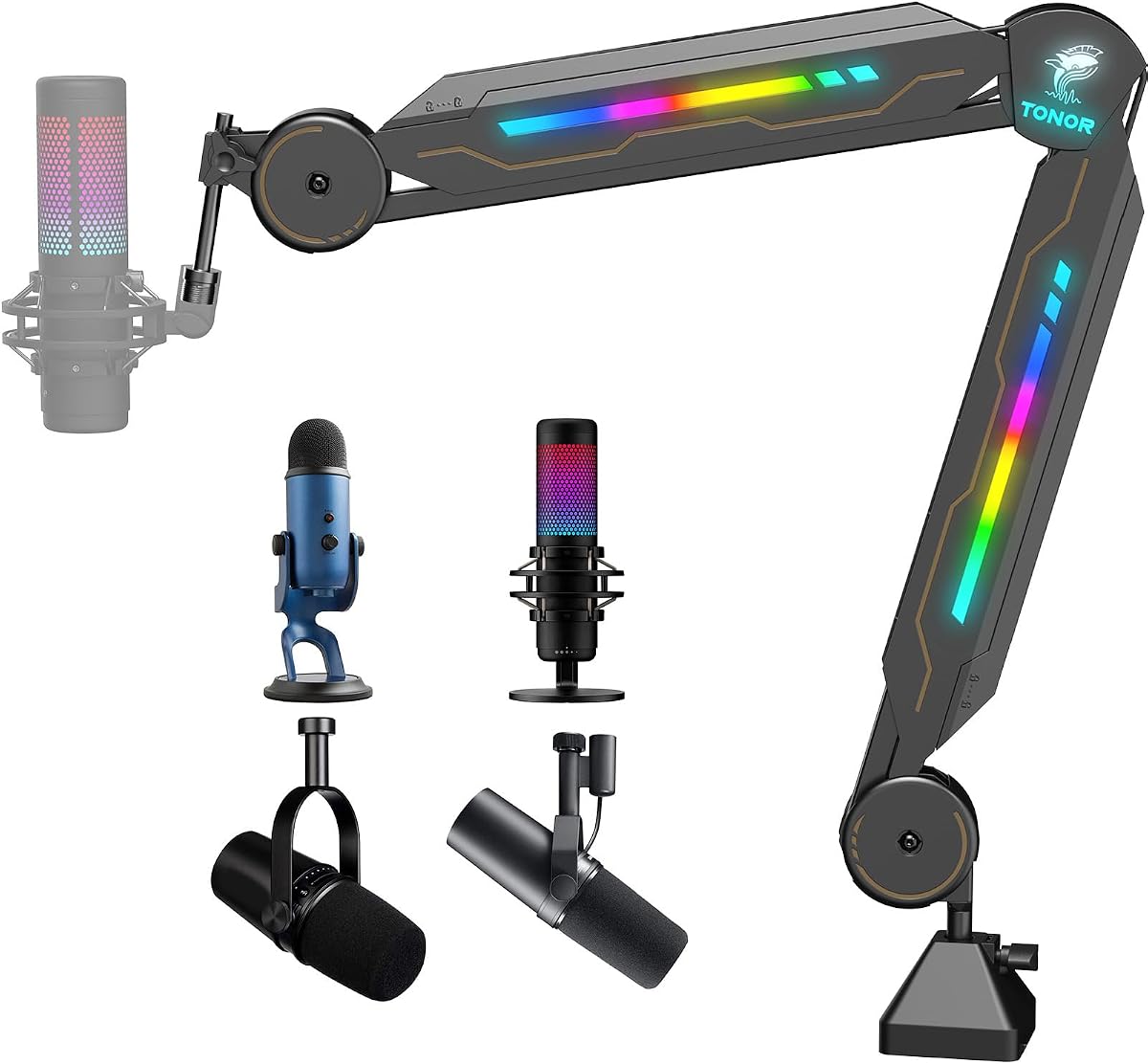
The TONOR T90 adds style with its RGB lighting effects. It transforms your gaming desk into a vibrant space with multiple light modes.
We may earn a commission when you buy through this link, at no additional cost to you.
Setup is quick and the boom arm offers great range of motion. The scissor design allows precise positioning for your microphone needs.
The cable channel keeps your desk neat which improves visual appeal. It supports most standard microphones with the 5/8 screw adapter.
Choose this for streaming setups where aesthetics matter. It balances function with style to enhance your content creation environment.
Choose from eleven exciting modes to set your gaming environment atmosphere.
Setup and installation happens within thirty seconds for immediate use.
We may earn a commission when you buy through this link, at no additional cost to you.
This kit brings concert vibes to your living room with its light ball. It is perfect for kids who love to sing and perform.
We may earn a commission when you buy through this link, at no additional cost to you.
The stand adjusts from fifteen to thirty five inches to fit growth. Materials are safe and non toxic for worry free play.
It connects to devices for music so they can sing along easily. Batteries power the lights for longer sessions without cables.
Buy this as a gift for young stars. It encourages creativity and provides a fun setup for parties or home use.
Colorful LED stage lights shine on walls to maximize musical enthusiasm.
Smooth edges and lightweight handle protect little hands from scratches.
We may earn a commission when you buy through this link, at no additional cost to you.
The YOUSHARES arm offers over 100 lighting modes via app or remote. It syncs light with sound for a truly immersive audio visual experience.
We may earn a commission when you buy through this link, at no additional cost to you.
Constructed from high quality steel it supports up to four pounds. This ensures your microphone stays stable even during movement.
The intelligent pickup feature adds a unique touch for streamers. It enhances every gaming session with synchronized visual feedback.
Get this for advanced setups that need customization. It combines heavy duty support with smart lighting technology for pros.
Lights flicker and change in sync with the sound rhythm seamlessly.
Built-in cable management system keeps your desk tidy at all times.
We may earn a commission when you buy through this link, at no additional cost to you.
This floor stand focuses on stability with its 4.5 lb weighted base. It ensures your microphone remains secure during dynamic performances.
We may earn a commission when you buy through this link, at no additional cost to you.
The thickened steel arm is durable enough for heavy microphones. It prevents deformation better than standard arms found in other stands.
Adjustment is swift with the clutch system for precise height settings. Non slip pads add extra grip to the surface it sits on.
Ideal for singers who need a stable floor solution. It handles performance gear well and packs away easily after shows.
Non-slip pads and metal gasket prevent unwanted wiggle or tipping.
Thickened 1.5mm steel arm significantly more durable than standard.
We may earn a commission when you buy through this link, at no additional cost to you.
This gaming microphone comes with stunning RGB lighting built-in. It helps create an immersive experience without needing extra equipment.
We may earn a commission when you buy through this link, at no additional cost to you.
The one-key noise cancellation allows you to suppress background noise. Gain control gives precise audio adjustment for streaming needs.
Zero latency monitoring ensures you hear your own voice clearly. It connects easily with USB-C or USB for maximum flexibility.
Buy this if you want a complete mic solution with style. It simplifies setup while delivering pro-grade audio quality.
Smart noise cancellation feature no other mic in its class offers.
Dynamic multicolor breathing or static solid color modes available.
We may earn a commission when you buy through this link, at no additional cost to you.
Pyle offers two stands in this package which is great for teams. They feature a compact design perfect for musicians on the go.
We may earn a commission when you buy through this link, at no additional cost to you.
The base is made of metal for balance and stability during use. Height adjustment is smooth to fit different user requirements quickly.
They come with standard thread for easy attachment of clips. The finish is sleek black to blend well in studio environments.
Choose this for a budget-friendly multi-pack option. It works well for home studios or band setups requiring multiple mics.
Ultra-light weight makes it easy for transport to gigs.
USA standard 5/8 inch screw-on threading ensures wide fit.
We may earn a commission when you buy through this link, at no additional cost to you.
This arm stands out with its integrated volume control knob. It lets you switch lighting modes and adjust settings easily with one hand.
We may earn a commission when you buy through this link, at no additional cost to you.
The infinity mirror effect in joints creates a unique visual. It supports microphones up to 3.3 lbs for reliable positioning.
Silent movement ensures smooth adjustments without shaking during recording. It adapts to both standing and seated setups effectively.
Select this for ergonomic desk control. The volume knob adds convenience for live streamers needing quick adjustments.
Built-in lighting and volume control knob for easy one hand use.
Multi-joint adjustable arm allows quick precise repositioning on desk.
We may earn a commission when you buy through this link, at no additional cost to you.
This tripod transforms venues with its built-in LED lighting in legs. It syncs with music energy for DJ and party setups effectively.
We may earn a commission when you buy through this link, at no additional cost to you.
Heavy duty steel frame ensures stability for expensive audio gear. The remote allows you to switch colors and modes quickly.
Plug-and-play setup saves time for traveling bands and event staff. It collapses down for easy transport in a gig bag.
Buy this if you need a lighting stand for shows. It declutters your stage and adds professional visual impact.
Transform any venue instantly with vibrant LED lighting integrated into legs.
Instant plug-and-play setup allows for quick deployment at venues.
We may earn a commission when you buy through this link, at no additional cost to you.
This arm brings a unique 7 color flowing light effect to streams. It connects via phone app for detailed color and mode control.
We may earn a commission when you buy through this link, at no additional cost to you.
The included extension tube adds height to your monitor level. This helps if you want your mic higher than the screen.
It works with popular gaming microphones using standard adapters. The base keeps the arm secure while you work or play.
Get this for advanced height needs and lighting control. It offers a versatile solution for desktop setups with high-end mics.
Equipped with extension tube to add 6.3 in height to arm.
Connect phone via Bluetooth to adjust light color and brightness.
We may earn a commission when you buy through this link, at no additional cost to you.
Choosing the right stand involves considering lighting, stability, and compatibility. This guide outlines key factors to help you decide.
Look for stands with adjustable lighting modes like RGB or static colors. Remote or app control offers more customization for your stream.
Ensure the lighting adds value without distracting from your audio quality.
Steel and aluminum construction ensure the stand is durable over time. Heavy bases prevent tipping when microphones sway during use.
Check for reinforced joints that support the weight of your mic.
Verify the load capacity matches your microphone weight. Heavier mics need stronger arms to avoid sagging or instability.
Always check the manufacturer limits to protect your equipment investment.
Decide between desk clamps for studios and floor stands for stages. Clamps save space but require a sturdy table to work safely.
Floor stands offer more height range but take up room in your space.
Ensure the stand supports your microphone's thread size. Many come with adapters for standard 5/8 inch connections.
Double check connectors to avoid needing extra purchases for setup.
Stands with cable channels keep wires tidy and organized. This reduces clutter on your desk and improves visual appeal.
Hidden routing prevents tripping hazards in home environments.
Look for arms with multiple joints for precise positioning. 360 degree rotation allows you to angle the mic easily.
Adjustable height ensures comfort for long recording sessions.
Quick installation saves time especially for portable setups. Some require tools while others are tool-free for instant use.
Read manuals to ensure you have the right mounting hardware.
Start by attaching the base or clamp securely to your desk. Ensure the surface is stable to prevent the stand from tipping over during use.
Connect the USB cable for lighting power if your model requires it. Install any necessary apps to control RGB modes and brightness levels.
Regularly check screws and joints for tightness to avoid accidents. Dust the stand gently to keep lighting panels clear and bright.
Not all models offer RGB features. Some are focused on basic floor stands without lights. Check product details to confirm lighting modes.
Most boom arms use 5/8 inch threads which work with XLR mics using adapters. Check the thread specifications before purchasing.
Many LED stands use USB for power. Ensure your PC has a free port. Some battery powered options exist for kids.
Glass surfaces can crack under high pressure. Check for non scratch padding or use a reinforced surface. Some clamps warn against glass.
Use a soft dry cloth to wipe the panels. Avoid moisture near electronic ports. Do not use harsh chemicals on plastic.
Most stands in this list support Blue Yeti. Verify the adapter size usually 5/8 inch. Some include the adapter directly.
Wall mounting requires specific brackets. Most are designed for clamp or floor use. Use caution when modifying mounting points.
Many products include a manufacturer warranty. Check the listing for terms. Amazon returns are available within standard timeframes.
We highlighted ten options ranging from kids kits to pro RGB arms. The YOUSHARES and TONOR models offer top lighting for streams.
Prioritize build quality and mic compatibility for long term use. Ensure the stand matches your room and desk setup needs.
Verify prices and availability before ordering since deals change. Use this guide to find the perfect visual and audio tool.