
TECKNET 2.4G Wireless Keyboard
4.4Editor score
Compact 11.5 inch size
12-month battery life
Quiet chocolate keycap design
Discover the top lightweight keyboards for portability and performance. We compare ten models for travel, office, and home use to help you find the perfect fit.
Finding the right lightweight keyboard can transform your workflow and make typing on the go much more comfortable. Whether you are a digital nomad, a student, or someone who values desk space, a slim and portable keyboard offers unmatched convenience without sacrificing functionality.
We have carefully evaluated ten distinct models based on their build quality, connectivity options, battery life, and overall typing experience. Our analysis focuses on real-world usability, ensuring that each recommendation meets the rigorous demands of modern computing environments across various operating systems.
Each pick in this guide highlights specific strengths tailored to different user needs, from budget-friendly options to premium travel companions. Please note that prices and availability can change frequently, so we recommend verifying the latest details before making your final purchase decision.
4.4Editor score

4.4Editor score

4.3Editor score
This side-by-side comparison highlights the key specifications and unique features of each lightweight keyboard model. By examining dimensions, connectivity, and battery life, you can quickly identify which device aligns best with your specific portable computing needs.





The GEODMAER 65% Gaming Keyboard stands out as a top contender for those seeking a balance between compactness and functionality. With a solid 4.3 rating, users appreciate its ultra-compact design that frees up valuable desk space while maintaining full media control.
We may earn a commission when you buy through this link, at no additional cost to you.
Its wired connection ensures stable low-latency performance ideal for both office tasks and gaming sessions. The detachable Type-C cable adds a layer of portability, allowing you to easily pack it away when moving between locations without tangling wires.
While it lacks wireless freedom, the mechanical feel technology provides a satisfying typing experience usually found in more expensive keyboards. The UV-coated keycaps resist fading over time, ensuring the keys remain legible even after prolonged daily use.
This keyboard is perfect for users who prioritize desk organization and want a robust device that can handle heavy typing loads. If you do not need wireless features, this model offers excellent value and reliable performance for any setup.
The 65% layout removes the numpad to save space but keeps essential navigation and arrow keys intact.
UV coating on keycaps prevents wear and tear ensuring the keyboard looks new for years of use.
We may earn a commission when you buy through this link, at no additional cost to you.
The Logitech Pebble Keys 2 K380s offers a unique blend of style and practicality for modern users. Its slim profile and tonal graphite finish make it a visually appealing addition to any desk while remaining incredibly portable for travel.
We may earn a commission when you buy through this link, at no additional cost to you.
One of its strongest features is the ability to connect via Bluetooth to three different devices simultaneously. You can switch between your laptop, phone, and tablet with a simple press of a button streamlining your workflow efficiently.
Typing on the rounded scooped keys feels familiar and comfortable resembling a laptop experience. The device is built with recycled plastic which appeals to environmentally conscious users without compromising on the sturdiness of the build.
Ideal for students and professionals who juggle multiple screens this keyboard delivers consistent performance over three years on a single battery charge. It is a reliable choice for those who value seamless switching and long-term durability.
Easy-Switch buttons allow instant toggling between connected devices without needing to re-pair settings.
Made with significant post-consumer recycled plastic reducing environmental impact while maintaining durability.
We may earn a commission when you buy through this link, at no additional cost to you.
For users who need a full-size layout without the bulk of traditional keyboards the Arteck 2.4G is an excellent solution. It combines a complete set of keys with a stainless steel body that feels premium and sturdy under the fingertips.
We may earn a commission when you buy through this link, at no additional cost to you.
The 6-month battery life is a standout feature ensuring you spend less time worrying about power and more time working. The rechargeable lithium battery charges via USB offering a sustainable and cost-effective way to keep your device running.
Despite its full-size footprint the keyboard remains surprisingly thin and light making it easier to transport than standard models. The low-profile keys provide a quiet typing experience which is perfect for shared workspaces or late-night sessions.
This keyboard is best suited for office workers or data entry professionals who need a numeric keypad regularly. Its robust build and long battery life make it a dependable daily driver for productive tasks.
Full size layout includes a dedicated number pad essential for spreadsheets and data entry tasks.
Steel construction gives a heavy-duty feel while maintaining an ultra-slim and lightweight profile.
We may earn a commission when you buy through this link, at no additional cost to you.
The ProtoArc XK01 redefines what a travel keyboard can be by offering a full-size layout in a foldable frame. Its tri-fold design allows it to pack down significantly while still providing 105 keys including a number pad and function row.
We may earn a commission when you buy through this link, at no additional cost to you.
Bluetooth 5.1 ensures a stable connection up to three devices allowing you to switch between your laptop and phone instantly. The aluminum hinges are tested for thousands of folds meaning this keyboard is built to withstand the rigors of frequent travel.
Scissor-switch keys are quiet and low-profile ensuring you can type in cafes or offices without disturbing others. The auto-sleep mode conserves battery power so the keyboard is ready to go when you need it most.
This is the ideal choice for business travelers or digital nomads who refuse to compromise on typing comfort. It bridges the gap between portability and full functionality better than almost any other model in its class.
Folds down to a small footprint perfect for luggage while retaining a full keyboard layout.
Internal aluminum hinges tested for 10000 folds ensure long term reliability during travel.
We may earn a commission when you buy through this link, at no additional cost to you.
The TECKNET 2.4G Wireless Keyboard is a fantastic budget-friendly option for anyone needing a portable typing solution. It delivers essential features like media hotkeys and a stable wireless connection at a price that is hard to beat.
We may earn a commission when you buy through this link, at no additional cost to you.
Its compact size makes it perfect for coffee shops or tight workspaces where every inch counts. The chocolate keycap design provides a smooth and quiet typing experience that reduces finger fatigue during long typing sessions.
Note that this model uses 2.4GHz USB connection rather than Bluetooth which ensures low latency but requires a USB-A port. If your device lacks Bluetooth support this is an ideal alternative that avoids pairing issues entirely.
For users on a tight budget this keyboard offers great value without sacrificing too much performance. It is best for casual users or those needing a secondary keyboard for light tasks on the go.
Works instantly with USB receiver without needing drivers or complex Bluetooth pairing processes.
Delivers essential wireless functionality and media controls at a fraction of the cost of premium models.
We may earn a commission when you buy through this link, at no additional cost to you.
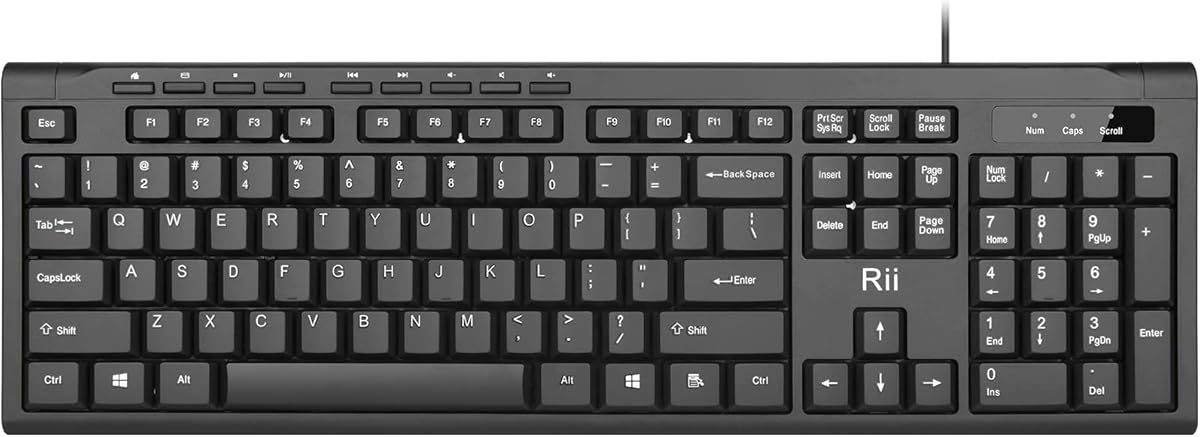
The Rii RK907 is designed for those who prioritize simplicity and portability above all else. Its ultra-slim profile allows it to slip into almost any bag or drawer making it a great backup keyboard for emergencies or travel.
We may earn a commission when you buy through this link, at no additional cost to you.
The low-profile keys offer a quiet typing experience which is perfect for libraries or quiet office environments. Splash resistance adds a layer of protection ensuring that minor spills do not render the keyboard useless unexpectedly.
As a wired USB device it requires no batteries and maintains a constant connection without any wireless latency concerns. This reliability makes it a solid choice for users who value stability over wireless convenience.
While it lacks advanced features like backlighting or programmable keys it excels at its core function of typing efficiently. It is an excellent secondary keyboard for a dedicated office spot or travel kit.
Ultra-thin profile makes it easy to slide into tight spaces or carry in a laptop bag.
Splash resistant coating protects against accidental liquid spills adding to the keyboard longevity.
We may earn a commission when you buy through this link, at no additional cost to you.
The Logitech MX Keys Mini brings premium features to a compact form factor perfect for high-end setups. Its smart illumination sensors light up keys as your hands approach automatically adjusting to ambient light conditions for optimal visibility.
We may earn a commission when you buy through this link, at no additional cost to you.
Typing feels natural with keys shaped to match your fingertips ensuring precision and comfort during long sessions. The minimalist design looks sophisticated on any desk while providing full functionality through programmable shortcut keys.
You can pair up to three devices and switch between them seamlessly allowing for a fluid workflow across computers. The rechargeable battery lasts up to five months with backlighting off ensuring you rarely need to find a charger.
This keyboard is ideal for professionals who want the best typing experience and modern connectivity options. If you value aesthetics and smart features this model justifies its price with unmatched quality and performance.
Backlight activates when hands approach and dims automatically to save battery and reduce eye strain.
Integrates with MX Master mouse for seamless copy paste across different computers easily.
We may earn a commission when you buy through this link, at no additional cost to you.
The ProtoArc XK04 is engineered specifically for mobile users who need a portable typing solution for phones and tablets. Weighing only 7.8 ounces it is incredibly light and folds into a small package that fits easily into a pocket.
We may earn a commission when you buy through this link, at no additional cost to you.
The PU leather cover adds a premium feel while protecting the keys from scratches during transport. Bluetooth 5.1 connects reliably to up to three devices allowing you to switch between your phone and tablet instantly.
Its compact layout with 0.55 inch keycaps fits comfortably on airplane trays or cafe tables where space is minimal. The auto-sleep standby ensures the battery lasts up to 150 days so it is always ready when you need it.
This keyboard is perfect for travelers or students who rely heavily on mobile devices. It provides a tactile typing experience that is much faster than virtual keyboards while maintaining high portability.
Keys arranged specifically for typing on phones and tablets making messaging and notes efficient.
Integrated PU cover adds durability and style while protecting keys from dust and damage.
We may earn a commission when you buy through this link, at no additional cost to you.
The Arteck Slim 2.4G brings a unique combination of stainless steel durability and ultra-thin design to the market. At just 0.16 inches thin it sits flush on your desk taking up almost no vertical space while maintaining full-size keys.
We may earn a commission when you buy through this link, at no additional cost to you.
The rechargeable lithium battery provides up to six months of use on a single charge ensuring you are not constantly swapping batteries. The low-profile keys are quiet and responsive making them suitable for quiet work environments.
Despite its slim build the heavy-duty feel of the steel material makes it feel robust and premium. This is ideal for users who want a durable keyboard that does not look bulky on a clean desk setup.
For those who need a full-size layout but prioritize a sleek look this model is an excellent fit. Its reliability and long battery life make it a practical choice for daily home or office use.
Only 0.16 inches thick ensuring it does not dominate the desk visually or physically.
Internal lithium battery lasts six months reducing waste and cost compared to disposable batteries.
We may earn a commission when you buy through this link, at no additional cost to you.
The Logitech K400 Plus Wireless Touch is designed specifically for media consumption and smart TV control. Its integrated touchpad eliminates the need for a separate mouse making it perfect for navigating menus from the comfort of a couch.
We may earn a commission when you buy through this link, at no additional cost to you.
The layout includes dedicated media keys for easy access to volume and playback controls. Its wireless range allows you to control your device from up to 33 feet away giving you full freedom to relax.
Built with an 18-month battery life this keyboard is low maintenance and ready whenever you need it. The spill-resistant design ensures that accidental spills do not damage the keyboard making it suitable for living room environments.
This is the best choice for anyone setting up a home theater PC or smart TV station. It combines keyboard and mouse functionality into one streamlined device for effortless entertainment control.
Large touchpad allows mouse control without needing a separate device for navigation.
Dedicated media keys allow instant access to volume and playback for easy TV usage.
We may earn a commission when you buy through this link, at no additional cost to you.
Choosing the right lightweight keyboard depends on your specific usage needs and environment. This guide breaks down the essential factors to consider before making a purchase.
Decide between wireless Bluetooth or 2.4GHz USB receiver and wired options. Bluetooth offers cleaner setups but requires pairing while wired ensures zero latency.
Always check if your device supports the required connection method before buying to avoid compatibility issues.
Consider if you need a full-size layout with a number pad or a compact design. Compact layouts save space but may require learning new key combinations.
Choose a layout that matches your workflow needs such as typing versus data entry.
Look at dimensions and weight to ensure it fits easily in your bag. Foldable keyboards offer extreme portability while ultra-thin models save desk space.
Prioritize designs that include protective covers if you plan to transport it daily.
Check if the keyboard uses disposable batteries or rechargeable lithium. Rechargeable options are more eco-friendly but may need charging cables.
Opt for long battery life models if you do not want frequent charging interruptions.
Key height and travel distance impact long-term comfort. Low profile keys are portable but may feel different than standard keyboards.
Ensure the keyboard feels comfortable for your hand size to prevent strain during long typing sessions.
Materials like stainless steel or aluminum add durability but may increase weight. Plastic models are lighter but can feel less premium.
Choose materials based on whether you prioritize weight savings or ruggedness.
Look for backlighting or media hotkeys if you work in low light or control media often. These features can enhance usability in specific environments.
Evaluate if these extras justify the cost difference compared to basic models.
To ensure longevity keep your keyboard clean by gently wiping keys with a soft dry cloth to remove dust and debris.
If you use a rechargeable model try not to let the battery drain completely before recharging to maintain battery health.
Store foldable keyboards in their protective covers when not in use to prevent scratches and damage during transport.
Yes many lightweight keyboards feature low-latency connections and anti-ghosting technology suitable for gaming. However mechanical switches usually provide a better experience for competitive gaming.
The best portable keyboards offer at least six months of battery life on a single charge. Some models can last up to three years depending on usage and backlighting settings.
Many modern keyboards support multi-device Bluetooth pairing allowing you to switch between three devices easily. Check product specs for Easy-Switch capabilities if this is important to you.
High-quality foldable keyboards use reinforced hinges tested for thousands of folds. Look for models with aluminum hinges and protective cases to ensure durability during travel.
Most lightweight keyboards are cross-platform compatible but check for OS switching buttons if you plan to use both Mac and Windows systems regularly.
Low-profile scissor-switch keys are generally the quietest option. Mechanical keyboards with silent switches also work well if you prefer tactile feedback without noise.
We have reviewed ten distinct models ranging from budget-friendly options to premium travel companions. Each offers unique strengths for portability whether you need a full-size layout or an ultra-compact frame.
Prioritize your specific needs such as battery life or connectivity to find the perfect match for your workflow. A lightweight keyboard should enhance your productivity without adding unnecessary bulk.
Please remember to check current prices and availability before making your final decision to ensure you get the best value for your investment.