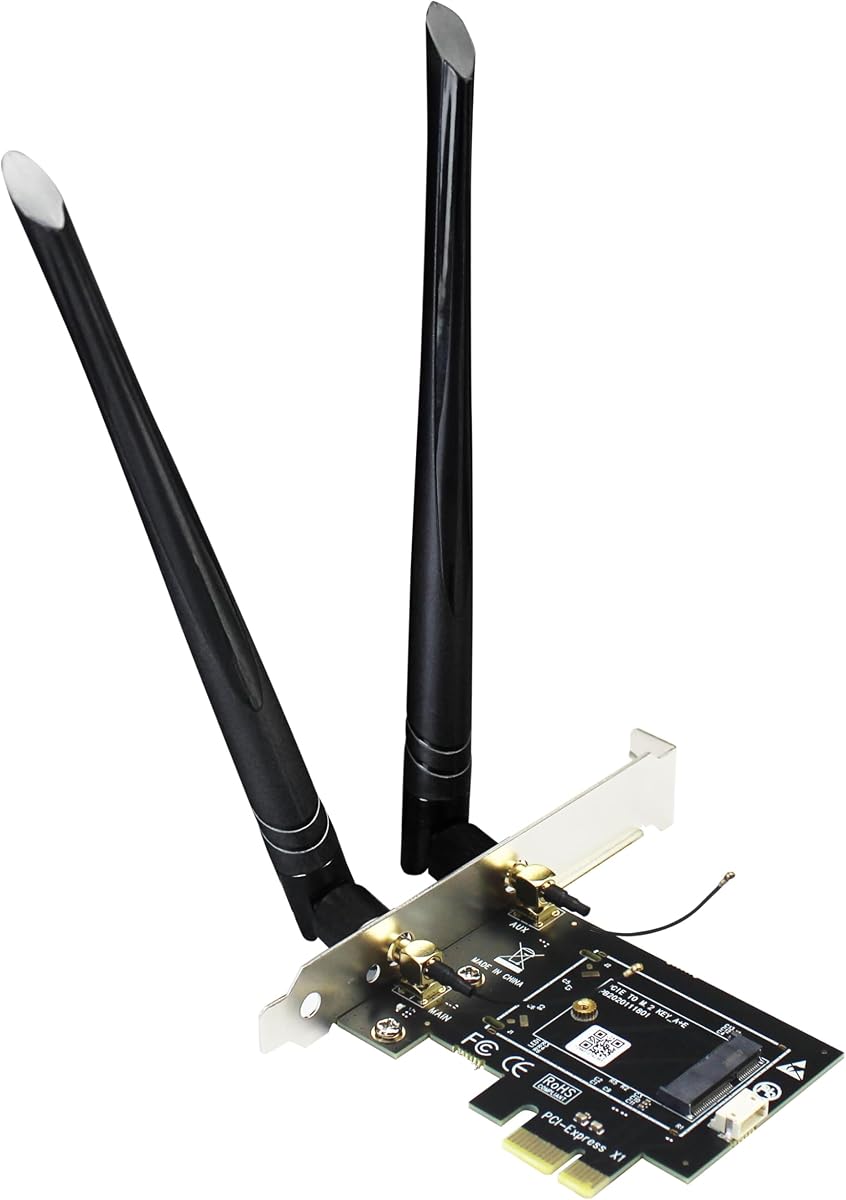
GLOTRENDS WA01 Adapter
4.1Editor score
M.2 E Key to PCIe X1
Supports Coral TPU Modules
Compatible With Many Wi-Fi Cards
Compare the top M2 Key E WiFi Cards for laptops and desktops including 22 E cards and adapters for seamless wireless network upgrades today.
Finding the right M2 Key E WiFi card can transform your wireless experience significantly. Whether you need faster speeds or better range, choosing the correct module ensures optimal performance for gaming and streaming tasks.
We analyzed ten leading products based on compatibility, speed capabilities, and user reviews. This guide covers everything from budget-friendly adapters to high-end WiFi 7 modules designed for modern systems.
Each pick highlights key features and real-world performance notes to help you decide. Keep in mind that pricing fluctuates regularly so check current deals before purchasing any wireless networking component.
4.1Editor score

4.5Editor score

4.6Editor score
This side-by-side comparison table lists every product reviewed here with key specifications to help you quickly identify which card or adapter fits your specific motherboard and performance needs.


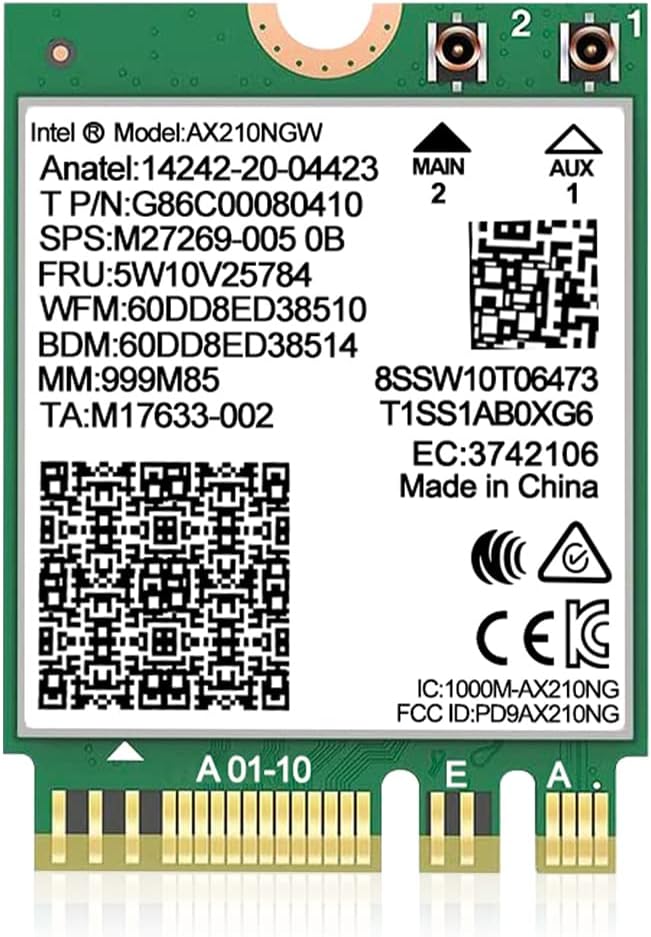



This AX210NGW DTK WiFi card stands out as a top choice for users seeking reliable WiFi 6E performance. With a solid 4.5 rating from verified buyers, it offers a comprehensive kit that includes antennas and brackets for easy desktop installation.
We may earn a commission when you buy through this link, at no additional cost to you.
The Intel AX210 chipset brings WiFi 6E to your system enabling tri-band connectivity across 2.4GHz, 5GHz, and the new 6GHz band. This setup delivers speeds up to 574Mbps on 2.4GHz plus 2400Mbps on both 5GHz and 6GHz bands for impressive throughput.
While the installation requires connecting USB cables for Bluetooth functionality, the performance gains justify the effort. It supports Bluetooth 5.3 which reduces latency for peripherals making it ideal for gaming setups requiring precise input response.
If you need a complete upgrade solution that bridges older laptops or desktops with modern WiFi standards this card is the best pick. Just ensure your motherboard supports M.2 Key E slots for proper physical and electrical connection.
Accessing the 6GHz band reduces interference from older devices ensuring smoother streaming and faster file transfers during peak usage times.
The inclusion of 5dBi high gain antennas and low-profile brackets means you get everything needed for immediate setup without extra purchases.
We may earn a commission when you buy through this link, at no additional cost to you.
For users on a tight budget the GLOTRENDS WA01 adapter offers exceptional value without sacrificing essential connectivity features. It bridges the gap between M.2 wireless modules and standard PCIe slots allowing flexible expansion options.
We may earn a commission when you buy through this link, at no additional cost to you.
This adapter works with a wide variety of WiFi modules including AX210 BE200 and even Coral TPU accelerators. The PCIe X1 interface handles WiFi traffic while a separate USB link manages Bluetooth signals effectively splitting the data load.
While it requires a USB header on your motherboard for Bluetooth this trade-off ensures compatibility with a broader range of cards. The 6-dBi antennas provide strong signal reception improving range compared to typical laptop internal units.
Choose this adapter if you want to reuse an existing M.2 module or need to test different cards without buying new ones. It is a versatile solution for desktop upgrades where cost efficiency matters most.
Supporting nearly any M.2 WiFi module gives you the freedom to choose the best wireless chip for your specific budget and performance needs.
Beyond networking this adapter enables machine learning acceleration by allowing Coral TPU modules to interface with your system via the same slot.
We may earn a commission when you buy through this link, at no additional cost to you.
The Intel Killer BE200 represents the cutting edge of wireless networking with official support for the latest WiFi 7 standard. Its high 4.6 rating reflects strong user satisfaction regarding stability and speed in demanding applications like competitive gaming.
We may earn a commission when you buy through this link, at no additional cost to you.
Featuring a max speed of up to 5.8 Gbps across 2.4GHz, 5GHz, and 6GHz bands this card leverages advanced features like Multi-Link Operation for reduced latency. It is specifically optimized for Intel processors ensuring seamless integration.
One limitation is its strict compatibility with Intel systems and Windows 11 which might exclude AMD users or those on older OS versions. However for dedicated gamers and professionals needing peak performance these requirements are often justified.
Select this card if you want future-proof connectivity and have the hardware to support it. The ultra low latency design ensures your connection remains responsive even under heavy network loads.
WiFi 7 brings 320MHz channels and 4K QAM which drastically increase throughput allowing for seamless 8K streaming and instant large file uploads.
Killer networking software prioritizes gaming traffic reducing ping spikes and ensuring smooth real-time communication during multiplayer matches.
We may earn a commission when you buy through this link, at no additional cost to you.
This QCNCM865 card offers a robust WiFi 7 experience at a competitive price point. Users appreciate its ability to deliver tri-band connectivity and low latency performance that rivals more expensive branded alternatives when paired with compatible routers.
We may earn a commission when you buy through this link, at no additional cost to you.
It supports Multi-Link Operation which allows simultaneous connections across different bands for better stability. The card achieves theoretical speeds up to 5.8Gbps on 320MHz channels making it a strong choice for future networks.
While it requires Windows 11 for full feature support including MLO it works with both Intel and AMD platforms unlike some competitors. This broad compatibility makes it an attractive option for custom PC builds.
If you want early access to WiFi 7 features without breaking the bank this card provides significant value. Ensure your router supports the same standards to unlock its full potential.
MLO technology combines channels from different bands to create a wider pipeline resulting in faster transfers and reduced latency spikes.
Unlike some premium cards this module functions well on AMD motherboards providing flexibility for diverse system configurations.
We may earn a commission when you buy through this link, at no additional cost to you.
This WiFi 6E AX210 NGW module is a direct replacement option designed for easy integration into laptops and desktops. Its high 4.6 rating indicates consistent performance and reliability across different use cases including streaming and general browsing.
We may earn a commission when you buy through this link, at no additional cost to you.
The AX210 chipset ensures tri-band capabilities with speeds up to 5374Mbps combining 2.4GHz, 5GHz, and 6GHz bands. Bluetooth 5.3 support enhances peripheral connectivity while optimizing power consumption for portable devices.
Installation requires downloading drivers from the Intel website which can take a few minutes but ensures you get the latest stability patches. Once set up the connection remains stable even in crowded wireless environments.
If you need a straightforward upgrade path for an older laptop this card is an excellent choice. It brings modern WiFi standards to your device without complex hardware modifications.
Built-in power management features help extend battery life on laptops by reducing unnecessary radio activity when idle.
Works seamlessly with existing WiFi 6 routers and prepares you for upcoming 6E networks ensuring your card remains relevant.
We may earn a commission when you buy through this link, at no additional cost to you.
The OKN AX210 WiFi card delivers impressive performance metrics with a 4.6 rating from users who value stable and fast wireless connections. It is a solid option for those who need tri-band WiFi without investing in expensive branded solutions.
We may earn a commission when you buy through this link, at no additional cost to you.
Equipped with MU-MIMO technology it allows multiple devices to communicate simultaneously improving network efficiency. The ultra-low latency feature ensures smooth gameplay and responsive video calls even when other users are active on the network.
While it includes essential features like WPA3 security you may need to purchase separate antennas if your case lacks existing ones. This makes the total cost slightly higher but still competitive compared to full kits.
Choose this module if you prioritize raw performance and security features over a complete accessory bundle. It works well on both Intel and AMD platforms for broad compatibility.
MU-MIMO ensures bandwidth is distributed efficiently among connected devices preventing slowdowns when multiple users stream content.
Support for WPA3 provides enhanced encryption protocols keeping your wireless network safer from modern security threats.
We may earn a commission when you buy through this link, at no additional cost to you.
This AX210 NGW Wireless Card stands out due to its 8dBi high gain antennas which provide superior signal range compared to standard 5dBi models. It is an excellent choice for users in larger homes or offices where distance matters.
We may earn a commission when you buy through this link, at no additional cost to you.
The kit includes all necessary components such as cables brackets and antennas making it a true desktop upgrade solution. Tri-band connectivity ensures you can take advantage of the new 6GHz spectrum for interference-free streaming.
While the larger antennas might look bulky in tight cases they deliver tangible performance benefits. Bluetooth 5.3 ensures your peripherals remain connected with minimal lag enhancing the overall user experience.
If you struggle with weak WiFi signals in certain rooms this card with its high gain antennas is likely to resolve the issue. Just ensure you have space to mount the external antennas properly.
The 8dBi antennas significantly extend the reach of your wireless signal reducing dead zones in larger living spaces.
Everything you need comes in one box ensuring you can upgrade your network immediately without waiting for additional parts.
We may earn a commission when you buy through this link, at no additional cost to you.
This variant of the QCNCM865 card emphasizes advanced features like Multi-Link Operation which is key to unlocking WiFi 7 performance. Users report high satisfaction with its ability to deliver fast and reliable connections under load.
We may earn a commission when you buy through this link, at no additional cost to you.
With a maximum data rate of 5.8Gbps it handles heavy tasks like 4K streaming and large file transfers with ease. The inclusion of Bluetooth 5.3 ensures your peripherals enjoy low latency and better energy efficiency.
Drivers should be downloaded directly from the manufacturer website to avoid conflicts with older installations. While it is limited to Windows 11 this ensures you get the latest security and performance optimizations.
Opt for this card if you want to experiment with WiFi 7 features on a budget. Its performance characteristics make it a strong contender for next-gen networking setups.
By using multiple bands at once this card maintains stable speeds even if one band experiences interference or congestion.
Investing in WiFi 7 now prepares your system for upcoming routers and networks ensuring years of continued support.
We may earn a commission when you buy through this link, at no additional cost to you.
The BrosTrend WiFi 6 Card is a solid entry-level option for those wanting to upgrade from older WiFi standards without spending a lot. It provides dual-band speeds up to 1800Mbps which is ample for most home usage scenarios.
We may earn a commission when you buy through this link, at no additional cost to you.
It follows the standard 2230 form factor making it a direct drop-in replacement for many laptop modules. Bluetooth 5.2 support ensures compatibility with modern peripherals while improving transmission speed over previous versions.
Linux users can also take advantage of this card as it supports kernels 6.5 or higher though official support is limited to Windows. This makes it a versatile choice for custom Linux builds.
Choose this card if you need a straightforward affordable upgrade to WiFi 6. It is perfect for general browsing streaming and gaming on a budget.
The standard 2230 size ensures it fits into most laptops and desktop slots without requiring physical modifications.
Compatibility with newer Linux kernels allows open-source users to upgrade their network without proprietary software dependencies.
We may earn a commission when you buy through this link, at no additional cost to you.
This second listing for the Killer BE200 highlights its specific focus on gaming performance and Intel ecosystem integration. The high 4.6 rating reflects user satisfaction with its ultra low latency design which minimizes lag.
We may earn a commission when you buy through this link, at no additional cost to you.
It features Bluetooth 5.4 which is the latest standard offering improved range and data rates for peripherals. The card requires an Intel processor for full functionality ensuring tight optimization for system resources.
While it is limited to Intel systems the performance benefits are significant for competitive gamers needing every millisecond of response time. If you have an AMD system you will need to look at other options.
Select this card for the best possible experience on an Intel gaming rig. Its focus on latency optimization makes it a standout for online competitive play.
The latest Bluetooth version offers improved power efficiency and faster pairing for your wireless controllers and headsets.
Deep integration with Intel platforms ensures drivers are stable and system resources are managed efficiently for peak throughput.
We may earn a commission when you buy through this link, at no additional cost to you.
Selecting the right wireless card involves checking your motherboard slot type desired speeds and operating system compatibility.
Ensure your motherboard has an M.2 Key E slot specifically for WiFi cards. Some laptops use CNVio2 which is not compatible with standard M.2 modules.
Check your hardware manual or use a tool like Device Manager to verify the exact slot type before purchasing any card.
Decide between WiFi 6 and WiFi 7 based on your router capabilities. WiFi 7 offers faster speeds but requires a new router to function fully.
If you have a standard WiFi 6 router a WiFi 6E card like the AX210 provides excellent value without needing new hardware.
Look for cards with Bluetooth 5.3 or 5.4 for better range and lower latency with your peripherals. Newer versions also improve power efficiency significantly.
Always check that the card supports the specific Bluetooth version you need for your headset or mouse.
Some high-end cards like the Intel Killer BE200 only support Windows 11. Verify that your OS matches the product requirements before buying.
If you use Linux ensure the chipset has open-source driver support to avoid functionality issues.
Desktop upgrades often need external antennas for good signal strength. Check if the package includes antennas or if you must buy them separately.
For laptops that internal antennas might work but ensure the connector matches your card's requirements.
While most M.2 cards work with both Intel and AMD some optimized chips like Killer are restricted to Intel systems.
Choose AMD-compatible modules like QCNCM865 if you have a Ryzen system to avoid hardware conflicts.
Ensure the manufacturer provides easy-to-find drivers for your system. Official Intel drivers are typically reliable but check third-party support options.
Download drivers before installation to avoid connectivity issues during setup.
Confirm the physical size is 2230 as this is the standard for most wireless cards. Mini PCIe cards require different adapters and slots.
Measure your available space especially in small form factor PCs before making a purchase decision.
Install the card gently into the M.2 Key E slot ensuring it is seated firmly without bending the edges. Secure it with the screw provided to prevent physical damage during movement.
Connect the antenna cables properly matching the main and aux ports to avoid signal issues. For desktops route the antennas out of the case to ensure maximum range.
Keep your drivers updated via the manufacturer website or Intel tools to maintain security and performance. Restart your PC after installation to ensure the system recognizes the new hardware.
Not all motherboards support M.2 Key E for WiFi as some use CNVio2 or Mini PCIe slots. You must verify your specific model supports standard NGFF Key E before purchasing.
Yes WiFi 7 cards are backward compatible with WiFi 6 and 6E routers but you will only get standard WiFi speeds. You need a WiFi 7 router to use full new features.
The main difference is that the AX210 supports the 6GHz band (WiFi 6E) while the AX200 does not. Both share similar speeds on 2.4GHz and 5GHz bands.
For desktop adapters Bluetooth usually requires a separate USB header connection. Ensure you connect the USB cable from the adapter to the motherboard properly.
Most AX210 cards work well with Linux but some high-end models like Intel Killer may not. Check the specific card documentation for kernel support details.
You will likely need drivers for full functionality. Windows usually installs basic ones automatically but you may need official drivers for the latest features.
Yes using a PCIe to M.2 adapter allows you to use M.2 WiFi cards in desktops. This provides a cost-effective way to upgrade older systems.
If you have a WiFi 7 router and need ultra-low latency it is worth it. For most users WiFi 6E still provides ample performance for daily tasks.
We have reviewed ten top options ranging from budget adapters to premium WiFi 7 modules. The AX210NGW DTK and GLOTRENDS WA01 stand out for their balance of features and affordability.
When selecting a card prioritize compatibility with your motherboard and processor. Ensure you have the correct slot type and OS support to avoid unnecessary returns.
Remember that prices fluctuate frequently so check current deals on these products before finalizing your purchase. A stable high-speed network is essential for productivity and entertainment.