
VSD Mini Macro Pad
4.1Editor score
Six customizable LCD keys
Compact portable design
Dual side RGB lighting
Discover the top macro pads for streaming in October 2026. This guide compares ten customizable controllers to help you streamline OBS, Twitch, and content
Streaming has evolved into a professional endeavor requiring precise control over multiple applications simultaneously. A macro pad for streaming acts as a dedicated command center, allowing creators to trigger complex actions with a single tap. These devices replace tedious keyboard shortcuts with visual, customizable keys that enhance productivity and reduce errors during live broadcasts.
To compile this list, we analyzed real-world performance, software compatibility, and build quality across ten leading models. We focused on devices that offer robust macro programming, seamless integration with OBS and Streamlabs, and reliable hardware for long sessions. Each product was evaluated based on its ability to simplify multitasking for gamers and content creators alike.
Each pick in this guide highlights specific strengths, from budget-friendly options to premium decks with audio mixing capabilities. You will find detailed breakdowns of key layouts, customization options, and software ecosystems. Please note that pricing and availability can change frequently, so verify current details before making your final purchase decision.
4.1Editor score

4.4Editor score

4.8Editor score
This side-by-side comparison highlights the core specifications and unique features of each macro pad. Whether you need audio controls, extra keys, or specific form factors, this table helps you identify the device that best fits your streaming setup and budget requirements.



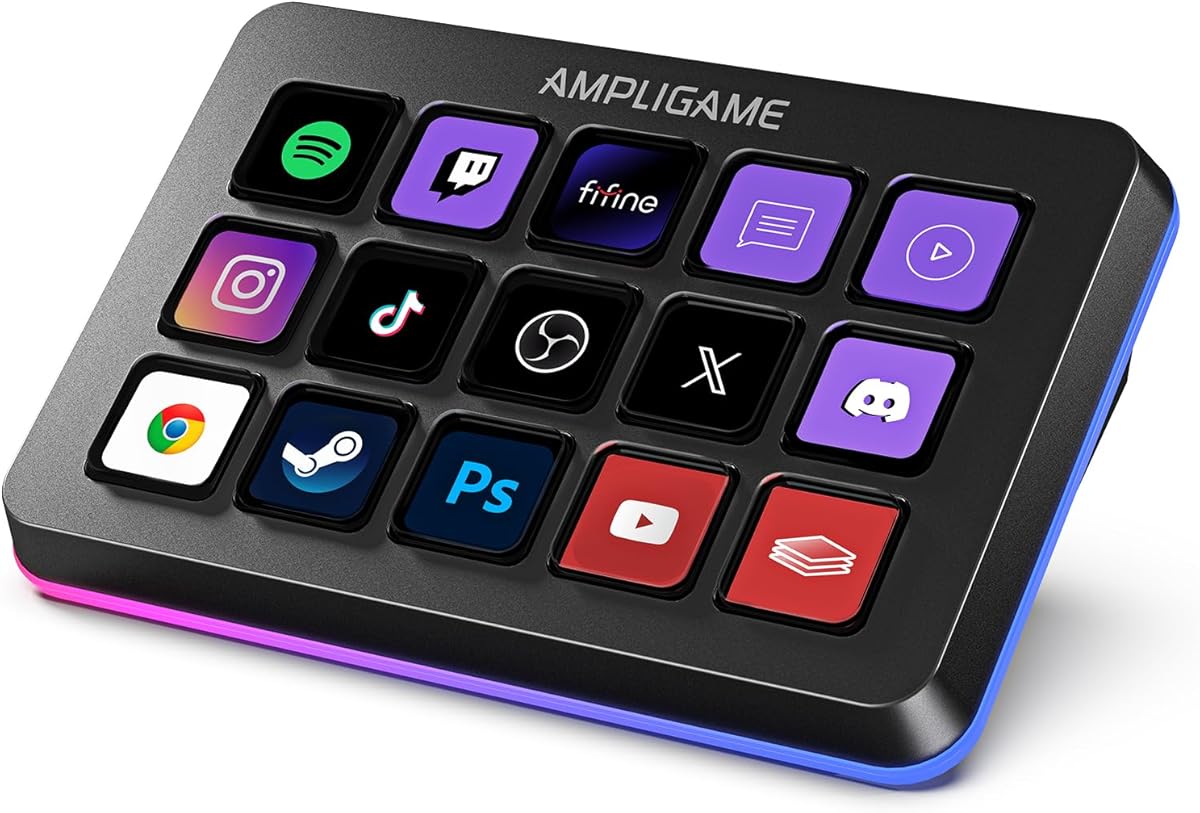


The VSD M18 Macro Pad stands out as a top contender in the streaming controller market. With an impressive rating of 4.4 stars, it offers a robust balance of features and affordability. Its 18 programmable keys allow streamers to manage scenes, audio, and chat without switching windows manually.
We may earn a commission when you buy through this link, at no additional cost to you.
Each of the 15 LCD keys supports custom images and GIFs, providing clear visual cues for your actions. The device integrates seamlessly with OBS, Streamlabs, and Twitch, making it easy to trigger macros like switching cameras or muting microphones. The built-in plugins for weather and calendars add extra utility beyond just streaming.
While the device performs well, some users may find the software setup slightly complex initially. Additionally, native Linux plug-and-play support is not available, which might limit Linux-based streamers. However, SDK documentation is provided for custom development if needed.
For streamers seeking a reliable, feature-rich deck without breaking the bank, the VSD M18 is an excellent choice. Its sturdy construction and versatile macro options ensure it can handle daily production tasks efficiently. We recommend this model for both beginners and experienced creators looking to upgrade their setup.
The single-tap command system lets you trigger pre-set macros instantly, reducing the time spent navigating menus during live broadcasts.
LCD keys display JPG or GIF images, ensuring you always know which function you are pressing without looking at software interfaces.
We may earn a commission when you buy through this link, at no additional cost to you.
The Stream Dock N1 offers a distinct vertical design that differentiates it from traditional horizontal macro pads. Rated highly at 4.7 stars, it is perfect for users with limited desk space. Its unique three-mode system includes a calculator function, adding utility beyond streaming and gaming tasks.
We may earn a commission when you buy through this link, at no additional cost to you.
With 15 customizable LCD keys, you can drag and drop files, apps, or media for quick access. The vertical orientation allows for comfortable left-hand operation without cluttering your main work area. Compatibility with OBS and Adobe Premiere ensures smooth workflow integration for editors and broadcasters.
Although the vertical design is space-efficient, it might take some time to adjust to the key layout compared to standard grids. The software market offers numerous plugins, but downloading them requires visiting the Space Station plugin market separately.
Ideal for cramped desks or left-handed users, the Stream Dock N1 maximizes utility in a minimal footprint. Its versatility as a calculator and shortcut deck makes it a great all-in-one tool for content creators who need efficiency without sacrificing desk real estate.
The vertical layout frees up horizontal space for monitors or gaming mice while still offering 15 keys for complex shortcuts.
Switch between shortcut, calculator, and numeric modes easily, allowing the device to serve multiple roles throughout your day.
We may earn a commission when you buy through this link, at no additional cost to you.
This version of the VSD M18 focuses heavily on efficiency with its one-touch operation system. It maintains the 4.5-star rating of its counterparts, proving its reliability for daily use. The 18 macro keys allow you to execute complex sequences with a single click, saving crucial time during streams.
We may earn a commission when you buy through this link, at no additional cost to you.
The surrounding RGB light ring adds a professional aesthetic to your desk setup, while the built-in plugins like clocks and weather widgets keep you informed. It connects via USB-C for immediate use and works seamlessly with OBS, YouTube, and Discord for a unified experience.
Despite its strengths, users should note that native Linux support is not available. Additionally, installing the proprietary software is necessary to unlock full functionality, which might be a hurdle for tech-averse users. However, free software updates ensure long-term viability.
If you prioritize speed and visual flair, the VSD M18 Stream Controller delivers consistent performance. Its high-grade materials and extensive compatibility make it a solid investment for streamers looking to streamline their workflow without investing in premium pricing tiers.
Customizable multi-hotkey macros allow you to launch apps or switch OBS scenes instantly with one single click of a key.
The adjustable RGB light ring cycles through colors, creating a vibrant atmosphere that complements gaming or streaming setups.
We may earn a commission when you buy through this link, at no additional cost to you.
The VSD Mini Macro Pad is the perfect entry point for streamers on a budget. With 6 fully customizable LCD keys, it offers essential macro capabilities without the bulk of larger decks. Its compact size makes it easy to fit on even the smallest desks while retaining full macro customization functions.
We may earn a commission when you buy through this link, at no additional cost to you.
You can set custom images and animations on each key for easy recognition, ensuring you know exactly what each button does. The dual side RGB light bars add stylish ambiance to your setup, which is great for streamers who want a professional look without spending a fortune.
While it lacks the extensive key count of premium models, it handles basic streaming needs well. The requirement to install VSD Craft software means it is not plug-and-play, but the installation process is straightforward for most users. Linux users can adapt it using open-source SDK files.
Ideal for beginners or those with limited desk space, the VSD Mini offers incredible value for its price. It simplifies repetitive tasks and integrates well with OBS and Twitch, proving that you don't need to spend a lot to improve your streaming workflow.
Six programmable keys allow for essential scene switches and app launches without the high cost of larger streaming controllers.
Dual RGB bars on the sides offer a unique lighting effect that enhances your desktop setup without taking up extra space.
We may earn a commission when you buy through this link, at no additional cost to you.
The VSD N4 Pro elevates streaming with dedicated audio controls and knobs. It features 10 customizable LCD keys and 4 RGB knobs, allowing precise adjustments to volume and audio effects without touching your software. This makes it an excellent choice for podcasters and broadcasters who need sound quality control.
We may earn a commission when you buy through this link, at no additional cost to you.
Its USB sound deck functionality lets you trigger sound effects and switch background audio with a tap. The dynamic RGB visuals sync with your media files, adding a visual layer to your audio production. The foldable ergonomic stand ensures comfortable viewing angles during long sessions.
While powerful, the device is more expensive than standard macro pads. Also, it sends audio control commands rather than having built-in speakers, so you still need external speakers or headphones. However, the 500+ plugin ecosystem offers vast customization options.
For creators who prioritize audio mixing alongside scene control, the VSD N4 Pro is unmatched in its category. It combines visual customization with tactile feedback, providing a studio-grade experience directly from your desktop. It is a premium tool for serious content creators.
Four programmable RGB knobs give you precise control over mic levels, volume, and playback adjustments without software menus.
The built-in passive USB dock adds extra ports for mice and storage drives, keeping your desk organized and efficient.
We may earn a commission when you buy through this link, at no additional cost to you.
The fifine D6 RGB brings a visually engaging experience to streaming decks. With 15 customizable macro keys and vivid RGB lighting, it stands out on any desk. The touchscreen interface makes it easy to see and control applications directly without relying on PC screen visibility.
We may earn a commission when you buy through this link, at no additional cost to you.
It integrates well with major streaming platforms like Twitch and YouTube. You can drag-and-drop apps to keys for quick access, which streamlines workflows significantly. The 9 different controllable RGB modes let you match the device's aesthetic to your gaming or stream theme perfectly.
Users should ensure firmware and software are updated for initial use to avoid glitches. While the screen is intuitive, touch sensitivity might vary depending on screen protectors or lighting conditions. Despite this, the high rating of 4.6 stars indicates strong user satisfaction.
For streamers who value visual feedback and RGB aesthetics, the fifine D6 is a compelling choice. It simplifies multitasking with a clear interface and robust plugin support, making it a great companion for content creators looking to enhance their setup's look and function.
The visual keypad lets you see app icons directly on the device, reducing the need to switch windows on your monitor.
Nine customizable RGB modes add a dynamic feel to your setup, enhancing the visual experience for both you and your viewers.
We may earn a commission when you buy through this link, at no additional cost to you.
The TreasLin VSDinside deck offers deep customization through its support for dynamic animated icons. With 18 macro keys and a rotary knob, it provides extensive control options for complex workflows. The inclusion of a numeric keypad mode adds versatility for users with tenkeyless keyboards.
We may earn a commission when you buy through this link, at no additional cost to you.
It features an extensive plugin marketplace with over 200 plugins, allowing you to control apps like Discord and OBS efficiently. The device works seamlessly across Windows and macOS, making it accessible for most users. VSD Craft software ensures you can assign functions exactly as you need.
One minor drawback is that Spotify integration requires an active Premium account. Additionally, the software setup might take some time to configure fully. However, the engineering team provides dedicated support, ensuring any issues are resolved quickly.
For those who want animated visual feedback and robust customization, this deck is top-tier. It transforms your desktop into a highly efficient tool with unique visual flair. It is recommended for streamers who want to personalize every aspect of their control interface.
Unlike static icons, dynamic animations provide engaging visual cues that make your deck look vibrant and interactive.
Switch to numeric mode to handle quick data entry or calculator tasks without needing a full-size keyboard.
We may earn a commission when you buy through this link, at no additional cost to you.
The Streonor S15 distinguishes itself with three status display panels for real-time system information. These non-touch panels show data like CPU temperature and weather, keeping you informed without cluttering your screen. The 15 customizable keys handle shortcuts and app actions effortlessly.
We may earn a commission when you buy through this link, at no additional cost to you.
You can create dedicated pages for streaming, editing, or gaming scenarios, ensuring you always have the right tools handy. The software allows for action flows that trigger multiple commands at once. Its compatibility with Windows and macOS makes it a versatile addition to any studio.
Linux users may find this model limiting as it does not support that OS. It also requires a direct USB connection for stability, which might restrict port placement. However, these are minor trade-offs for the rich feature set it provides.
Ideal for multitaskers who need constant system visibility, the Streonor S15 offers a professional solution. The status panels provide a unique utility that enhances monitoring during intense production sessions. It is a strong contender for creators needing detailed oversight.
Three status panels display critical system data like GPU temperature and time, helping you maintain stability during streams.
Dedicated pages allow you to switch contexts instantly, whether you are gaming, editing, or streaming.
We may earn a commission when you buy through this link, at no additional cost to you.
The Streonor S10 boasts an impressive 4.9 rating due to its premium all-in-one design. It combines LCD keys, a touchscreen, and four rotary knobs in one unit. This hybrid approach offers both quick shortcuts and precise adjustments for volume and timeline scrolling.
We may earn a commission when you buy through this link, at no additional cost to you.
The device is built for demanding workflows, allowing you to launch apps and control audio levels efficiently. It supports over 100 plugins, ensuring broad compatibility with industry-standard software. The integrated touchscreen provides an additional layer of interaction for complex controls.
As a flagship model, it comes with a higher price tag. The setup involves managing multiple software components, which can be complex for casual users. However, the flexibility and control it provides justify the investment for professional creators.
If you need a central console that handles audio, macros, and navigation, the Streonor S10 is unparalleled. Its high rating reflects its reliability and versatility. It is the ultimate choice for creators who demand top-tier control and performance from their hardware.
Combining LCD keys with a touchscreen gives you multiple ways to interact with your apps and media files.
Rotary knobs allow for precise volume and mic level adjustments without relying on mouse clicks or software sliders.
We may earn a commission when you buy through this link, at no additional cost to you.
The Elgato Stream Deck MK.2 sets the standard for streaming controllers in the industry. With 15 customizable LCD keys and a high rating of 4.8, it offers unmatched software reliability. Its extensive plugin ecosystem includes tools for OBS, Twitch, Philips Hue, and more.
We may earn a commission when you buy through this link, at no additional cost to you.
It features one-touch operation for complex actions, making it easy to adjust audio, mute mics, or turn on lights instantly. The visual feedback on each key ensures you know your command has been executed. The build quality is robust, designed to withstand years of daily use.
While it is more expensive than some competitors, the stability and support provided by Elgato justify the cost. It does not have as many niche features like audio knobs, but its software polish is superior. It is the safest bet for professional streamers.
If you want a reliable, polished tool that works perfectly out of the box, this is the best option. Its compatibility with a massive range of apps ensures it will fit your workflow seamlessly. We recommend it for creators who prioritize stability and ease of use.
Access thousands of plugins developed by Elgato and third-party creators to extend functionality without coding.
The software is optimized for stability, ensuring your macros work consistently without crashing during critical streams.
We may earn a commission when you buy through this link, at no additional cost to you.
Choosing the right macro pad depends on your specific workflow needs and budget. This guide outlines key factors to consider to help you make an informed decision for your streaming setup.
The number of keys determines how many actions you can control simultaneously. Models range from six keys for basic tasks to eighteen or more for complex workflows. Consider whether you need a compact design for portability or a larger layout for extensive shortcuts.
Look for models that fit your desk space and allow comfortable access to all keys during intense sessions.
Ensure the macro pad integrates seamlessly with your primary software like OBS, Streamlabs, or Adobe products. Good software allows for easy drag-and-drop customization and robust plugin support. This ensures you can automate tasks across different applications without friction.
Check that the device supports your operating system, such as Windows or macOS, for smooth installation and usage.
High-quality macro pads allow you to customize key icons with images or animations for visual feedback. Some models support GIFs or dynamic icons, making it easier to identify functions at a glance. This feature is crucial for reducing errors during live broadcasts.
Look for devices that allow detailed customization to match your specific workflow and aesthetic preferences.
For podcasters or streamers, built-in audio controls like knobs or sound decks are valuable. These allow you to adjust volumes or trigger sound effects without opening software windows. This tactile control enhances production quality and streamlines the mixing process.
Prioritize models with physical knobs if audio mixing is a frequent part of your content creation process.
Streaming devices are used frequently, so sturdy construction is essential for longevity. Look for macro pads made with high-grade materials and reliable buttons that can withstand thousands of presses. A solid build ensures the device remains responsive over time.
Check for warranties or quality certifications that indicate a long-lasting product for daily professional use.
Macro pads vary significantly in price, from budget-friendly options to premium decks with advanced features. Determine your budget and prioritize features that offer the most value for your specific needs. A mid-range model often provides the best balance of features and cost.
Invest in a device that grows with you, offering enough utility to justify the investment without unnecessary extras.
Most devices connect via USB or USB-C, but some require specific ports or direct connections for stability. Ensure the device is powered reliably without frequent battery recharging if wireless. Wired connections often provide better stability for critical streaming tasks.
Verify that the connection type matches your available ports to avoid needing extra adapters or hubs.
A robust community and active developer support can extend the life of your macro pad through plugins and updates. Look for devices with active user communities for troubleshooting tips and custom layouts. Reliable customer support is also essential for resolving hardware or software issues.
Choose a brand with a history of good support to ensure you get help when you need it most.
Start by downloading the manufacturer's software and connecting the macro pad to your computer via USB. Follow the setup guide to map keys to your favorite applications like OBS or Discord. Test each key to ensure the macro triggers correctly before going live.
Regularly update the device firmware and software to access new features and fix bugs. Clean the keys and screens gently with a dry cloth to prevent dust buildup. Avoid exposing the device to excessive heat or moisture to maintain its condition.
Customize your layouts based on your workflow to maximize efficiency. For example, place common stream commands on easily reachable keys and save different profiles for gaming versus editing. Revisit your macros periodically to remove outdated commands and keep the interface clean.
Most modern macro pads are compatible with macOS, especially those that support Windows. Always check the product specifications for system requirements. Many devices offer dedicated drivers or software versions for Mac users to ensure full functionality.
While some basic functions might work plug-and-play, full customization usually requires installing manufacturer software. This software allows you to assign macros and customize icons. Without it, the device may default to basic keyboard shortcuts.
Linux support varies by brand. Some devices offer open-source SDKs or community drivers, while others do not support it natively. Check the product details carefully if you rely on Linux to avoid compatibility issues.
Use a soft, dry microfiber cloth to wipe the screen gently. Avoid using harsh chemicals or excessive moisture which could damage the display. For stubborn dirt, lightly dampen the cloth with water and wipe carefully.
Most require proprietary software to unlock full features like macros and customization. However, basic typing functions might work without drivers. Ensure you download the latest software from the official website for the best experience.
Yes, macro pads are excellent for gaming shortcuts and combos. You can assign complex key sequences to single buttons. This reduces input load and allows for faster reactions during gameplay.
With proper care, most macro pads last several years. The keys are typically rated for millions of presses. Regular maintenance like dusting and updating firmware helps extend the device's useful life.
Yes, you can use multiple devices simultaneously to expand your control space. The system should recognize each as a separate input. Ensure your software can handle multiple devices without conflict.
Selecting a macro pad for streaming significantly enhances your productivity and streaming quality. The VSD M18 and Elgato Stream Deck MK.2 offer exceptional value for different budgets. Each model provides unique features that cater to specific workflow requirements.
Prioritize compatibility and build quality when making your decision. A device that integrates smoothly with your software will save time and frustration during live sessions. Focus on the features that matter most to your content creation style.
Always verify current pricing and availability before purchasing. Prices can fluctuate due to sales or stock levels. Regular updates to your software ensure you continue to get the best performance from your chosen device.