
Thrustmaster T-Flight Hotas X USB Flight Sim Stick & Throttle – PC
4.5Editor score
Plug and play setup
Detachable throttle unit
Adjustable stick resistance
This guide compares the top 10 Mac game flight controllers for 2026, evaluating build quality, compatibility, and features to help you choose the best
Flight simulation on a Mac offers an immersive way to explore aviation without leaving your desk. Finding the right controller ensures precise inputs and realistic handling for your virtual cockpit experience.
We evaluated ten top flight controllers based on build quality, compatibility, and user feedback. Our list covers yokes, joysticks, and throttle systems designed to enhance your Mac gaming setup effectively.
Each pick highlights key strengths and ideal use cases for different pilot types. Prices and availability change frequently, so check current listings before making your final decision today.
4.5Editor score

4.6Editor score

4.4Editor score
The following table provides a side-by-side overview of all ten selected flight controllers. Compare specifications and key features to determine which unit best fits your simulation needs.





This bundle combines the Logitech G PRO Flight Yoke System with Pro Flight Rudder Pedals for a comprehensive simulation experience. With a 4.6 rating, it offers realistic controls and smooth adjustments ideal for serious pilots.
We may earn a commission when you buy through this link, at no additional cost to you.
The realistic yoke controls provide an excellent introduction for aspiring pilots while enhancing muscle memory for experienced users. Differential toe brakes on the pedals deliver full control during takeoff and runway operations.
The foot rests on the pedals adjust to accommodate various sizes and include non-slip materials for safety. However, the setup requires significant desk space and represents a higher price point compared to standalone units.
Pilots seeking a complete and reliable solution should buy this bundle. It remains the top recommendation for those ready to invest in a high-fidelity flight simulation setup.
The differential toe brakes add another layer of realistic control essential for ground handling.
Over 54 programmable controls ensure most aircraft functions are accessible under your fingertips.
We may earn a commission when you buy through this link, at no additional cost to you.
The Thrustmaster T-Flight Hotas X offers an affordable entry point into flight simulation with a 4.5 rating. It features a comfortable ergonomic design and detachable throttle for flexible setups on Mac systems.
We may earn a commission when you buy through this link, at no additional cost to you.
Full programmability allows customization of all 12 action buttons and 5 axes to match your preferred setup. The precision joystick includes adjustable resistance for fine-tuning stick tension to your liking.
While the plastic construction feels less robust than premium models, the weighted base ensures stability during use. It remains an excellent option for those prioritizing value without sacrificing essential control.
Beginners and budget-conscious simmers should buy this controller. It provides immediate takeoff readiness and the versatility to build a perfect Hotas arrangement for your space.
Detach the throttle to create your ideal cockpit mount or keep it connected for a compact desktop.
Skip complicated configuration with preconfigured controls and built-in memory that saves your custom programming.
We may earn a commission when you buy through this link, at no additional cost to you.
The Honeycomb Alpha Yoke & Switch Panel delivers an advanced simulation experience with a 4.4 rating. Designed by pilots, it features a realistic 180-degree rotation and a solid steel shaft for smooth control.
We may earn a commission when you buy through this link, at no additional cost to you.
The base includes a Switch Panel with master, alternator, avionics, and light switches alongside a 5-position ignition switch. The dual mounting solution allows for full use with or without clamps on various desk types.
Although the higher cost and large footprint may be considerations, the build quality justifies the investment. The dual linear ball bearings provide smooth control that mimics real aircraft handling effectively.
Serious enthusiasts and home cockpit builders should buy this system. It offers the most realistic flight simulation experience possible with comprehensive controls and robust design.
The included switch panel consolidates essential avionics and light controls for easier access.
Use heavy-duty clamps or 3M Micro-Suction Pads for a clamp-free solution on thicker tables.
We may earn a commission when you buy through this link, at no additional cost to you.
The Logitech G X56 H.O.T.A.S is a military-grade controller with a 4.0 rating and over 189 programmable controls. It is ideal for VR setups where subtle distinctions in button feel help navigation.
We may earn a commission when you buy through this link, at no additional cost to you.
New Mini Analog Stick Control Surfaces allow control of pitch, roll, yaw, and weapons separately from the space craft. Accurate 16-bit aileron and elevator axes with hall-effect sensors ensure precision.
The adjustable stick force via the Advanced 4-Spring System lets you fine-tune resistance. However, full functionality requires software installation which can make the initial setup complex.
VR users and combat sim enthusiasts should buy this controller. Its high button count and specialized features offer the exact level of performance demanding pilots require.
Controls are placed perfectly under fingers to navigate the control set with ease in VR.
Use the software to set the lighting color to match the rest of your gaming rig.
We may earn a commission when you buy through this link, at no additional cost to you.
The Turtle Beach VelocityOne Flightstick stands out with a 4.2 rating and an integrated OLED flight management display. It offers high-precision, non-contact main axes for accurate inputs.
We may earn a commission when you buy through this link, at no additional cost to you.
It includes 27 programmable buttons, 8 axes, a POV hat, and a touchpad navigation sensor for full cursor control. The intuitive flight configuration wheel simplifies profile swaps on the fly.
While the plastic feel may not match premium metal builds, the universality across Xbox and PC is a major advantage. The ambidextrous design ensures comfort for both left and right-handed users.
Cross-platform gamers should buy this controller for its convenience. The OLED display adds a unique layer of immersion and utility not found on many competitors.
The OLED flight management display keeps real-time flight data visible without looking away.
The touchpad navigation sensor allows for full cursor control directly from the flightstick.
We may earn a commission when you buy through this link, at no additional cost to you.
The Logitech G Saitek X52 Pro features an LCD multi-function display with a 3.9 rating. It enhances gameplay through intuitive controls and a progressive throttle with resistance adjustment.
We may earn a commission when you buy through this link, at no additional cost to you.
The precision centering mechanism and no contact technology on axes improve control accuracy. The 5 position handle adjustment system suits all hand sizes with a soft-touch, contoured grip.
While it is an older design compared to newer models, the LCD display remains a useful tool for monitoring data. Smart Technology software allows deep customization for specific game profiles.
Those who value display feedback over raw specs should buy this system. It offers a classic, reliable setup for civil and military flight simulation.
The illuminated LCD display provides immediate access to critical flight data.
Detents for Afterburner and Idle give tactile reference points for throttle positioning.
We may earn a commission when you buy through this link, at no additional cost to you.
The Turtle Beach VelocityOne H.O.T.A.S offers 73 programmable inputs and a 2.6 rating. It includes high-resolution 16-bit Hall-Effect sensors for precise control and a full-color display.
We may earn a commission when you buy through this link, at no additional cost to you.
Swappable Dual Throttle detents deliver tactile thrust reference points while adjustable resistance settings allow fine-tuning. The VelocityOne Flight Hangar app enables full customization and personalized settings.
The rating suggests potential issues with reliability or comfort for some users. However, the expandable ecosystem supports pedals and mounting solutions for a full cockpit setup.
Users who want maximum programmability and an ecosystem approach should buy this. It suits those who plan to build a complete and highly customized flight deck.
High-resolution 16-bit Hall-Effect sensors ensure smooth and accurate control inputs.
The Flight Hangar app allows deep customization of settings and personalization.
We may earn a commission when you buy through this link, at no additional cost to you.
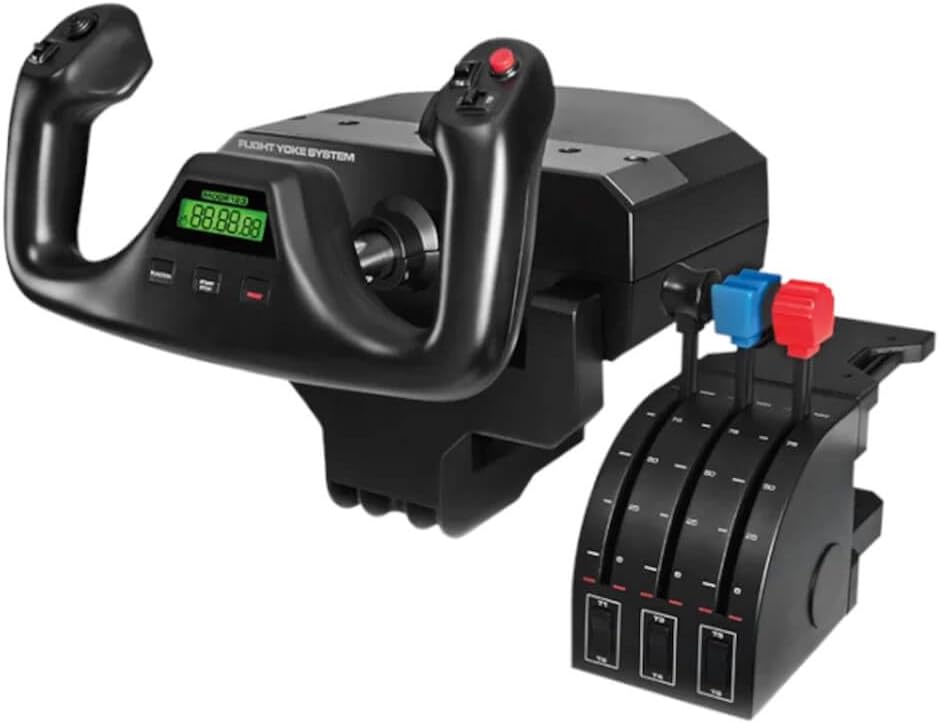
This Logitech G PRO Flight Yoke System has a 4.4 rating and features a stainless steel yoke shaft. It provides 75 programmable controls including a configurable throttle quadrant and 3 modes.
We may earn a commission when you buy through this link, at no additional cost to you.
The integrated 1-USB 2.0 Port Hub adds convenience for connecting other peripherals. The separate three-axis lever throttle and 2-position clamp ensure a versatile and robust setup for civil aviation.
The setup requires desk space for the yoke and throttle separate. However, the 3 modes allow switching between different aircraft types easily.
Civil aviation simmers should buy this system for its classic design and reliability. The USB hub and configurable knobs enhance functionality for complex flight procedures.
The 1-USB 2.0 Port Hub simplifies connectivity for other cockpit devices.
The stainless steel shaft provides robust and accurate control of your virtual aircraft.
We may earn a commission when you buy through this link, at no additional cost to you.
The Renewed Logitech G Saitek PRO USB Flight Yoke System offers a 4.2 rating and is an affordable option for Mac users. It features 14 buttons including a 3-position mode switch and a POV hat switch.
We may earn a commission when you buy through this link, at no additional cost to you.
The integrated digital chronograph is perfect for brushing up on IFR and cross-country procedures. It connects via a USB 2.0 port and is compatible with Mac OSX operating systems.
While renewed units may have limited warranties, the price savings are significant for budget pilots. The chronograph and Smart Technology software allow for complete customizability.
Budget conscious buyers should buy this renewed unit to start simming immediately. It offers essential features and proven performance at a reduced cost.
The integrated digital chronograph helps practice navigation procedures between checkpoints.
It is compatible with Mac OSX operating systems ensuring broad platform support.
We may earn a commission when you buy through this link, at no additional cost to you.
The Logitech G PRO Flight Yoke System is rated 4.3 and provides an ideal setup for new pilots. It features a stainless steel shaft and 54 programmable controls for realistic simulation.
We may earn a commission when you buy through this link, at no additional cost to you.
The POV Hat, 14 button controls, and 3-position mode switch ensure most aircraft functions are under your fingertips. It includes a Flight Throttle Quadrant and robust desk clamps for stability.
Compatibility with Windows 11/10/8.1/7 is listed. Mac users may need to check compatibility carefully. The setup requires software download for use with simulators like X-Plane.
Aspiring pilots should buy this system for its realistic controls and robust clamping force. It helps build muscle memory effectively for a solid foundation in aviation.
Realistic yoke controls help experienced pilots build muscle memory effectively.
The 2-position desk clamp provides mounting flexibility for a wide range of desks.
We may earn a commission when you buy through this link, at no additional cost to you.
Choosing the right flight controller depends on your specific simulation goals and available desk space.
Yokes mimic real aircraft controls for civil aviation while joysticks suit combat. Throttle quadrants add essential speed control for realism.
Pick a type that matches your primary simulation focus.
Look for solid steel shafts and robust clamps that ensure stability. Premium materials like aluminum enhance durability over plastic.
Invest in quality to prevent drift during long sessions.
More buttons and axes allow you to map critical functions easily. Check for software support that allows deep customization for specific titles.
Ensure the controller supports the games you play most.
Verify that the driver support includes macOS or uses standard protocols. Some controllers require specific downloads that may not be available for Mac.
Always confirm system requirements before buying.
Yokes and throttle quadrants require significant desk space for mounting. Measure your area to ensure the unit fits comfortably.
Consider compact units if desk space is limited.
Prices range significantly from affordable sticks to full systems. Determine your spending limit to find the best value.
Higher prices usually bring more features and better durability.
Pedals add realism for ground control and banking. Bundles often include pedals for a complete setup.
Add pedals later if starting with a standalone unit.
Good software allows saving profiles and fine-tuning sensitivity. Check if the manufacturer provides updates for new simulators.
Robust software extends the controller's useful life.
Mount the controller securely to your desk using provided clamps or mounts. Ensure cables are managed to prevent accidental disconnection during use.
Calibrate the axes through your flight simulator settings to center inputs. Adjust friction and resistance to match your preference for pitch and roll.
Clean the surface regularly with a soft cloth to remove dust. Store in a dry area to prevent moisture damage to internal sensors.
Compatibility varies by model. Many units work with macOS via standard USB protocols. Always check the system requirements and download the latest drivers before purchasing.
Pedals are not strictly necessary for civil flight but add realism for ground control. They are essential for military sims requiring precise banking and ground maneuvering.
Most controllers work seamlessly with X-Plane. The software supports standard USB input devices and allows mapping of specific axes and buttons easily.
A yoke mimics real aircraft steering for civil aviation. A joystick offers more flexibility for combat and high-performance aircraft.
Most require drivers for advanced customization. Basic plug-and-play functionality works for simple use but software unlocks full programmability.
Use the provided clamps or mounting plates. Ensure the surface is sturdy enough to handle the force of operation during simulation.
Refurbished units can be a great value. Check warranty terms and return policies to ensure reliability before purchase.
More buttons allow mapping critical functions like flaps and landing gear. Aim for at least 12 to cover most basic needs effectively.
Our top picks offer a range of options from affordable Hotas setups to premium yoke systems. The Logitech bundles provide excellent value with realistic controls for civil aviation.
Prioritize build quality and Mac compatibility when selecting your next controller. Ensure you have enough desk space for the full setup before purchasing.
Prices and availability change frequently so check current listings for the best deals. Your simulation experience improves significantly with the right hardware.