
WWZMDiB CH341A EEPROM BIOS Programmer
4.1Editor score
Supports 24 and 25 series chips
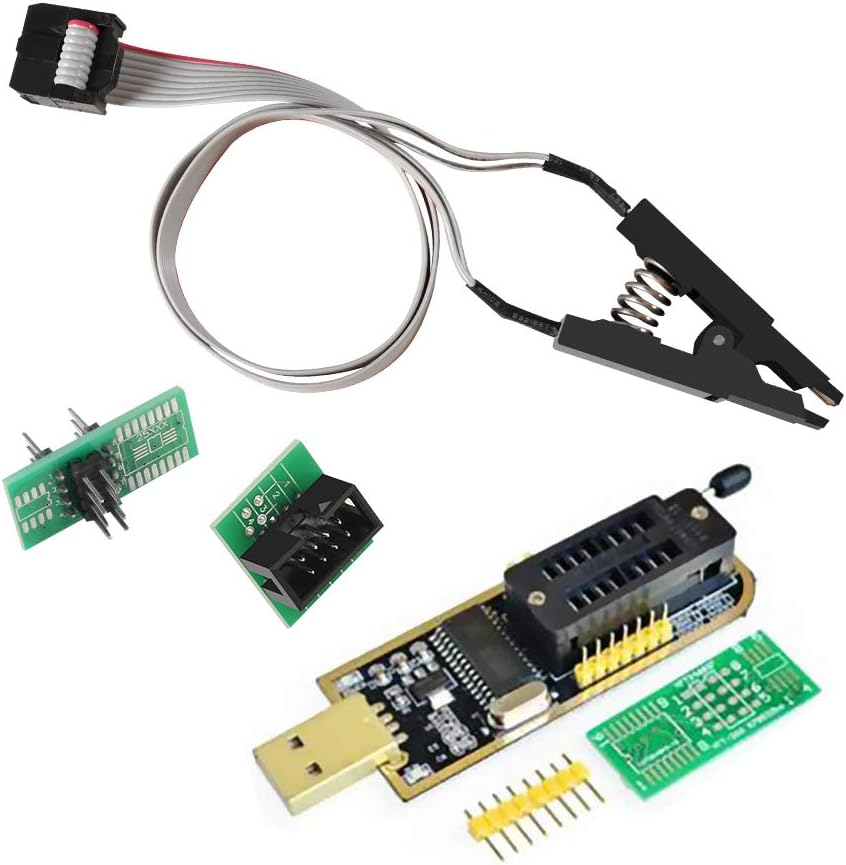
Includes SOIC8 SOP8 test clip
Requires no welding for connection
This guide compares the top ten BIOS flash tools including programmers and bootable drives to help you select the right utility for hardware recovery and
Selecting the right BIOS flash tool is essential for technicians and enthusiasts who need to update firmware or recover from system failures. These devices allow you to rewrite the critical code that controls your hardware. Without the correct tool, attempting these repairs can lead to permanent damage or further complications for your motherboard.
We have evaluated a range of options from affordable clip programmers to comprehensive bootable recovery kits. Our comparison focuses on compatibility with common chip series, ease of use for beginners, and the reliability of the writing process. Each product offers a unique approach to handling BIOS management tasks.
Each pick below highlights specific strengths such as speed, voltage support, or included accessories. You will find detailed breakdowns of features and real-world applications. Please note that availability and pricing fluctuate frequently so verify current details before making a final decision.
4.1Editor score
4.4Editor score

4.3Editor score
The following table provides a side-by-side comparison of all ten products. It highlights key specifications and capabilities to help you distinguish between similar tools.





This CH341A programmer provides an accessible way to back up and reprogram BIOS chips. It supports the most common 24 and 25 series chips used in consumer electronics. The package includes a clip that allows you to attach directly to the board.
We may earn a commission when you buy through this link, at no additional cost to you.
The main benefit of this tool is its simplicity. You do not need to desolder chips to perform operations. The software works with Windows and lets you save backups before making changes. This protects your system if a new BIOS file causes issues.
Users should be careful to confirm the chip voltage before clamping the clip. The tool supports 3.3 volt and 5 volt switching but lacks auto-detection. Forcing the wrong voltage can damage the memory chip permanently.
This is a great choice for hobbyists or technicians who need a reliable programmer without a high price tag. If you work with routers or older motherboards this kit covers most standard needs.
The included clip lets you access chips without removing them from the motherboard. This saves time and reduces the risk of physical damage during repairs.
It handles the 24 and 25 series which are found in many devices. This makes it a versatile option for general firmware management tasks.
We may earn a commission when you buy through this link, at no additional cost to you.
This kit combines a CH341A programmer with extra clips and adapters for broader utility. It is designed to make the process of flashing BIOS chips easier for users. The double clip ensures you have a spare if one wears out.
We may earn a commission when you buy through this link, at no additional cost to you.
The high rating suggests users find it reliable for everyday tasks. The main unit supports a wide range of EEPROM types found in motherboards and routers. The clips are built to grip chips securely during operation.
Be aware that some chip classes like ESMT SST may only be readable with this hardware. Additionally peripheral circuits on the board can prevent direct reading in some cases.
This is the best all-around pick for those needing a ready-to-use solution. It balances cost and capability well for standard recovery and update workflows.
You receive the programmer and all necessary clips in one package. This removes the guesswork of matching components and saves time on setup.
User feedback indicates consistent performance across different chip types. This reliability is crucial when working with critical system firmware.
We may earn a commission when you buy through this link, at no additional cost to you.
This bootable drive is designed for users who need to regain access to locked systems. It works with both legacy BIOS and modern UEFI modes on various devices. The interface guides you through the reset process step by step.
We may earn a commission when you buy through this link, at no additional cost to you.
The tool does not require an internet connection to function which is useful in isolated environments. You can also customize the drive with other ISO applications to expand its capabilities. This flexibility is valued by system administrators.
The lower rating may stem from specific compatibility issues with newer hardware or complex security settings. It is also limited to password recovery rather than full BIOS flashing tasks.
Use this when the primary goal is restoring access to an account. It is a specialized tool for login issues rather than general firmware updates.
On-screen instructions help you navigate the reset process safely. You can recover accounts without reinstalling the operating system or losing data.
It works with Windows and Linux distributions making it versatile for mixed environments. This broad compatibility ensures you can use it on most PCs.
We may earn a commission when you buy through this link, at no additional cost to you.
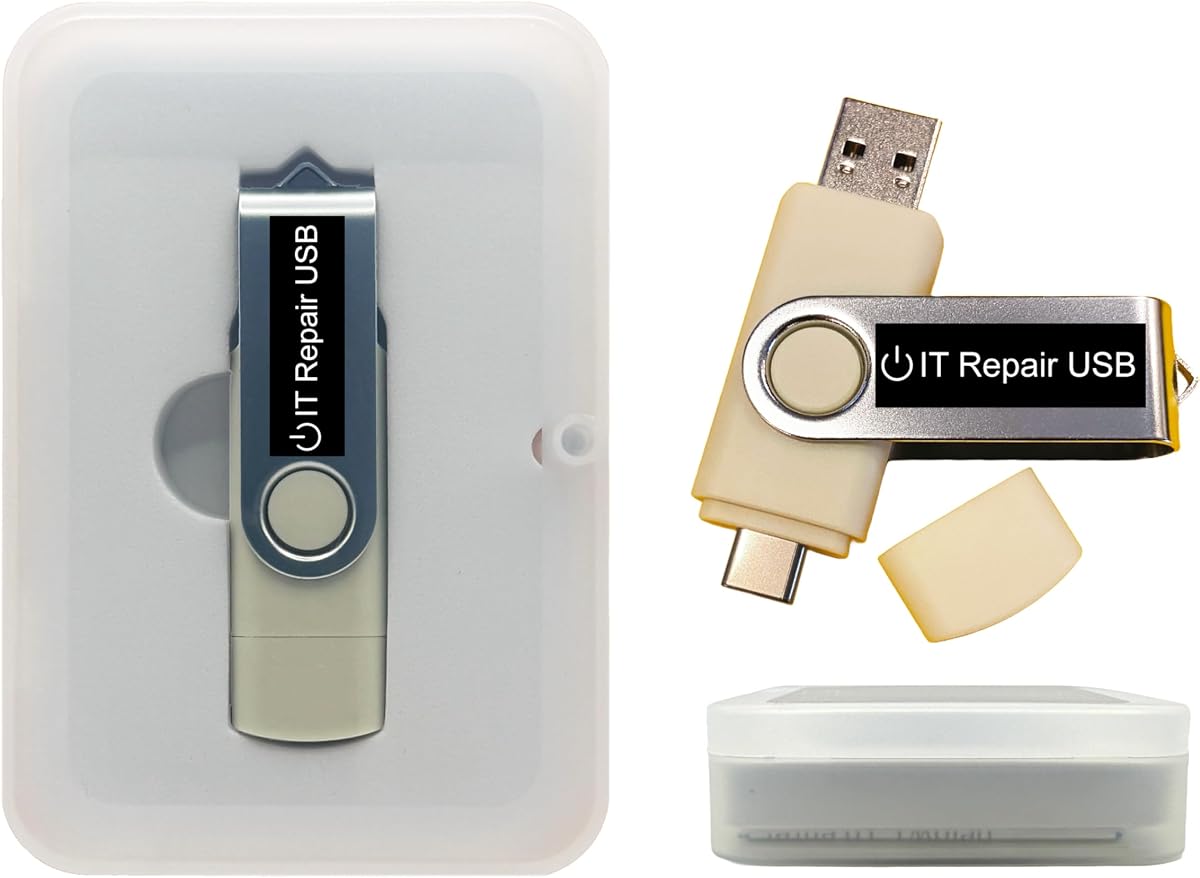
This USB drive simplifies the installation of Windows 11 on systems that do not meet TPM requirements. It works with both UEFI and legacy BIOS modes. This makes it useful for older machines that need an upgrade.
We may earn a commission when you buy through this link, at no additional cost to you.
The drive is handmade and tested which suggests attention to quality control. It serves as a reliable recovery tool if your main installation drive fails. You can use it to reinstall the operating system cleanly.
It cannot fix hardware issues such as bad RAM or dead motherboards. It also does not include a license key so you must have one to activate.
This is a practical choice for IT professionals managing mixed hardware environments. It solves the TPM barrier that blocks many standard official installations.
It allows installations on systems that lack modern security hardware. This extends the life of older computers by enabling newer OS updates.
The 8GB capacity holds the installer and recovery tools efficiently. Its small size makes it easy to carry for field repairs.
We may earn a commission when you buy through this link, at no additional cost to you.
This kit improves on the standard CH341A by adding a 1.8V adapter for low voltage chips. It also claims to offer faster erasing and writing speeds than typical units. This is useful for repetitive tasks where time matters.
We may earn a commission when you buy through this link, at no additional cost to you.
The inclusion of a DIP8 adapter increases its versatility. You can adapt the programmer to different chip packages easily. This reduces the need to buy separate converters.
The extra components add complexity and potential failure points. Users must ensure the adapter is installed correctly to avoid errors. The speed improvements are noticeable but depend on the specific chip.
If you need more speed and voltage options this kit is a strong upgrade. It is a step above the basic models for serious users.
The enhanced chip allows operations up to three times faster. This reduces wait times during bulk flashing or backup sessions.
The 1.8V adapter lets you work with modern low voltage chips. This expands the range of devices you can service safely.
We may earn a commission when you buy through this link, at no additional cost to you.
This model claims the fastest read and write speeds on the market. It automates voltage detection to prevent damage from incorrect settings. The set includes fifteen adapters to cover a wide variety of chip packages.
We may earn a commission when you buy through this link, at no additional cost to you.
The automation feature saves time and reduces the risk of human error. The speed is significant when dealing with larger memory chips or batches. This efficiency is valuable in professional repair settings.
The higher cost may not be justified for casual users. If you only flash a few chips a year the extra features might not pay off.
For professionals who need reliability and speed this is the top tier option. It removes friction from the workflow and ensures consistent results.
Auto detection of voltage prevents accidental burning of chips. This adds a layer of protection that cheaper tools lack.
The fifteen adapters support 24 25 and 93 series chips. This makes it a single tool for many different electronics.
We may earn a commission when you buy through this link, at no additional cost to you.
This toolkit offers a wide range of utilities for diagnosing and fixing Windows systems. You can run it live or use it as a recovery OS. It supports both modern UEFI and legacy BIOS modes on many computers.
We may earn a commission when you buy through this link, at no additional cost to you.
The customizable nature allows you to add your own tools to the drive. This flexibility makes it a long term asset for IT staff. It does not require internet access to run the diagnostics.
The interface may feel dated compared to modern solutions. Boot times can be slower depending on the USB port and drive speed.
This is a solid choice for technicians who need a Swiss Army Knife for repairs. It covers more ground than a simple installer drive.
You can perform repairs without an internet connection. This is vital when network access is unavailable or restricted.
Adding your own ISOs lets you tailor the toolkit to your needs. This adaptability ensures the drive evolves with your requirements.
We may earn a commission when you buy through this link, at no additional cost to you.
This clip is designed specifically for 16 pin IC chips used in many SPI flash operations. It supports both narrow and wide body variants. The gold plating on the pins ensures a stable electrical connection.
We may earn a commission when you buy through this link, at no additional cost to you.
The long connection line gives you flexibility in how you set up your work. You can place the clip on the motherboard and keep the programmer away from heat. This is safer for the components.
It is not a standalone programmer but an accessory for existing tools. You must own a compatible programmer to use it effectively. It is also limited to one pin count.
If you need a durable clip for 16 pin chips this is a good investment. It works well with common programmers like the Tl866A.
The gold plating reduces resistance and improves signal integrity. This helps prevent read errors during programming tasks.
The 40cm cable allows you to position the programmer safely. This helps avoid heat buildup near the chip during operation.
We may earn a commission when you buy through this link, at no additional cost to you.
This recovery tool stands out by working with Secure Boot enabled systems. Most recovery drives require you to disable this feature. It ensures you are installing the latest official version from Microsoft.
We may earn a commission when you buy through this link, at no additional cost to you.
You can rely on US based support if you run into issues. This direct support channel is often faster than forum help. It is designed specifically for modern PCs.
The lack of legacy BIOS support means it will not work on older machines. You must be on a system that uses UEFI to use this drive.
Use this for modern laptops and desktops where security features are active. It simplifies the recovery process without compromising security settings.
No need to change BIOS settings to boot the drive. This saves time and reduces the risk of locking yourself out.
It downloads directly from Microsoft ensuring you get the current version. This avoids issues with outdated or modified ISO files.
We may earn a commission when you buy through this link, at no additional cost to you.
This drive runs Kali Linux which is a standard for penetration testing and cybersecurity. It comes with over 600 tools pre-installed for network and system auditing. It supports both standard Intel and ARM based systems.
We may earn a commission when you buy through this link, at no additional cost to you.
You can run it live or install it to your hardware for full performance. The tools help you analyze security vulnerabilities and manage networks. This is useful for IT security professionals.
It is not designed for flashing BIOS chips on motherboards. Its focus is entirely on software security and network auditing.
Include this in your toolkit if you need a portable security lab. It is a powerful resource for ethical hacking and analysis.
The drive comes ready to use with 600 security tools. This eliminates the need to install packages manually.
It supports both Intel and ARM platforms for broader use. This flexibility ensures it works on various modern hardware.
We may earn a commission when you buy through this link, at no additional cost to you.
Choosing the right tool depends on your technical skills and the type of chips you work with. Consider the features below to match your needs.
Ensure the tool supports the chip series you encounter most often. Most tools cover 24 and 25 series but some also handle 93 or 25T types. Check the supported list before buying.
Verify that the tool lists your specific chip models to avoid errors.
Professional users benefit from faster read and write speeds. Some models offer auto detection which reduces wait time per chip. Faster tools increase throughput during bulk operations.
Speed matters more if you process many devices weekly.
Look for tools that support both 3.3 volt and 5 volt logic. Some high-end models also handle 1.8 volt chips for modern boards. Incorrect voltage can destroy expensive memory chips.
Always check the voltage requirements of your target hardware.
Beginners should prefer tools with automatic chip detection and clear software. Clips that clamp directly without soldering are safer and easier. Complex setups may lead to connection errors.
Simplicity reduces the chance of physical damage during setup.
A complete kit saves money by including clips and adapters. Some packages include multiple clip sizes or voltage adapters. This ensures you have the right tools ready to use.
Check the box contents to avoid buying extra parts later.
Confirm the programmer software works with your operating system. Most tools run on Windows but some offer Linux support. Compatibility ensures you can control the tool properly.
Test the software before starting any critical repairs.
Clips and cables are often the first parts to fail. Look for reinforced connectors and gold plated pins for longevity. A solid build reduces the need for frequent replacements.
Quality construction saves money over the long term.
Choose vendors that offer responsive support for technical issues. Some brands provide firmware updates for their programmers. Reliable support is crucial when tools malfunction unexpectedly.
Prioritize sellers with a track record of good service.
Always back up the original data on a chip before writing new firmware. This preserves the factory settings in case the new data fails to load.
Connect the clip firmly to the pins and check that all contacts are clean. A loose connection can cause read errors or corrupt the chip.
Store the programmer and accessories in a static-free container when not in use. Humidity and dust can degrade the electronic components over time.
Most modern tools use clips that clamp directly onto the chip pins. This allows you to perform operations without removing the chip from the board. Soldering is only required for permanent connections or damaged sockets.
Both types often use similar hardware like the CH341A programmer. The difference lies in the software protocol and chip voltage support. Ensure your tool matches the memory type used by your motherboard.
Yes many tools support the chips found in laptop motherboards. Always verify the chip is accessible on the board. If you cannot reach it you may need to remove a cover or shield.
Check the markings on the chip for voltage ratings. Common values are 3.3 volt or 5 volt. Using the wrong voltage can burn the chip. Some advanced tools detect this automatically.
Failures often happen because of peripheral circuits on the board interfering. You may need to disconnect power or components to read the chip. This isolates the chip from other signals.
They are safe if you follow voltage and connection guidelines. Beginners should practice on old hardware before working on live systems. Taking time to learn the software prevents mistakes.
The top picks offer a range of solutions from basic clips to advanced programmers with automatic features. For budget conscious users the standard kits provide great value. Professionals benefit from the speed and automation of premium models.
Prioritize compatibility and voltage support over price to avoid damaging hardware. A tool that matches your specific chip series will save time and frustration. Ensure the software works with your OS before purchasing.
Check current availability and support options before making a decision. Prices and stock levels change frequently so verify details directly. Choose the tool that fits your specific repair needs best.