
Hearvo USB 3.0 HDMI KVM Switch
4.0Editor score
4K@60Hz HDMI Output
4 USB 3.0 Ports
Plug and Play Setup
This guide compares the top 10 laptop with KVM support switches for dual monitors and multiple devices, highlighting features like 4K output, USB-C docking
Finding the right laptop with KVM support can transform your workspace by allowing seamless control over multiple systems using a single set of peripherals. Whether you are a developer, designer, or power user, a reliable switch ensures efficiency.
We evaluated ten top-rated products based on video resolution, USB bandwidth, compatibility, and build quality. Each model offers unique strengths for different setups, from basic dual-computer sharing to advanced triple-monitor docking stations.
Every pick includes detailed specs, pros, cons, and usage scenarios to help you decide. Prices fluctuate frequently, so check current listings before purchasing to ensure you get the best deal for your specific needs and budget.
4.0Editor score

4.2Editor score
4.6Editor score
The following comparison table outlines the key specifications of each selected switch to help you identify the best fit for your laptop and monitor configuration.


The Hearvo USB 3.0 HDMI KVM Switch stands out as an accessible entry point for users needing basic control over two computers with a single monitor. With a rating of 4.0, it delivers solid performance for everyday tasks.
We may earn a commission when you buy through this link, at no additional cost to you.
Its standout qualities include support for 4K resolution at 60Hz, ensuring sharp visuals for work or entertainment. The inclusion of four USB 3.0 ports allows you to share keyboards, mice, and storage devices seamlessly between systems.
While it lacks external power, which can limit high-demand USB peripherals, the switch handles standard devices reliably. The plug-and-play design means you can set it up in minutes without installing software.
This switch is ideal for home offices or small workspaces where budget is a priority. It effectively reduces cable clutter and improves workflow efficiency for those managing two laptops or PCs.
The 4K@60Hz capability ensures you get crisp visuals without compromising frame rates for content consumption or work tasks.
With four USB 3.0 ports, you can connect essential devices like mice, keyboards, and webcams, sharing them between both computers with ease.
We may earn a commission when you buy through this link, at no additional cost to you.
This hybrid switch is designed for power users who need to manage four computers and two monitors. It earns a 4.2 rating for its flexibility in handling diverse video inputs and high-speed data transfer.
We may earn a commission when you buy through this link, at no additional cost to you.
Key strengths include the ability to connect computers with different port configurations, such as USB-C, DisplayPort, and HDMI. The EDID emulator ensures stable switching without resolution resets.
The 100W PD charging port is a major plus for laptop users, reducing the need for separate chargers. However, managing four computers requires careful cable management.
Ideal for IT professionals or studios with multiple machines, this switch centralizes control. Its hybrid design offers unmatched versatility for complex dual-monitor workstations.
Supporting a mix of USB-C, DP, and HDMI inputs allows you to connect any combination of laptops and desktops without compatibility issues.
The integrated 100W PD port charges your laptop while you work, keeping your setup clean and reducing the need for wall adapters.
We may earn a commission when you buy through this link, at no additional cost to you.
This dock combines a KVM switch with a triple-monitor docking station, allowing two laptops to share three displays. It is rated 4.3 for its performance in expanding workspace real estate significantly.
We may earn a commission when you buy through this link, at no additional cost to you.
It supports dual 4K@60Hz plus a 1080P display using MST technology. The 10Gbps USB 3.1 Gen2 ports ensure fast data transfer for external drives and peripherals.
Charging up to 100W means your laptop stays powered while connected. However, Mac users should note that extended displays may be limited to mirroring.
Perfect for data analysts or designers needing wide screen real estate, this switch maximizes your laptop's capabilities. It reduces desk clutter while boosting productivity.
MST technology allows a single laptop output to drive three separate screens, ideal for multitasking across spreadsheets, coding, and reference documents.
USB 3.1 Gen2 ports deliver 10Gbps speeds, ensuring that file transfers and peripheral responsiveness remain fast and reliable.
We may earn a commission when you buy through this link, at no additional cost to you.
The AV Access 8K KVM Switch earns our Editor's Choice for its premium features that cater to demanding professional workflows. It supports triple-monitor setups with impressive resolution capabilities.
We may earn a commission when you buy through this link, at no additional cost to you.
It delivers up to 8K@60Hz for desktops, ensuring ultra-sharp visuals. The built-in Ethernet sharing ensures both computers stay online even when switching control, which is vital for network tasks.
With 100W PD charging and high-speed USB ports, it functions as a full docking station. The only notable trade-off is the price point compared to basic switches.
Best for designers and traders needing high resolution, this switch offers unmatched versatility. It replaces multiple devices, simplifying your desk while enhancing performance.
The ability to handle 8K output provides unmatched clarity for detailed design work or data analysis across three screens.
Ethernet sharing keeps both PCs connected to the internet, preventing interruptions to downloads or sync processes when switching devices.
We may earn a commission when you buy through this link, at no additional cost to you.
This docking station is specifically optimized for developers or professionals who switch between a work and personal laptop. It receives a 4.2 rating for its robust feature set tailored to dual-laptop users.
We may earn a commission when you buy through this link, at no additional cost to you.
The 20Gbps USB-C bandwidth ensures smooth data transfer and high-resolution video output. Fast switching via EDID emulation means you can toggle between systems in seconds without reconnections.
It offers extensive connectivity including USB, Ethernet, and SD card slots. The 60W charging per port keeps both laptops powered up during use.
Ideal for hybrid workers, this device streamlines your workspace. Its comprehensive port selection eliminates the need for extra hubs, keeping your desk organized.
Advanced EDID emulation allows instant toggling between laptops, minimizing downtime during meetings or workflow transitions.
With 12 ports including SD card and Ethernet, it serves as a complete workstation replacement for your laptops.
We may earn a commission when you buy through this link, at no additional cost to you.
With a 4.9 rating, this KVM docking station is a top-tier choice for those prioritizing reliability and performance. It combines triple-monitor capability with high-speed data transfer.
We may earn a commission when you buy through this link, at no additional cost to you.
It supports 8K@60Hz for desktops, ensuring future-proof visual quality. The built-in SD card reader and headset jack add convenience for media creators.
The 100W PD charging and Ethernet sharing make it a complete hub. While pricey, the build quality and feature depth justify the investment for professionals.
Best for high-end workstations, this switch handles demanding tasks seamlessly. It offers the best balance of speed, resolution, and connectivity in its class.
The high rating reflects consistent performance and reliability, ensuring minimal downtime in critical work environments.
Features like SD card readers and audio jacks reduce the need for additional adapters, streamlining your desk setup.
We may earn a commission when you buy through this link, at no additional cost to you.
This docking station is tailored for dual-laptop users needing independent network access. It holds a 4.1 rating for its practical features focused on connectivity and video quality.
We may earn a commission when you buy through this link, at no additional cost to you.
The shared Gigabit Ethernet port ensures both laptops stay online without additional routers. The 4K dual display support allows for a spacious workspace.
Switching is fast thanks to EDID emulation. The 100W charging port is convenient for laptop power needs. It effectively consolidates desk hardware.
Ideal for hybrid workers using multiple laptops, this device simplifies connections. It offers a cost-effective solution for managing dual systems.
Ethernet sharing means both laptops can access the internet simultaneously, avoiding interruptions during file transfers or updates.
Front panel buttons allow quick changes between laptops without restarting applications, maintaining workflow momentum.
We may earn a commission when you buy through this link, at no additional cost to you.
This KVM switch is ideal for users with DisplayPort monitors needing high resolution. It scores 4.2 for its ability to handle 8K and 4K refresh rates smoothly.
We may earn a commission when you buy through this link, at no additional cost to you.
The inclusion of a 12V power adapter ensures stable operation for USB devices. With four USB 3.0 ports, you can share essential peripherals between computers.
It supports high refresh rates like 4K@120Hz for gaming. However, it lacks keyboard shortcuts for switching, relying on physical buttons.
Best for gaming setups or high-res displays, this switch delivers solid performance. It ensures your hardware is utilized fully without bottlenecks.
Support for 4K@120Hz ensures smooth gameplay when switching between gaming PCs and workstations.
The external power adapter guarantees consistent power for connected USB devices, preventing disconnects during use.
We may earn a commission when you buy through this link, at no additional cost to you.
This switch is built to integrate with existing USB-C docking stations. It receives a 3.9 rating, reflecting its specific use case for users with Thunderbolt or USB-C monitors.
We may earn a commission when you buy through this link, at no additional cost to you.
It offers up to 20Gbps transfer speed and 140W charging pass-through, keeping laptops powered. Its compact size makes it easy to carry for mobile workers.
However, compatibility is strict; laptops must support DP Alt Mode. It is less versatile than docking station switches but effective for specific setups.
Best for travelers using portable docks, this switch simplifies connections. It ensures your high-power dock functions seamlessly across two computers.
With 140W pass-through, this switch can charge even high-performance laptops while you switch between devices.
Its compact form factor fits easily in laptop bags, making it ideal for professionals who move between locations.
We may earn a commission when you buy through this link, at no additional cost to you.
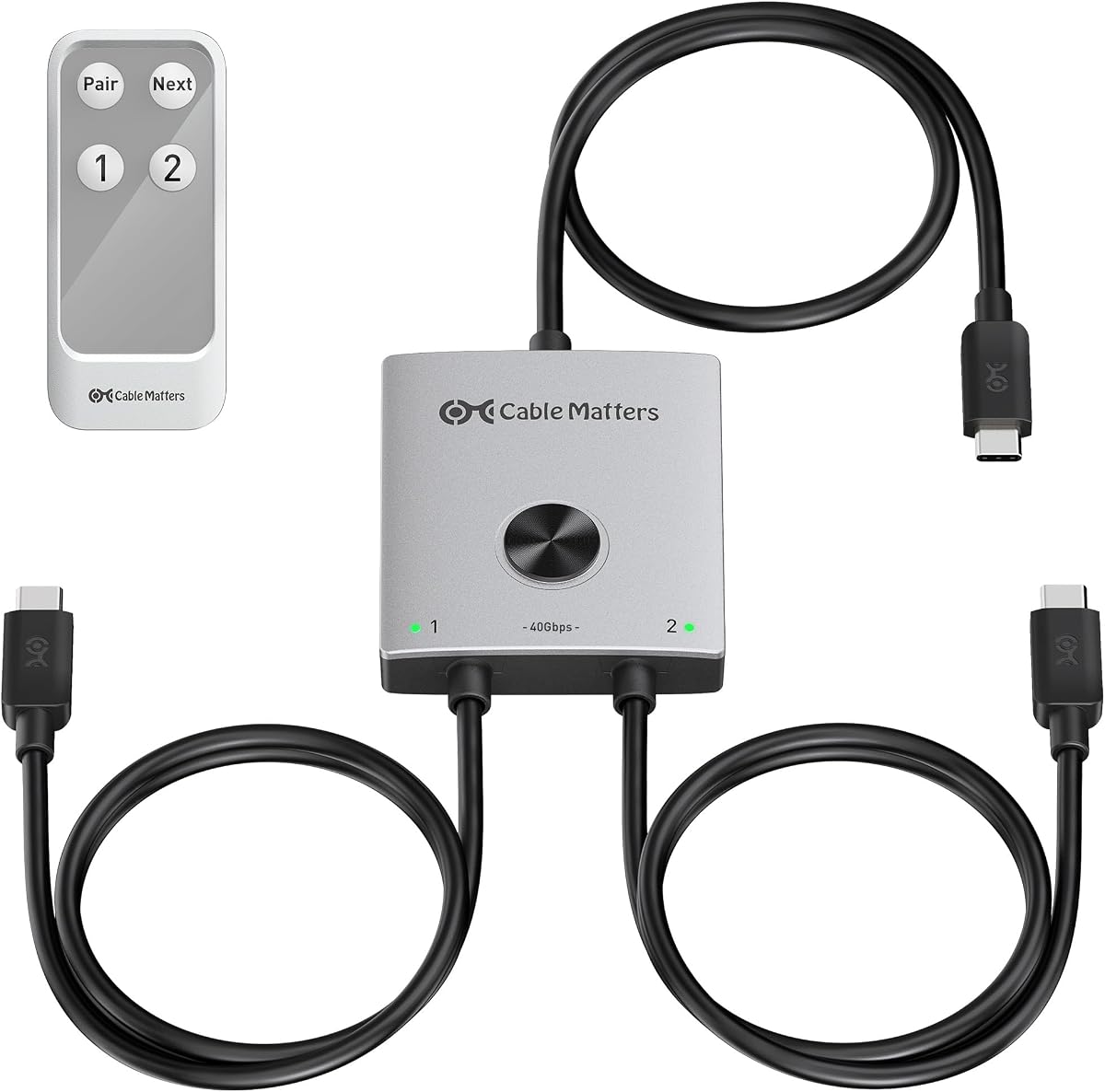
This premium switch handles Thunderbolt 4 docking stations with 40Gbps bandwidth. It is rated 4.6 for its ability to support high-end Apple and Windows setups.
We may earn a commission when you buy through this link, at no additional cost to you.
It allows two laptops to share one monitor and dock, supporting up to 8K resolution. The RF remote adds convenience by not requiring line of sight.
With 140W charging, it supports the most powerful laptops. However, it requires docks with detachable host cables for proper function.
Ideal for premium workstation users, this switch ensures no bandwidth loss. It is the best option for Thunderbolt enthusiasts needing reliability.
Full support for Thunderbolt 4 docks ensures you get maximum performance for video and data without compromise.
The RF remote lets you switch devices from anywhere in the room, adding convenience and flexibility to your setup.
We may earn a commission when you buy through this link, at no additional cost to you.
Choosing the right KVM switch requires understanding your monitor and laptop capabilities to ensure compatibility.
Ensure the switch supports the maximum resolution and refresh rate of your monitor. Higher-end switches support 4K at 60Hz or higher.
Look for 8K support if you plan to use future displays for long-term usability.
USB 3.0 ports provide 5Gbps speeds suitable for standard peripherals. USB 3.1 or Thunderbolt offers faster speeds for external drives.
Prioritize 10Gbps or higher if you transfer large files frequently between systems.
Some switches support only one monitor while others allow dual or triple displays via MST or multiple HDMI ports.
Choose a model that matches your desired screen layout to avoid resolution scaling issues.
Many modern switches include Power Delivery (PD) to charge laptops. Check if the wattage supports your laptop's requirements.
100W PD is standard for most laptops, but high-performance machines may need higher output.
Most switches support Windows, macOS, and Linux. However, macOS may limit extended display support to mirroring.
Check specific notes on MST support if you use a Mac with multiple external screens.
Identify the ports on your laptop (USB-C, HDMI, DisplayPort) and ensure the switch matches them.
USB-C switches are versatile for modern laptops, while HDMI/DP switches suit desktop setups.
Switching can be done via physical buttons, remote controls, or keyboard hotkeys.
Consider your workflow to decide if a remote or button placement suits your desk better.
Advanced docking stations share Ethernet connections and audio jacks. This reduces cable clutter significantly.
Choose a switch with shared Ethernet if internet access is critical for all connected computers.
First, connect your monitors and peripherals to the KVM switch before plugging in the computers to avoid detection errors.
Second, install any required drivers only if your system requires them; most modern switches work plug-and-play without installation.
Third, regularly check all cables for wear and tear, and ensure proper ventilation to keep the switch cool during heavy use.
Most KVM switches work with MacBooks for input sharing, but extended displays often require mirroring due to macOS limitations on MST. Check product details for specific Mac support.
Yes, hybrid switches support laptops with USB-C, HDMI, or DisplayPort outputs. Ensure the switch has the required input ports for your specific devices.
Some switches include HDMI or USB cables. Verify the package contents to see if you need to purchase separate video or power cables.
Advanced KVM docking stations share an Ethernet connection so both computers stay online. Check for an Ethernet sharing feature in the specs.
Ensure the monitor is connected correctly and the switch detects it. Check if your laptop supports the resolution or if a reboot is required.
Press the button on the switch or use the included wired or wireless remote. Some models allow switching via keyboard shortcuts.
This guide covers the top options ranging from affordable HDMI switches to premium Thunderbolt docking solutions. Each pick offers unique advantages for different workspace needs.
Prioritize compatibility with your monitor resolution and laptop ports. Ensure the KVM switch supports your desired number of screens and charging requirements.
Prices and stock change frequently. Verify current offers and availability before purchasing to get the best deal for your specific setup.