
GE BigEZ OneTouch Big Button Remote
4.3Editor score
Full button backlighting included
Simple brand-specific preset setup
White color for high contrast
This guide compares ten easy to use TV remote for seniors options to help you find the perfect large button remote with simple controls and reliable performance
Finding the right remote control can be a significant challenge for older adults or those with limited dexterity. Standard remotes often feature tiny buttons and complex menus that cause frustration. A dedicated senior-friendly remote simplifies this experience with larger keys and intuitive layouts designed for clarity and ease of use.
We have evaluated ten top-rated universal remotes specifically designed for elderly users and those with vision impairments. Our comparison focuses on button size, setup simplicity, compatibility with major TV brands, and overall build quality. Each product was selected based on user feedback and technical specifications to ensure reliability.
Each pick in this list highlights unique features that cater to different needs, from backlit buttons to color-coded controls. While we strive to provide accurate information, product availability and pricing may fluctuate over time. Always check the latest details on the retailer site before making your final purchasing decision for your home setup.
4.3Editor score
4.2Editor score

4.4Editor score
This table provides a side-by-side look at all ten selected remotes to help you compare their key features and compatibility at a glance.


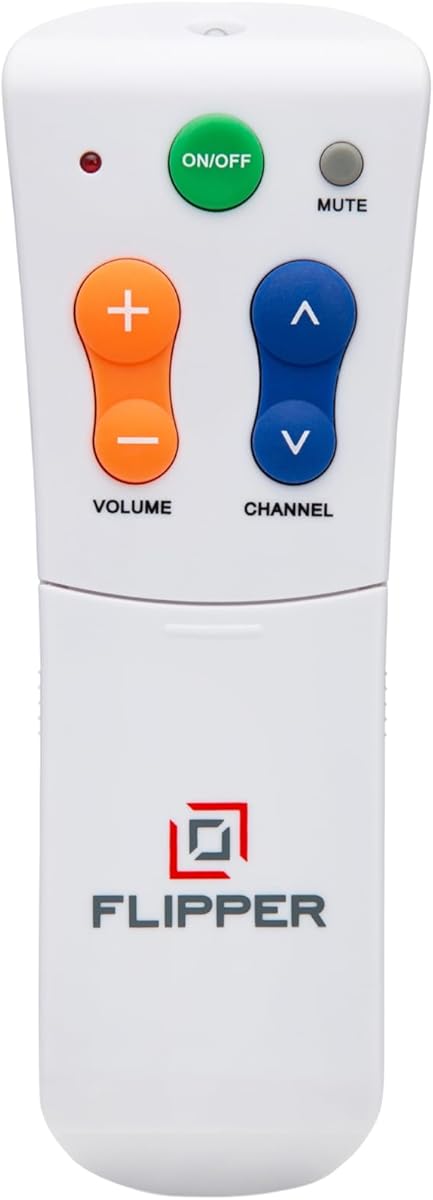
The Flipper Big Button TV Remote is designed specifically to empower seniors with dementia or vision impairments. With a rating of 4.2 stars it stands out for its radically simplified interface. The remote focuses on only four main buttons for daily use ensuring users never feel overwhelmed by technology.
We may earn a commission when you buy through this link, at no additional cost to you.
This remote shines because of its thoughtful design that prioritizes independence. The color-coded buttons like green for power and orange for volume make identification instant. Additionally the hidden slideout buttons allow caregivers to set up to 25 favorite channels without cluttering the main face.
One trade-off to note is the inability to navigate streaming apps like Netflix or Hulu. This limitation is intentional to prevent confusion but it means traditional cable or satellite setups are best. For users who just want basic TV control this is a minor drawback compared to the clarity it provides.
If you are caring for an elderly loved one who struggles with standard remotes this is the top choice. It offers a unique balance of functionality and simplicity that fosters dignity and independence. The peace of mind it provides to caregivers is invaluable for daily living.
The four-button main layout ensures seniors can find power volume and channels instantly without hunting through menus or small keys.
Caregivers can pre-program up to 25 favorite channels allowing the user to cycle through preferred content with simple channel buttons.
We may earn a commission when you buy through this link, at no additional cost to you.
The GE BigEZ OneTouch Remote offers an excellent entry point for those seeking a budget-friendly senior remote with high visibility. Rated at 4.3 stars this remote features a bright white body and fully backlit buttons that are easy to see in the dark. It simplifies setup with a one-touch process for specific brands.
We may earn a commission when you buy through this link, at no additional cost to you.
Its key strength lies in the vision-friendly features designed for low light environments. The blue volume and orange channel buttons provide immediate visual cues which is critical for users with color blindness or reduced eyesight. The lightweight design ensures it is easy to handle without strain.
While it supports five major brands including Samsung and LG it may not cover every niche device. The setup is straightforward but requires following the manual steps for brand selection. This minor limitation is outweighed by the value and reliability it offers for standard TV watching.
This remote is ideal for seniors who need a clear affordable solution without complex features. It balances cost and functionality well making it a smart choice for budget-conscious households. The included technical support adds a layer of confidence for users who need help setting it up.
Every button is fully backlit ensuring visibility in dark rooms without needing external lights or phone flashlights to find controls.
The one-touch programming allows users to select their TV brand and start using the remote quickly without coding or codes.
We may earn a commission when you buy through this link, at no additional cost to you.
This premium remote is engineered specifically for Samsung smart TV owners who need reliable high-contrast control. With a 4.4 rating it stands out for its automatic backlight that stays on for 30 seconds. The package includes a protective cover and wall hook adding practical value beyond the remote itself.
We may earn a commission when you buy through this link, at no additional cost to you.
The standout features include its zero-setup functionality and ergonomic design. Users do not need to pair or code the device making it ready to use immediately out of the box. The soft silicone buttons provide tactile feedback and comfort for those with arthritis or stiff fingers.
A notable limitation is that it works primarily with Samsung TVs excluding other brands. While the response speed is excellent this specificity means it may not fit households with mixed TV brands. However for dedicated Samsung owners this offers a premium tailored experience that rivals standard remotes.
Investing in this remote makes sense for households wanting a dedicated reliable tool for their Samsung setup. The included accessories prevent loss and damage which is common with elderly users. Its focus on ease of use and protection makes it a top tier choice for specialized needs.
The backlight activates automatically and stays on for 30 seconds giving users enough time to find buttons without fumbling in the dark.
The kit includes a silicone cover and a wall hook which keeps the remote safe and easy to find within the living room.
We may earn a commission when you buy through this link, at no additional cost to you.
The Big Button Universal Remote All is defined by its effortless installation process. Rated 4.4 stars this device works right out of the box for most major brands without requiring code entry. It targets users who want immediate functionality without the hassle of programming steps or manuals.
We may earn a commission when you buy through this link, at no additional cost to you.
Its primary benefit is universal compatibility across a wide range of TV manufacturers. From Samsung to Philips it covers most common household sets with an extra-large enter button for clear input. The straightforward layout ensures that daily tasks like changing channels are accessible to everyone.
While it lacks advanced streaming features it excels as a traditional remote replacement. The 90-day warranty shows the manufacturer confidence in its durability. This focus on core functions makes it a solid choice for households that do not rely heavily on smart TV app navigation.
This remote is best for users who value simplicity and speed over extra features. It removes the barrier of entry entirely making it perfect for seniors moving into assisted living or new homes. The wide compatibility ensures it will likely work with most standard TV setups easily.
Insert batteries and the remote works instantly without pairing or programming saving time and reducing frustration for elderly users.
A 90-day warranty and responsive support team ensure users can get a replacement quickly if issues arise during daily use.
We may earn a commission when you buy through this link, at no additional cost to you.
The EZclicker Big Button Universal Remote combines portability with accessibility features for daily TV use. With a 4.2 rating it is praised for its compact size which makes it easy to hold and store. The tactile feedback on buttons helps users confirm presses without looking directly at the device.
We may earn a commission when you buy through this link, at no additional cost to you.
Its ease of programming is a major strength allowing quick setup via volume buttons. The remote focuses on core TV functions to keep the interface clean and understandable. This design choice helps prevent overwhelm for users who find complex menus difficult to navigate effectively at home.
The lack of streaming support means it is strictly for traditional TV viewing. The black body may offer less contrast than white models for those with severe vision issues. However its lightweight nature and clear layout make it a reliable tool for standard entertainment needs.
This remote is suitable for seniors who want a straightforward device without unnecessary features. It serves well as a backup remote or primary tool for basic viewing. The combination of ease and affordability makes it a practical choice for many households seeking simplicity.
Buttons provide physical feedback when pressed ensuring users know a command has been sent without needing to verify on a screen.
Its compact size allows for easy handling and storage on small tables or in pockets without taking up much space.
We may earn a commission when you buy through this link, at no additional cost to you.
This remote is designed to serve as a traditional replacement for older TV setups. Rated 4.4 stars it emphasizes a clear layout with large marked buttons for easy visibility. The ergonomic body shape ensures a comfortable grip for users with limited hand strength or dexterity issues.
We may earn a commission when you buy through this link, at no additional cost to you.
Its primary value lies in its dependability for everyday entertainment control. The remote avoids complex smart features that might confuse users preferring direct control over volume and channels. This simplicity makes it a robust tool for households that value consistency and reliability over connectivity.
While it does not support voice commands it covers essential functions thoroughly. The durable construction ensures it can withstand daily use without breaking. Users looking for a no-nonsense device will find this remote meets their needs effectively without extra bloat or confusion.
Ideal for those needing a basic reliable tool this remote excels in its dedicated focus. It is a strong candidate for care facilities or homes with multiple generations. The ergonomic design reduces strain making it a comfortable choice for extended viewing sessions at home.
The shape of the remote fits naturally in the hand reducing grip strain during regular use for those with arthritis or weakness.
Focusing on standard functions ensures consistent performance without needing internet or complex pairing steps for simple TV control.
We may earn a commission when you buy through this link, at no additional cost to you.
The EZclicker TV Remote Simple focuses on delivering essential controls without clutter. With a 4.2 rating it is recognized for its simple layout that reduces cognitive load for users. Its compact 6-inch design makes it easy to hold and carry around the living room easily.
We may earn a commission when you buy through this link, at no additional cost to you.
This remote is built to handle standard TV operations like power volume and channel changes. The tactile feedback on buttons helps users confirm their actions without looking. This physical confirmation is vital for those with limited vision who need sensory feedback during operation.
It does not support streaming apps which limits its utility for modern smart TV viewers. However for basic cable or antenna setups it performs reliably. The black body is a matter of personal preference but may lack the contrast of white models for some users.
Best suited for users who prioritize simplicity above all else this remote is a solid basic choice. It avoids unnecessary features that could lead to confusion during daily use. Its affordability and straightforward design make it accessible for a wide range of households.
The layout removes unnecessary buttons ensuring users only interact with functions they actually use for their daily television watching.
Each button provides a satisfying click ensuring users know a signal was sent even if they cannot see the light on the remote.
We may earn a commission when you buy through this link, at no additional cost to you.
The Philips BigEZ OneTouch Remote offers broad compatibility for controlling multiple devices like TVs and soundbars. Rated 3.8 stars it features a fully backlit keypad and one-touch setup for specific brands. This makes it versatile for users needing to manage more than one input source from a single remote.
We may earn a commission when you buy through this link, at no additional cost to you.
Its strength lies in its ability to simplify control for setups involving multiple devices. The one-touch programming process aims to reduce the complexity of finding codes manually. This feature is particularly helpful for households with cable boxes alongside traditional televisions in the room.
Some users report variability in setup success which may affect reliability. However the backlit keys provide a significant advantage for evening use. The directional pad supports basic navigation which is helpful for smart TV menus that require simple input steps.
This remote is a good middle ground for households needing broader device support. It balances features like backlighting with simplicity in layout. While ratings vary the potential for controlling multiple devices makes it a worthy candidate for complex living room setups.
Users can control both their TV and cable box reducing the need to switch remotes which often causes frustration or loss.
The full backlight ensures all buttons are visible in low light making evening TV watching more comfortable and accessible.
We may earn a commission when you buy through this link, at no additional cost to you.
This remote focuses on delivering high visibility and essential controls for daily viewing. Rated 3.0 stars it features simple large buttons and clear labeling to reduce confusion. The minimalist design ensures that only necessary functions are present which helps prevent accidental presses during use.
We may earn a commission when you buy through this link, at no additional cost to you.
Its main benefit is the reduction of cognitive load for users with dementia or vision issues. The large buttons are easy to see and press ensuring users can operate the remote with confidence. It serves as a direct replacement for complex stock remotes that often overwhelm elderly users.
While user ratings are lower the design intent remains focused on accessibility. The lack of extra features might be a downside for tech-savvy households but fits simple needs. Its affordable price point makes it a low-risk option for testing accessibility improvements at home.
This remote is suitable for users who need straightforward reliable basic control. It strips away all unnecessary elements to focus on core functionality. For those prioritizing simplicity over advanced features it offers a functional solution for standard television needs.
By removing extra buttons the remote ensures users only encounter functions they need reducing the chance of accidental input.
Clear labels on buttons help users quickly identify the right key without confusion during daily operation or low light settings.
We may earn a commission when you buy through this link, at no additional cost to you.
The Anderic RR1004 remote features glow-in-the-dark keys for superior low-light visibility. With a 4.0 rating it is praised for its minimalist design that includes only essential controls. This reduces clutter and makes it easier to find the right button in dark rooms or night settings.
We may earn a commission when you buy through this link, at no additional cost to you.
Its standout feature is the glowing keys that do not require battery power to activate. This ensures visibility even when power is unavailable or the remote is misplaced in a dark corner. The pre-programmed setup for LG TVs makes it ready for immediate use without effort.
The learning function allows copying from existing remotes but requires line-of-sight which might be tricky. Additionally the setup for other brands may need manual guidance. However for LG users or those needing basic control it offers a reliable and affordable solution for standard viewing needs.
This remote is ideal for users who need reliable visibility without backlit electronics. Its simplicity makes it a good choice for care facilities where ease of use is paramount. The glow keys provide a passive visibility advantage that enhances the overall user experience significantly.
The keys glow in low light without needing batteries ensuring visibility at night or in dark rooms without extra lights.
Pre-programmed for LG TVs this remote works out of the box for LG owners eliminating the need for manual code entry.
We may earn a commission when you buy through this link, at no additional cost to you.
Selecting the right remote involves considering several key factors that ensure comfort ease of use and reliability for elderly users.
The physical size of buttons is the most critical factor for users with limited vision or dexterity. Look for remotes with oversized keys that are spaced apart to prevent accidental presses. A simplified layout with fewer buttons reduces cognitive load and helps users find controls quickly without frustration during daily use.
Prioritize remotes that focus on essential functions like power volume and channels. Avoid models with cluttered menus or hidden buttons that require complex steps to access.
High contrast colors and backlighting are essential for low light environments. Remotes with full backlighting or glow-in-the-dark keys ensure visibility without needing a separate light source. Color-coded buttons can also help distinguish between volume and channel controls for those with reduced eyesight.
Choose a remote with a bright body color like white to contrast with the buttons. This helps users locate the device quickly on a dark couch or table.
Easy setup is crucial to ensure the remote is functional without extensive technical help. Look for options with one-touch brand selection or no programming requirements. Complex code entry can be a barrier for seniors and caregivers making the remote unusable if the process is too difficult.
Models that come pre-programmed for specific brands or have a simple learning function are preferred. This reduces the time needed to get the device working correctly.
Confirm that the remote supports your specific TV brand and any additional devices like cable boxes. Some remotes are designed for TVs only while others support multiple devices. Universal remotes can reduce clutter but ensure they cover the brands you actually use at home.
Check if the remote works with traditional broadcast or smart TVs. Ensure you know if streaming app navigation is needed as many senior remotes do not support this feature.
A comfortable grip and lightweight body prevent hand strain during regular use. Look for remotes made from durable materials like ABS plastic that can withstand drops. Soft tactile buttons provide feedback confirming a press without needing to look at the device directly.
Ergonomic designs that fit naturally in the hand are important for users with arthritis. Avoid heavy remotes that might be difficult to hold steadily.
Standard batteries are easier to replace for many users but rechargeable options can be convenient. Check if the remote requires rare batteries or standard AA/AAA which are widely available. Long battery life ensures less frequent changes which can be difficult for seniors to manage.
Remotes with clear battery indicators or long-lasting power sources reduce maintenance. Ensure the battery compartment is easy to open without tools or excessive force.
Access to customer support and a warranty provides peace of mind if issues arise. Look for companies offering U.S.-based support or detailed setup videos online. A good warranty policy ensures you can get a replacement quickly if the device fails.
Support availability is particularly important for setup issues. Ensure the manufacturer offers resources that match your technical comfort level.
Prices range from affordable basics to premium specialized remotes. Determine your budget based on the essential features you need like backlighting or brand specific support. Often mid-range options offer the best balance of features and reliability.
Investing in a slightly higher priced remote with better features can prevent frustration and return costs later. Compare value based on long-term use and reliability.
Insert batteries according to the polarity diagram usually found inside the compartment. Ensure you use standard AA or AAA batteries as required by the model. If the remote has a glow feature do not expose it to direct light frequently to maintain charge in the phosphorescent material.
Clean the remote regularly with a soft dry cloth to remove dust and oils that can interfere with button response. Avoid using harsh chemicals or water directly on the device to prevent damage to the internal electronics. If a protective cover is provided keep it clean to maintain hygiene.
Store the remote in a consistent and accessible location like a dedicated side table. If a wall hook is included mount it at a height easy to reach to prevent loss. Keeping the remote in one place ensures users know where to find it without searching.
Most of these remotes support basic smart TV functions like power and volume. However they typically do not allow navigation of complex streaming app menus like Netflix. They are best for traditional viewing or when a separate device handles streaming content.
First ensure the batteries are inserted correctly and fresh. If the brand code was not accepted try an alternative code from the manual. Many remotes also support a learning feature to copy commands from your original remote for better compatibility.
Yes models like Flipper are designed specifically for dementia with simplified layouts. Removing complex buttons reduces confusion and stress significantly for patients with memory issues. Caregivers can set favorites to allow independent use without frustration.
Many universal remotes support multiple devices like cable boxes. You usually need to select the device code before pairing. Check your specific model capabilities as some focus on TV only to keep the interface simple.
Yes all listed remotes use standard disposable batteries like AA or AAA. Some models glow in the dark without needing batteries for visibility. Ensure you keep spares handy since elderly users may need assistance with replacement.
Choose a model with backlit buttons or glow-in-the-dark keys for visibility. Placing the remote on a light-colored tray can also help locate it easily. Avoid dim areas where the device might get lost or forgotten by the user.
Choosing the right remote can significantly improve the daily entertainment experience for seniors. Our top picks like Flipper and GE BigEZ offer the best balance of simplicity visibility and reliability. These devices prioritize essential functions to reduce frustration and foster independence effectively.
When making a decision consider the specific needs of the user such as vision levels or dementia. Backlighting and button layout are critical factors to ensure the device is accessible in all conditions. A well-chosen remote prevents daily struggles and makes TV watching enjoyable again.
Please note that prices and availability may change frequently across online retailers. Always check the current details and reviews on the official site before purchasing. Taking these steps ensures you get the best value and most reliable device for your home.